
Form Cms 484 PDF Details

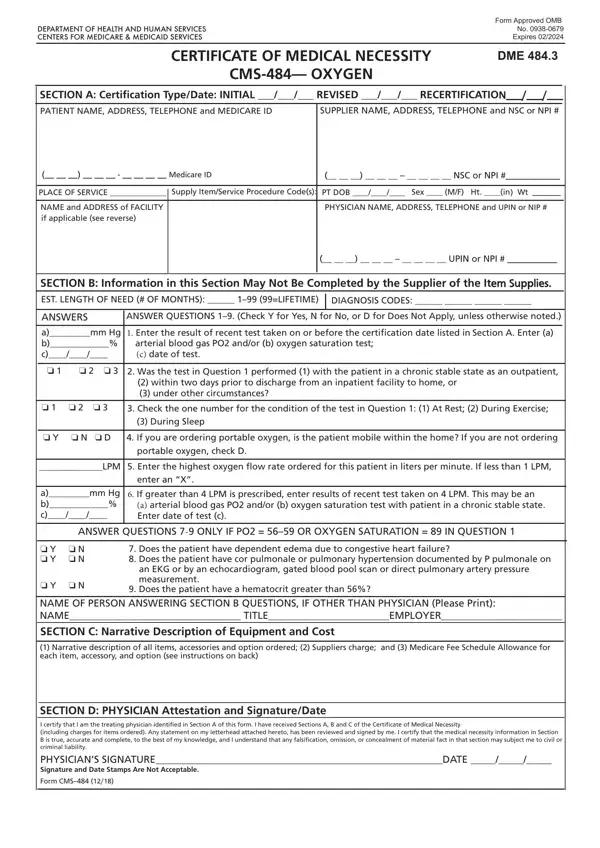
The CMS-484 form, approved by the OMB and set to expire in February 2024, plays a critical role in the healthcare industry, particularly for patients requiring oxygen therapy. Managed by the Centers for Medicare & Medicaid Services, this form serves as a Certificate of Medical Necessity for oxygen, detailing everything from patient information, certification type, and supplier details to the medical justification for oxygen therapy. Physicians fill out this document to certify the medical necessity of oxygen for a patient, which includes detailed patient data, diagnostic codes, and the expected duration of need, ranging from temporary to lifetime use. Additionally, the form captures crucial information on oxygen flow rate and the results of any pertinent tests that affirm the patient's need for therapy. The form is meticulously structured to facilitate a comprehensive evaluation, ensuring that Medicare beneficiaries receive oxygen supplies that are both medically necessary and appropriate for their condition. A narrative description of the equipment and associated costs is also included, fostering transparency and accountability. This certificate must be completed with precision, as it directly impacts the approval process for Medicare coverage of oxygen therapy. Importantly, the CMS-484 underscores the collaborative effort between healthcare providers and suppliers to support patient health, making it an indispensable tool within the realm of respiratory care.

QuestionAnswer
Form NameForm Cms 484
Form Length2 pages
Fillable?No
Fillable fields0
Avg. time to fill out30 sec
Other namesmedical necessity oxygen, cms 484, form 484, how to cms oxygen

How to Edit Form Cms 484 Online for Free

Should you want to fill out how to cms oxygen, you don't have to install any kind of programs - just give a try to our PDF tool. Our tool is consistently evolving to provide the very best user experience attainable, and that's due to our commitment to constant enhancement and listening closely to comments from customers. With some easy steps, you are able to begin your PDF journey:

Step 1: First, access the pdf editor by clicking the "Get Form Button" above on this site.

Step 2: This tool offers the ability to customize your PDF in various ways. Change it with personalized text, adjust what is originally in the document, and put in a signature - all when you need it!

Concentrate while completing this document. Make sure every blank field is filled in properly.

1. The how to cms oxygen necessitates specific information to be typed in. Be sure that the subsequent blanks are finalized:

Filling in part 1 of department of health form cms 484

2. Right after filling out this part, go on to the subsequent step and fill in the essential particulars in all these blank fields - o o o, o Y o N o D, During Sleep, If you are ordering portable, portable oxygen check D, LPM Enter the highest oxygen flow, enter an X, amm Hg b c, If greater than LPM is, a arterial blood gas PO andor b, ANSWER QUESTIONS ONLY IF PO OR, o Y o N o Y o N, Does the patient have dependent, o N, and an EKG or by an echocardiogram.

department of health form cms 484 writing process shown (part 2)

3. This next step is straightforward - complete all the empty fields in SECTION D PHYSICIAN Attestation to complete the current step.

Stage number 3 for filling in department of health form cms 484

Always be extremely careful while filling in SECTION D PHYSICIAN Attestation and SECTION D PHYSICIAN Attestation, as this is the section in which a lot of people make errors.

Step 3: Just after going through your form fields, click "Done" and you are done and dusted! Grab your how to cms oxygen when you sign up for a free trial. Easily gain access to the pdf form inside your FormsPal account page, with any edits and changes automatically kept! At FormsPal, we do everything we can to be sure that your information is stored secure.