
Form CMS-847 at a glance
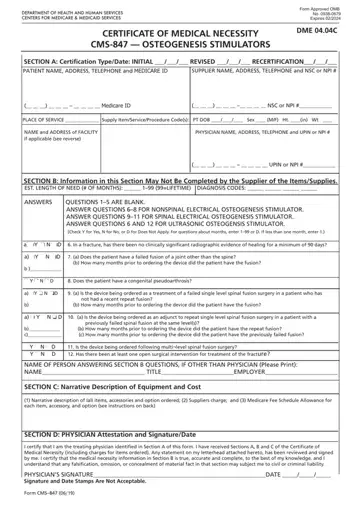
What it is: Form CMS-847 is the Certificate of Medical Necessity for Osteogenesis Stimulators.
Who signs: After completion and/or review by the physician of Sections A, Band C, the physician's must sign and date the CMN in Section D, verifying the Attestation appearing in this Section.
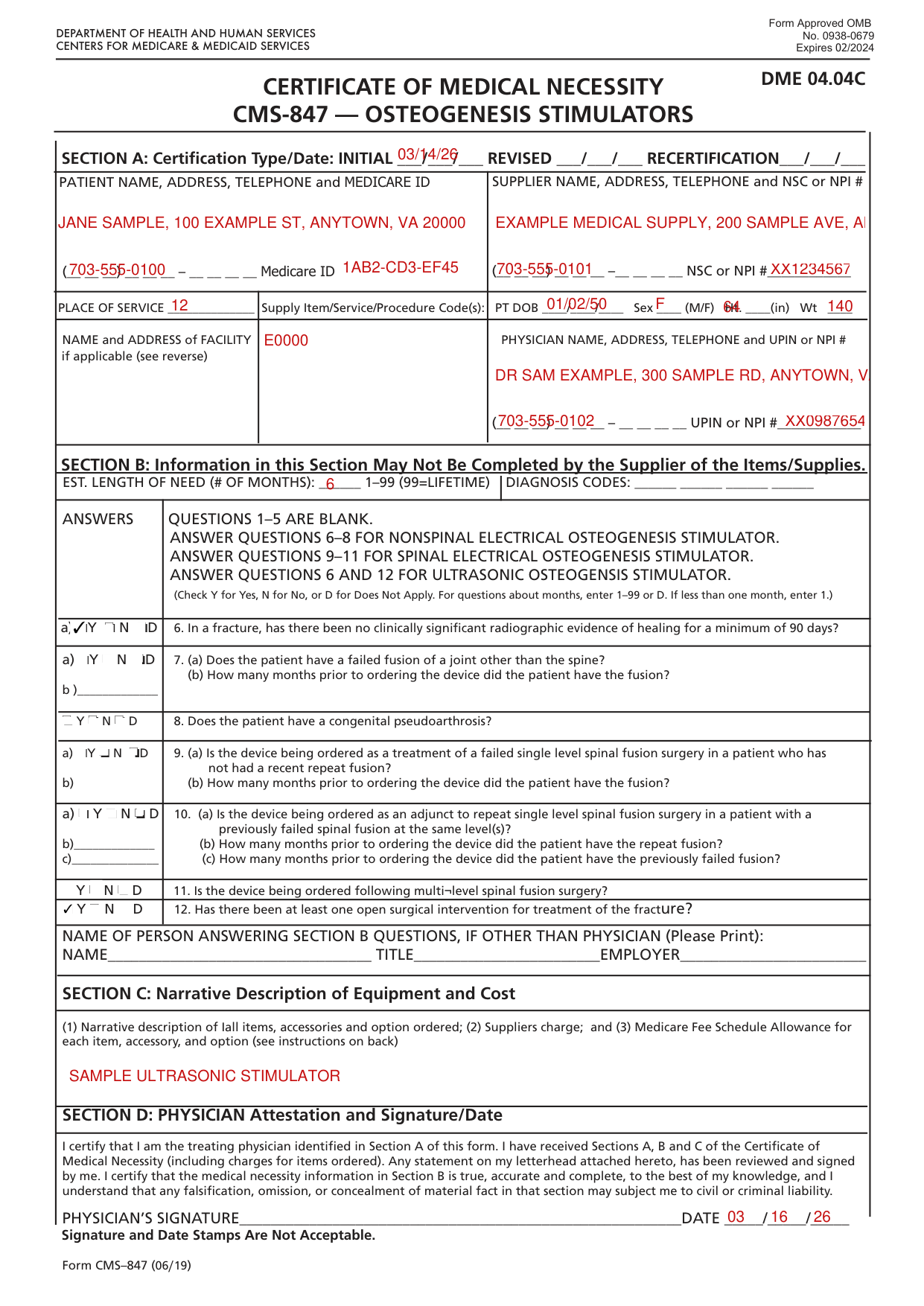
A filled-in Form CMS-847 example: a certificate for an ultrasonic stimulator
How to fill out Form CMS-847, box by box
Certification Type/Date

SECTION A: Certification Type/Date: INITIAL, RECERTIFICATION, REVISE
Whether submitting a REVISED or a RECERTIFIED CMN, be sure to always furnish the INITIAL date as well as the REVISED or RECERTIFICATION date.
If this is a revised certification (to be completed when the physician changes the order, based on the patient's changing clinical needs), indicate the initial date needed in the space marked INITIAL, and indicate the recertification date in the space marked REVISED.
If this is a recertification, indicate the initial date needed in the space marked INITIAL, and indicate the recertification date in the space marked RECERTIFICATION.
Patient, supplier and place of service
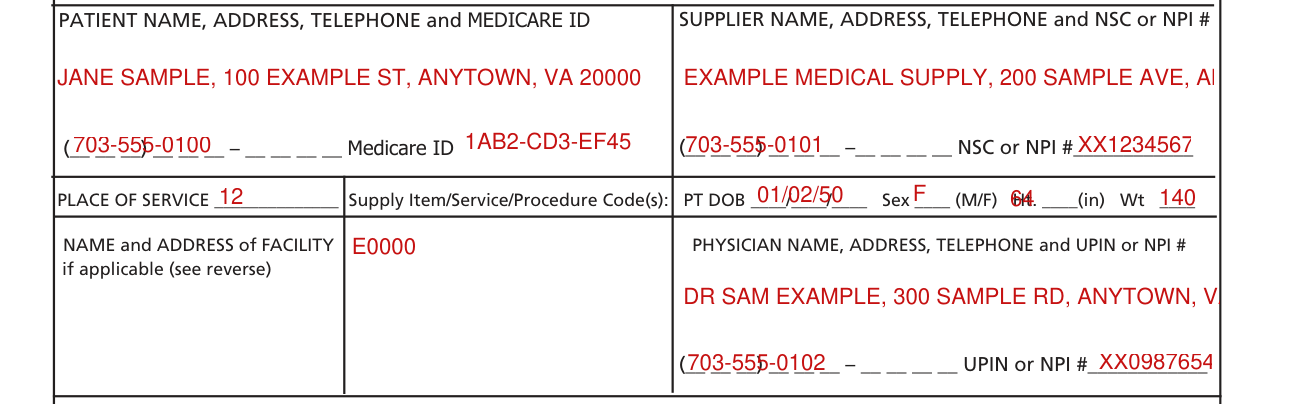
Indicate the patient's name, permanent legal address, telephone number and his/her Medicare ID as it appears on his/her Medicare card and on the claim form.
Indicate the name of your company (supplier name), address and telephone number along with the Medicare Supplier Number assigned to you by the National Supplier Clearinghouse (NSC) or applicable National Provider Identifier (NPI).
If using the NPI Number, indicate this by using the qualifier XX followed by the 10-digit number.
If using a legacy number, e.g. NSC number, use the qualifier 1C followed by the 10-digit number.
Indicate the place in which the item is being used, i.e., patient's home is 12, skilled nursing facility (SNF) is 31, End Stage Renal Disease (ESRD) facility is 65, etc.
If the place of service is a facility, indicate the name and complete address of the facility.
List all procedure codes for items ordered.
Procedure codes that do not require certification should not be listed on the CMN.
Indicate patient's date of birth (MM/DD/YY) and sex (male or female); height in inches and weight in pounds, if requested.
Physician name, address and telephone

Indicate the PHYSICIAN'S name and complete mailing address.
Accurately indicate the treating physician's Unique Physician Identification Number (UPIN) or applicable National Provider Identifier (NPI).
If using UPIN number, use the qualifier 1G followed by the 6-digit number. (For example. 1Gxxxxxx) Indicate the telephone number where the physician can be contacted (preferably where records would be accessible pertaining to this patient) if more information is needed.
Length of need and diagnosis codes

Indicate the estimated length of need (the length of time the physician expects the patient to require use of the ordered item) by filling in the appropriate number of months.
If the patient will require the item for the duration of his/her life, then enter 99.
In the first space, list the diagnosis code that represents the primary reason for ordering this item.
List any additional diagnosis codes that would further describe the medical need for the item (up to 4 codes).
Section B questions 6 to 12
This section is used to gather clinical information to help Medicare determine the medical necessity for the item(s) being ordered.
Answer each question which applies to the items ordered, checking Y for yes, N for no, or D for does not apply.
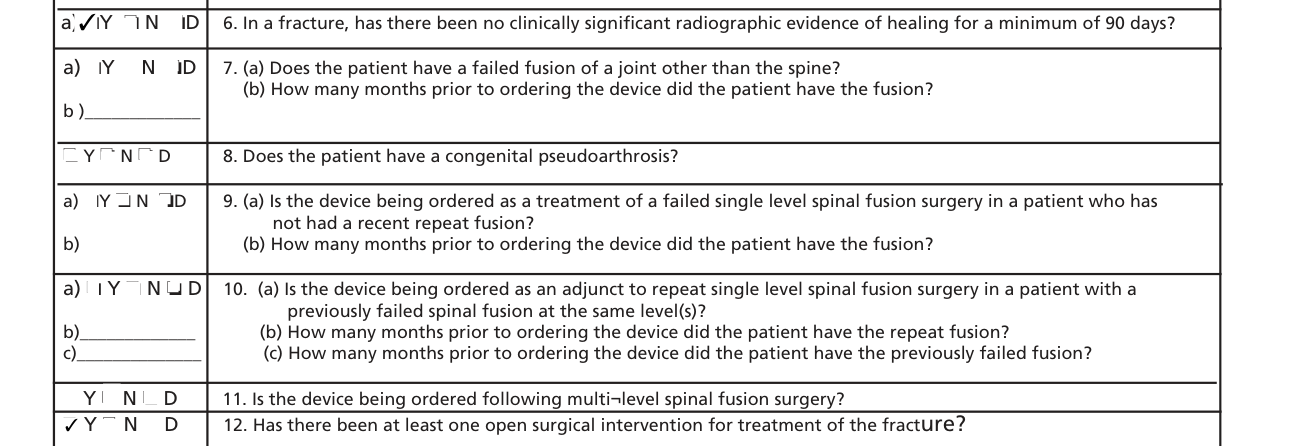
ANSWER QUESTIONS 6-8 FOR NONSPINAL ELECTRICAL OSTEOGENESIS STIMULATOR. ANSWER QUESTIONS 9-11 FOR SPINAL ELECTRICAL OSTEOGENESIS STIMULATOR. ANSWER QUESTIONS 6 AND 12 FOR ULTRASONIC OSTEOGENSIS STIMULATOR.
Check Y for Yes, N for No, or D for Does Not Apply. For questions about months, enter 1-99 or D. If less than one month, enter 1.
6. In a fracture, has there been no clinically significant radiographic evidence of healing for a minimum of 90 days?
7. (a) Does the patient have a failed fusion of a joint other than the spine? (b) How many months prior to ordering the device did the patient have the fusion?
8. Does the patient have a congenital pseudoarthrosis?
9. (a) Is the device being ordered as a treatment of a failed single level spinal fusion surgery in a patient who has not had a recent repeat fusion?
10. (a) Is the device being ordered as an adjunct to repeat single level spinal fusion surgery in a patient with a previously failed spinal fusion at the same level(s)? (b) How many months prior to ordering the device did the patient have the repeat fusion? (c) How many months prior to ordering the device did the patient have the previously failed fusion?
11. Is the device being ordered following multi-level spinal fusion surgery? 12. Has there been at least one open surgical intervention for treatment of the fracture?
Name of person answering Section B questions

NAME OF PERSON ANSWERING SECTION B QUESTIONS, IF OTHER THAN PHYSICIAN (Please Print):
If a clinical professional other than the treating physician (e.g., home health nurse, physical therapist, dietician) or a physician employee answers the questions of Section B, he/she must print his/her name, give his/her professional title and the name of his/her employer where indicated.
If the physician is answering the questions, this space may be left blank.
Section C: Narrative Description of Equipment and Cost

SECTION C: Narrative Description of Equipment and Cost (1) Narrative description of all items, accessories and option ordered; (2) Suppliers charge; and (3) Medicare Fee Schedule Allowance for each item, accessory, and option (see instructions on back)
Section D: the physician signs and dates

Signature and Date Stamps Are Not Acceptable.
By signing, the physician certifies that the medical necessity information in Section Bis true, accurate and complete, to the best of the physician's knowledge; any falsification, omission, or concealment of material fact in that section may subject the physician to civil or criminal liability.
More rules for Form CMS-847
The physician's signature also certifies the items ordered are medically necessary for this patient.
Common questions about Form CMS-847
Who fills out the medical necessity form?
Section A (May be completed by the supplier) If this is an initial certification for this patient, indicate this by placing date (MM/DD/YY) needed initially in the space marked INITIAL. Section B may not be completed by the supplier. While this section may be completed by a non-physician clinician, or a Physician employee, it must be reviewed, and the CMN signed (in Section D) by the treating practitioner. Section C (To be completed by the supplier) Supplier gives (1) a narrative description of the item(s) ordered, as well as all options, accessories, supplies and drugs; (2) the supplier's charge for each item(s), options, accessories, supplies and drugs; and (3) the Medicare fee schedule allowance for each item(s), options, accessories, supplies and drugs, if applicable. Section D (To be completed by the physician) The physician's signature certifies (1) the CMN which he/she is reviewing includes Sections A, B, C and D; (2) the answers in Section Bare correct; and (3) the self-identifying information in Section A is correct.
Sources
[1] Form CMS-847 (06/19), Certificate of Medical Necessity: Osteogenesis Stimulators, Centers for Medicare & Medicaid Services (the Official source link on this page).
