
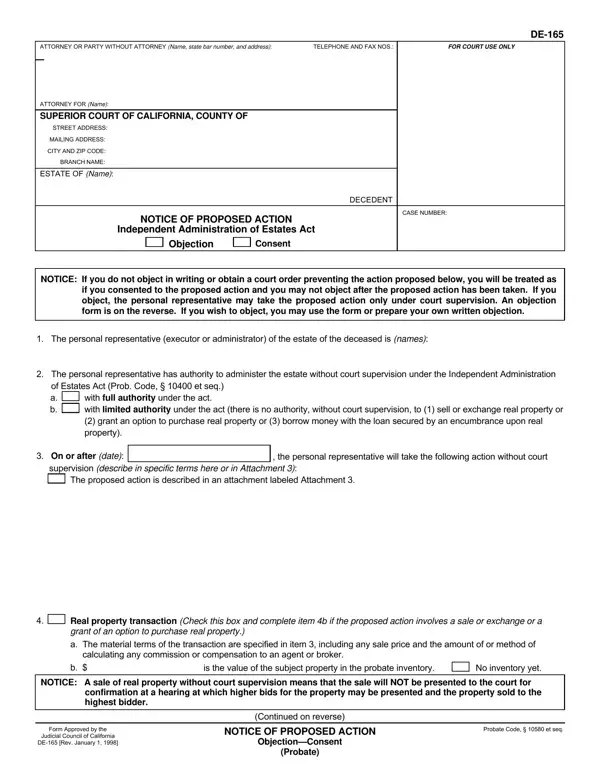
Form De 165 PDF Details

When navigating the complexities of managing the estate of a deceased loved one, understanding the DE-165 form is crucial. This form, known as the Notice of Proposed Action, is a key document under the Independent Administration of Estates Act. It serves as a bridge between the personal representative—be it an executor or administrator—and the parties interested in the estate, facilitating clear communication regarding significant actions proposed on the estate's behalf. The form outlines the intended actions by the personal representative, who is authorized to administer the estate without the need for constant court supervision, although this comes with certain limitations, especially concerning real property transactions. Moreover, the DE-165 form acts as a safeguard for interested parties, providing them an opportunity to consent to or object against the proposed actions before they are carried out, ensuring transparency and fairness in the administration process. This essential document, therefore, plays a pivotal role in the smooth execution of estate management duties, making it vital for all parties involved to understand its purpose, contents, and the procedures it entails.

QuestionAnswer
Form NameForm De 165
Form Length2 pages
Fillable?No
Fillable fields0
Avg. time to fill out30 sec
Other namesProb, encumbrance, TOyou, de 165

How to Edit Form De 165 Online for Free

With the help of the online tool for PDF editing by FormsPal, you can easily fill in or alter seq here and now. Our tool is constantly evolving to deliver the best user experience achievable, and that is because of our dedication to continuous improvement and listening closely to feedback from users. With just several simple steps, it is possible to start your PDF journey:

Step 1: Just press the "Get Form Button" at the top of this page to see our pdf file editing tool. This way, you'll find all that is needed to fill out your file.

Step 2: This tool offers you the opportunity to change almost all PDF forms in a range of ways. Enhance it by writing any text, correct existing content, and add a signature - all at your fingertips!

This document requires particular info to be typed in, hence you need to take some time to provide precisely what is required:

1. First, when completing the seq, start out with the page that includes the following blanks:

How you can complete CALIFORNIA part 1

2. After this segment is completed, you need to include the required particulars in The personal representative, The personal representative has, a b, with full authority under the act, On or after date, the personal representative will, supervision describe in specific, and The proposed action is described in order to progress further.

Stage no. 2 for filling out CALIFORNIA

3. This third step is going to be simple - complete every one of the fields in Real property transaction Check, is the value of the subject, No inventory yet, NOTICE A sale of real property, Form Approved by the, Judicial Council of California, DE Rev January, Continued on reverse, NOTICE OF PROPOSED ACTION, ObjectionConsent, Probate, and Probate Code et seq to conclude this process.

Writing part 3 in CALIFORNIA

4. The subsequent section needs your information in the subsequent places: ESTATE OF Name, CASE NUMBER, DECEDENT, If you OBJECT to the proposed, a Sign the objection form below, address, b Send your own written objection, c Apply to the court for an order, d NOTE Your written objection or, item or before the proposed, If you APPROVE the proposed, If you need more INFORMATION call, and Date. Ensure you give all of the needed info to move onward.

CALIFORNIA writing process shown (step 4)

5. As you come near to the finalization of this document, you'll notice a couple extra requirements that need to be satisfied. In particular, Date, TYPE OR PRINT NAME, SIGNATURE OF PERSONAL, I OBJECT to the action proposed in, OBJECTION TO PROPOSED ACTION, NOTICE Sign and return this form, box in item or before the, Date, TYPE OR PRINT NAME, SIGNATURE OF OBJECTOR, and CONSENT TO PROPOSED ACTION must all be filled in.

Step no. 5 in filling in CALIFORNIA

People who work with this form frequently make mistakes while filling out I OBJECT to the action proposed in in this part. Be certain to review what you enter right here.

Step 3: Just after double-checking the entries, click "Done" and you're good to go! Go for a 7-day free trial account with us and gain direct access to seq - download or edit from your personal account page. FormsPal offers secure form tools without data record-keeping or sharing. Be assured that your data is safe here!