
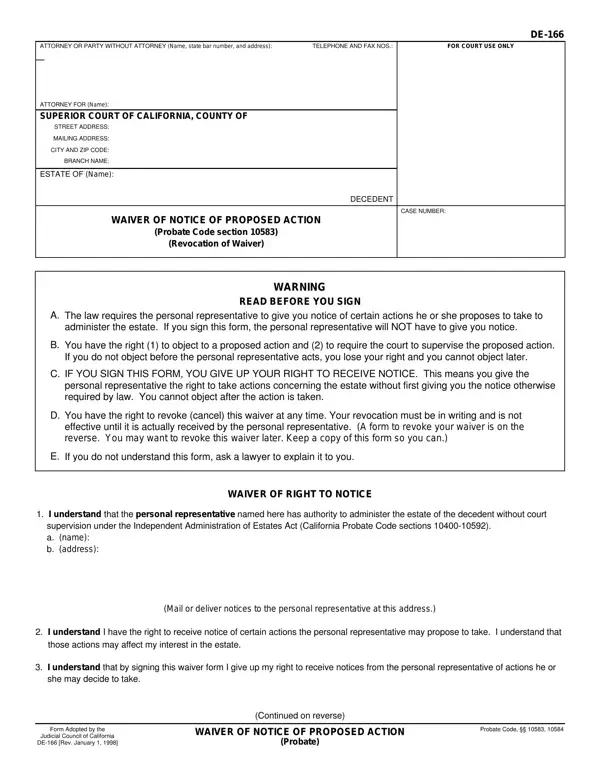
Form De 166 PDF Details

The De 166 form plays a critical role in the administration of estates in California, guiding the interaction between personal representatives and beneficiaries or interested parties regarding notice of proposed actions. Under the umbrella of the Independent Administration of Estates Act, this form allows a personal representative to proceed with certain estate administration actions without needing to give prior notice to those beneficiaries or interested parties who choose to waive their right to such notices. This waiver can significantly streamline the probate process but also relinquishes the waiving party's right to object to the actions proposed by the personal representative after they have been taken. The form contains clear warnings to ensure signatories are fully aware of the rights they are giving up, emphasizing the importance of understanding the form fully before signing. It presents options for individuals to specifically list the actions they are waiving notice of or to opt for a blanket waiver of all actions covered under the act. Furthermore, it incorporates provisions for the revocation of a waiver, allowing for a reinstatement of the right to receive notices at any future point, which must be communicated in writing to the personal representative. The inclusion of a section for the proof of service by mail on the reverse side underscores the legal need for documentation that such communications have been correctly sent, serving as a safeguard for both personal representatives and those waiving their rights. This form, therefore, encapsulates the legal balance between facilitating efficient estate management and protecting the rights and interests of all parties involved.

QuestionAnswer
Form NameForm De 166
Form Length2 pages
Fillable?No
Fillable fields0
Avg. time to fill out30 sec
Other nameswaiver notice probate, de166, de 166 form, waiver probate

How to Edit Form De 166 Online for Free

fee waiver for probate can be completed effortlessly. Just make use of FormsPal PDF editor to complete the task without delay. FormsPal is committed to making sure you have the ideal experience with our editor by continuously presenting new functions and upgrades. With all of these updates, using our tool becomes easier than ever! Here is what you would want to do to get started:

Step 1: Click on the "Get Form" button in the top area of this page to open our PDF tool.

Step 2: After you start the PDF editor, you'll notice the document prepared to be filled in. In addition to filling out various fields, you may also perform various other things with the PDF, namely adding any text, editing the original textual content, inserting illustrations or photos, placing your signature to the PDF, and more.

In an effort to fill out this PDF document, make sure that you provide the required information in each and every blank:

1. Whenever submitting the fee waiver for probate, make certain to include all of the important blanks in their corresponding area. It will help expedite the work, enabling your details to be processed without delay and properly.

Filling out section 1 of ca waiver probate

2. The third part would be to fill out the following blanks: I understand that the personal, supervision under the Independent, Mail or deliver notices to the, I understand I have the right to, I understand that by signing this, Form Adopted by the, Judicial Council of California, DE Rev January, WAIVER OF NOTICE OF PROPOSED ACTION, Probate, Probate Code, and Continued on reverse.

I understand that the personal, WAIVER OF NOTICE OF PROPOSED ACTION, and DE Rev January inside ca waiver probate

3. The following segment focuses on ESTATE OF Name, CASE NUMBER, DECEDENT, By signing below I WAIVE MY RIGHT, a b, Any and all actions the personal, See Attachment, Date, TYPE OR PRINT NAME, My address is type or print, SIGNATURE, Keep a copy for your records, REVOCATION OF WAIVER OF NOTICE OF, and I previously signed a waiver of - fill in all these fields.

DECEDENT, Any and all actions the personal, and SIGNATURE of ca waiver probate

People who use this PDF frequently make errors when filling out DECEDENT in this section. You should definitely go over everything you type in here.

4. Filling out I previously signed a waiver of, TYPE OR PRINT NAME, My address is type or print, SIGNATURE, Mail or deliver this revocation to, PROOF OF SERVICE BY MAIL, I mailed a copy of the Waiver of, depositing a copy of the, The envelope was addressed and, Name of personal representative, c d, and Date of mailing Place of mailing is crucial in this next form section - don't forget to spend some time and take a close look at each and every blank!

ca waiver probate writing process detailed (step 4)

5. This document should be wrapped up with this section. Further you have a comprehensive set of fields that need specific information to allow your document submission to be complete: I declare under penalty of perjury, TYPE OR PRINT NAME, DE Rev January, WAIVER OF NOTICE OF PROPOSED ACTION, Probate, SIGNATURE, and Page two.

Step # 5 in filling in ca waiver probate

Step 3: Prior to moving on, check that all blanks are filled out correctly. As soon as you’re satisfied with it, press “Done." Join us today and easily gain access to fee waiver for probate, prepared for downloading. All adjustments made by you are preserved , so that you can modify the pdf later if needed. Whenever you work with FormsPal, you can easily fill out forms without needing to worry about information incidents or records being shared. Our protected software makes sure that your personal information is maintained safe.