
Form Dhec 252 PDF Details

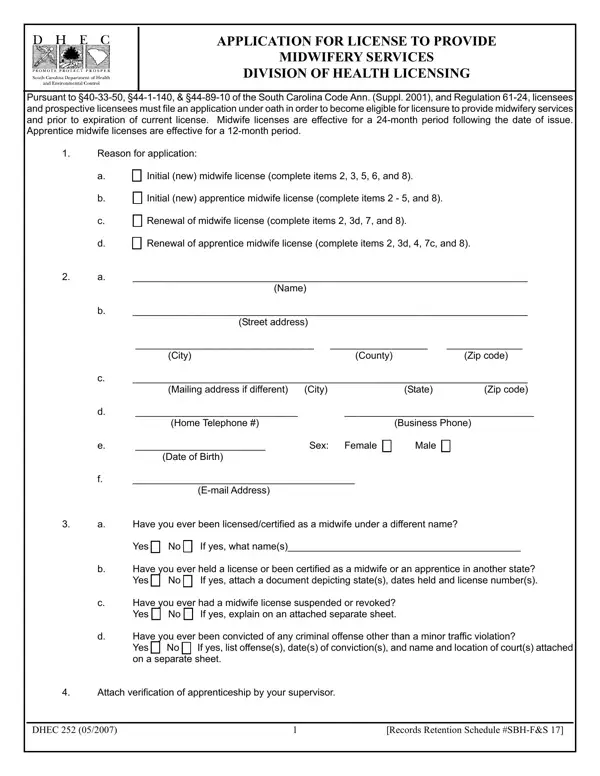
In the realm of healthcare and wellness professions, the process of becoming officially licensed to practice carries its own set of rigorously defined steps and requirements. Among such professions, midwifery holds a significant place, with its practitioners providing invaluable services during one of the most crucial times in a client's life. The Application for License to Provide Midwifery Services, known as the DHEC 252 form, stands as a critical step for those in South Carolina aiming to enter or continue their journey in this profession under the Division of Health Licensing. This comprehensive form serves multiple purposes; it caters to both new applicants aiming for their initial licensure and existing practitioners seeking license renewal. It encompasses the need for detailed personal information, the submission of qualifications including educational transcripts, proof of apprenticeship, CPR certifications, and additional supporting materials such as recommendations and evidence of continuing education. Moreover, the form plays a pivotal role in ensuring that practitioners uphold the legal requirements, as it calls for applicants to disclose past criminal offenses and licensure suspensions or revocations, aiming to maintain the integrity and trust in the midwifery profession. With licenses validity spanning across different durations for midwives and apprentice midwives, and stringent specifications for application completion and submission, the DHEC 252 form encapsulates a crucial juncture for midwifery professionals in South Carolina, guiding them through the procedural pathways to licensure.

QuestionAnswer
Form NameForm Dhec 252
Form Length3 pages
Fillable?No
Fillable fields0
Avg. time to fill out45 sec
Other namesMIDWIFERY, Suppl, 24-month, licensure

How to Edit Form Dhec 252 Online for Free

If you intend to fill out sbh, you don't have to download any programs - just use our PDF tool. To make our tool better and more convenient to use, we continuously work on new features, with our users' feedback in mind. In case you are looking to get going, here's what it requires:

Step 1: Press the orange "Get Form" button above. It is going to open up our editor so you could start filling out your form.

Step 2: The tool helps you change almost all PDF files in various ways. Enhance it by writing personalized text, correct what's originally in the PDF, and include a signature - all doable in minutes!

This document requires specific information; to guarantee consistency, don't hesitate to take note of the recommendations just below:

1. The sbh involves specific information to be typed in. Ensure that the next blanks are filled out:

Filling out part 1 in MIDWIFERY

2. After the last part is done, you have to put in the required specifics in Have you ever been, Yes cid No cid If yes what names, Have you ever held a license or, Have you ever had a midwife, Have you ever been convicted of, Attach verification of, and DHEC Records Retention Schedule so you can progress further.

Tips to fill in MIDWIFERY step 2

It's very easy to make errors while filling in the Have you ever been convicted of, consequently be sure you look again before you decide to finalize the form.

Step 3: Before finalizing your form, it's a good idea to ensure that all blanks are filled in the correct way. As soon as you think it is all good, press “Done." Right after setting up a7-day free trial account at FormsPal, you will be able to download sbh or email it at once. The PDF file will also be accessible via your personal cabinet with your adjustments. FormsPal is dedicated to the privacy of all our users; we make sure that all personal data processed by our system stays secure.