

Form DS-64 at a glance
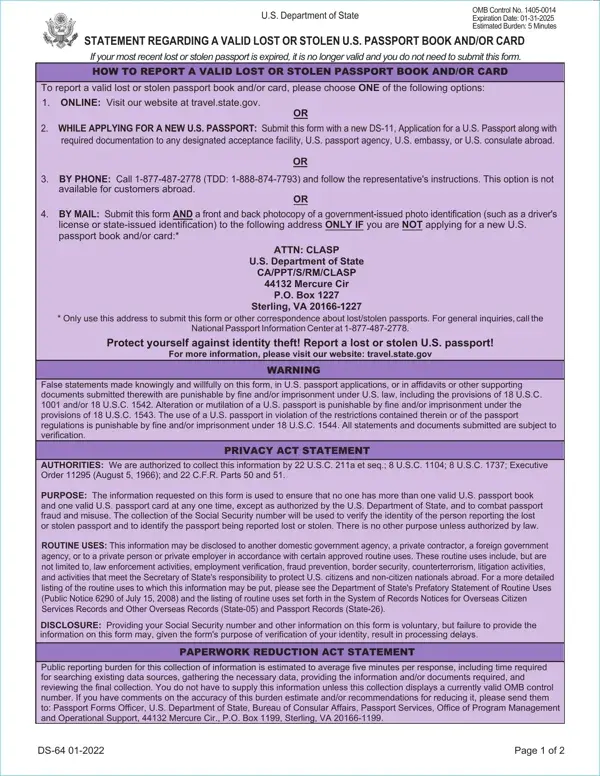
What it is: Form DS-64 is the Statement Regarding a Valid Lost or Stolen U.S. Passport Book and/or Card.
Who signs: The applicant, age 16 or older, signs on the Applicant's Legal Signature line and enters the Date (mm/dd/yyyy). A Mother/Father/Parent/Guardian signs the Legal Signature if identifying minor under age 16 and enters the Date (mm/dd/yyyy).
A U.S. national may not normally bear more than one valid or potentially valid U.S. passport book and/or card at a time.
A statement is required when applying for a new U.S. passport if the previously valid or potentially valid passport is not submitted.
A filled-in Form DS-64 example: a passport book reported lost
How to fill out Form DS-64, box by box
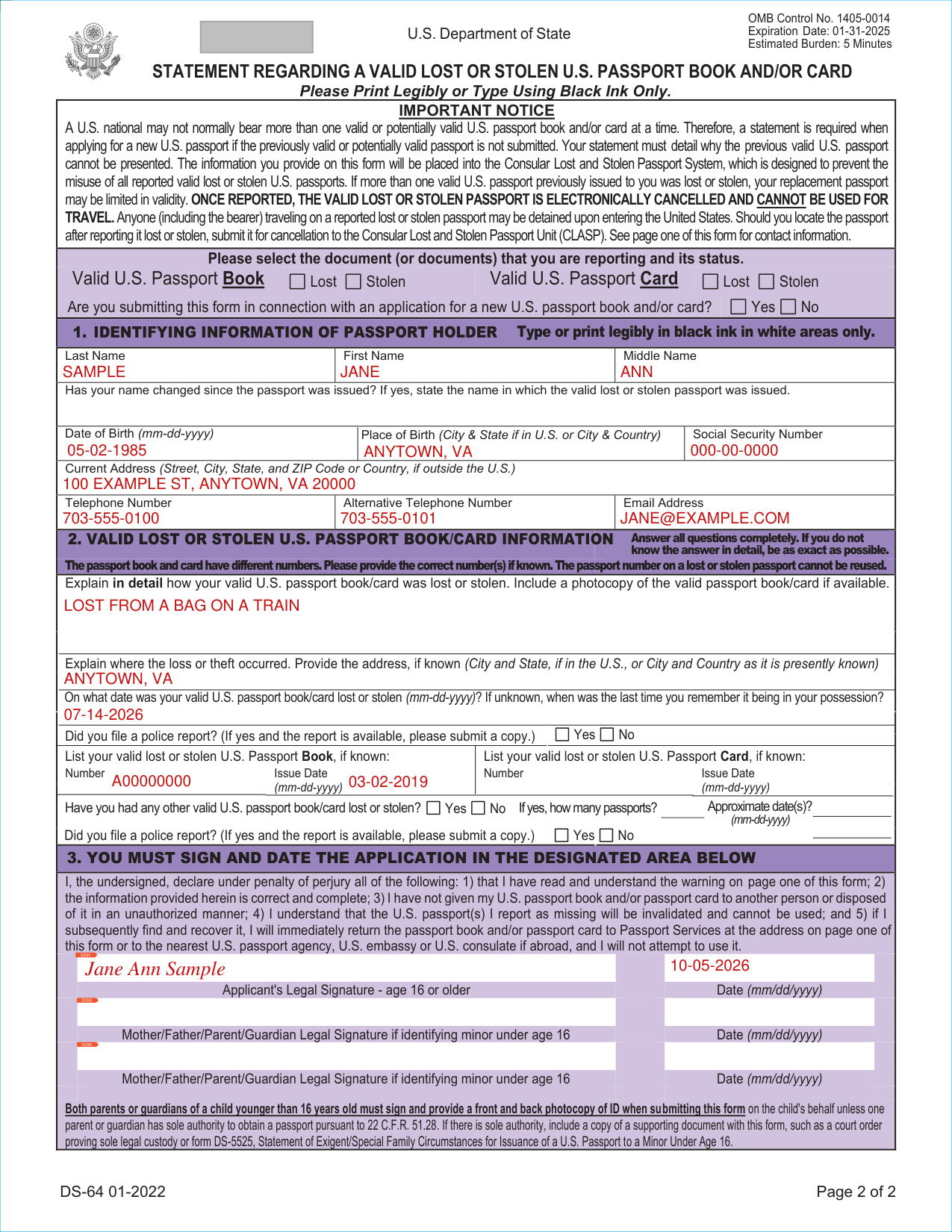
Last Name, First Name and Middle Name

Enter the Last Name, First Name and Middle Name.
Has your name changed since the passport was issued?
If yes, state the name in which the lost or stolen passport was issued

If yes, state the name in which the lost or stolen passport was issued.
Date of Birth, Place of Birth and Social Security Number

Enter the Date of Birth (mm-dd-yyyy), the Place of Birth (City & State if in U.S. or City & Country) and the Social Security Number.
Providing your Social Security number and other information on this form is voluntary, but failure to provide the information on this form may, given the form's purpose of verification of your identity, result in processing delays.
Current Address, Telephone Number, Alternative Telephone Number and Email Address

Enter the Current Address (Street, City, State, and ZIP Code or Country, if outside the U.S.).
Enter the Telephone Number, Alternative Telephone Number and Email Address.
Explain where the loss or theft occurred
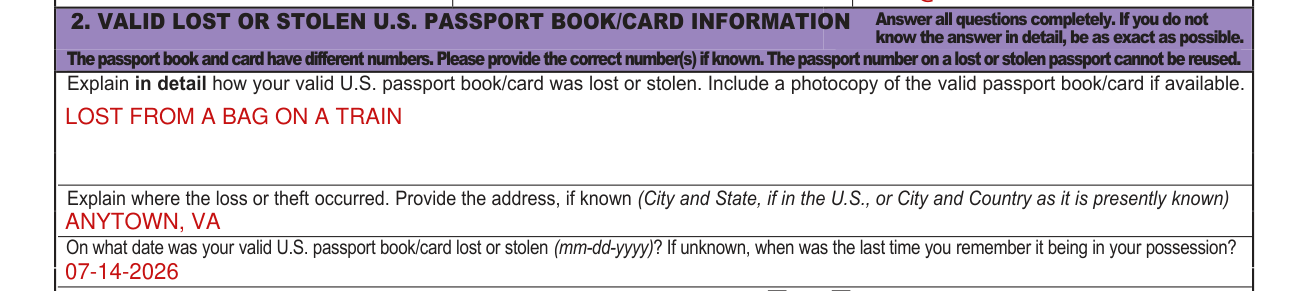
Include a photocopy of the valid passport book/card if available.
Explain where the loss or theft occurred. Provide the address, if known (City and State, if in the U.S., or City and Country as it is presently known).
On what date was your valid U.S. passport book/card lost or stolen (mm-dd-yyyy)? If unknown, when was the last time you remember it being in your possession?
List your valid lost or stolen U.S. Passport Book and Passport Card, if known

List your valid lost or stolen U.S. Passport Book, if known: Number and Issue Date (mm-dd-yyyy). List your valid lost or stolen U.S. Passport Card, if known: Number and Issue Date (mm-dd-yyyy).
Have you had any other valid U.S. passport book/card lost or stolen?

Have you had any other valid U.S. passport book/card lost or stolen? Yes No If yes, enter how many passports and the Approximate date(s) (mm-dd-yyyy).
If more than one valid U.S. passport previously issued to you was lost or stolen, your replacement passport may be limited in validity.
Signature

You declare under penalty of perjury that: 1) you have read and understand the warning on page one of this form; 2) the information provided herein is correct and complete; 3) you have not given your U.S. passport book and/or passport card to another person or disposed of it in an unauthorized manner; 4) the U.S. passport(s) you report as missing will be invalidated and cannot be used; and 5) if you subsequently find and recover it, you will immediately return the passport and/or passport card to Passport Services at the address on page one of this form or to the nearest U.S. passport agency, U.S. embassy or U.S. consulate if abroad, and you will not attempt to use it.
The applicant, age 16 or older, signs on the Applicant's Legal Signature line and enters the Date (mm/dd/yyyy).
A Mother/Father/Parent/Guardian signs the Legal Signature if identifying minor under age 16 and enters the Date (mm/dd/yyyy).
More rules for Form DS-64
Please select the document (or documents) that you are reporting and its status: Valid U.S. Passport Book Lost Stolen, Valid U.S. Passport Card Lost Stolen.
Are you submitting this form in connection with an application for a new U.S. passport book and/or card? Yes No
Did you file a police report? If yes and the report is available, please submit a copy.
Once reported, the valid lost or stolen passport is electronically cancelled and cannot be used for travel.
Anyone (including the bearer) traveling on a reported lost or stolen passport may be detained upon entering the United States.
Applying for a new passport, mailing, reporting online or by phone, and other situations
You are applying for a new U.S. passport
WHILE APPLYING FOR A NEW U.S. PASSPORT: Submit this form with a new DS-11, Application for U.S. Passport along with required documentation to any designated acceptance facility, U.S. passport agency, U.S. embassy, or U.S. consulate abroad.
You are NOT applying for a new U.S. passport book and/or card
BY MAIL: Submit this form AND a front and back photocopy of a government-issued photo identification (such as a driver's license or state-issued identification) to the address under BY MAIL ONLY IF you are NOT applying for a new U.S. passport book and/or card.
You report online or by phone
To report a valid lost or stolen passport, please choose ONE of the following options.
ONLINE: Visit travel.state.gov.
BY PHONE: Call 1-877-487-2778 (TDD: 1-888-874-7793) and follow the representative's instructions. This option is not available for customers abroad.
You locate the passport after reporting it lost or stolen
Should you locate the passport after reporting it lost or stolen, submit it for cancellation to the Consular Lost and Stolen Passport Unit (CLASP). See page one of this form for contact information.
You are submitting this form on the child's behalf
Both parents or guardians of a child younger than 16 years old must sign and provide a front and back photocopy of ID when submitting this form on the child's behalf unless one parent or guardian has sole authority to obtain a passport pursuant to 22 C.F.R. 51.28.
If there is sole authority, include a copy of a supporting document with this form, such as a court order proving sole legal custody or form DS-5525, Statement of Exigent/Special Family Circumstances for Issuance of a U.S. Passport to a Minor Under Age 16.
Common questions about Form DS-64
What is a DS-64 form for a passport?
Your statement must detail why the previous valid U.S. passport cannot be presented. The information you provide on this form will be placed into the Consular Lost and Stolen Passport System, which is designed to prevent the misuse of all reported valid lost or stolen U.S. passports.
Is there a penalty?
False statements made knowingly and willfully on this form, in U.S. passport applications, or in affidavits or other supporting documents submitted therewith are punishable by fine and/or imprisonment under U.S. law, including the provisions of 18 U.S.C. 1001 and/or 18 U.S.C. 1542. Alteration or mutilation of a U.S. passport is punishable by fine and/or imprisonment under the provisions of 18 U.S.C. 1543. The use of a U.S. passport in violation of the restrictions contained therein or of the passport regulations is punishable by fine and/or imprisonment under 18 U.S.C. 1544.
Sources
[1] Form DS-64, Statement Regarding a Valid Lost or Stolen U.S. Passport Book and/or Card, U.S. Department of State (the Official source link on this page).