
Form F3910 Cfd PDF Details

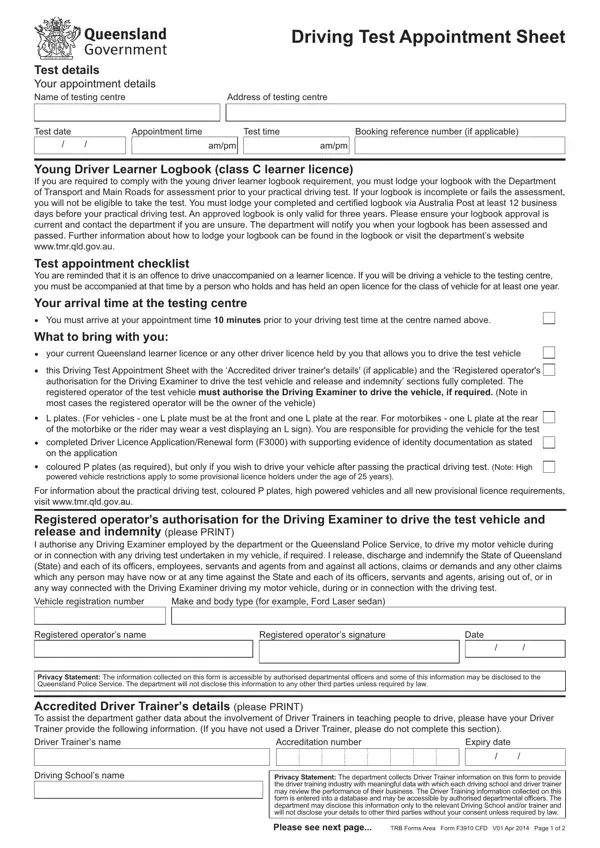
The F3910 CFD form, serving as a driving test appointment sheet, is a crucial document for candidates preparing to undergo their practical driving test. It encompasses a comprehensive array of details necessary for the appointment, including the test centre's name and address, test date and time, and the booking reference number if available. This form is particularly significant for young drivers adhering to the class C learner licence requirements, which includes the submission and approval of a learner logbook by the Department of Transport and Main Roads prior to the test. Applicants are mandated to send their completed logbooks via Australia Post, at least 12 business days before the test, to be eligible for taking the test. Additionally, the form lists essential reminders for the test day, including the requirement to be accompanied if driving to the test centre on a learner licence, the necessary documents and items to bring along, and an authorization section for the driving examiner to operate the test vehicle if needed. With a detailed checklist and a segment on vehicle standards for the practical test, the form serves as an indispensable guide for candidates, ensuring they are well-prepared and informed about the procedures and regulations surrounding their driving test appointment.

QuestionAnswer
Form NameForm F3910 Cfd
Form Length2 pages
Fillable?No
Fillable fields0
Avg. time to fill out30 sec
Other namesdriving test appointment sheet, driving test appointment, timebooking dmv drivers license, driver test appointment

How to Edit Form F3910 Cfd Online for Free

Handling PDF documents online is always surprisingly easy with our PDF tool. You can fill out driving test appointment here effortlessly. FormsPal team is dedicated to providing you with the perfect experience with our tool by continuously introducing new capabilities and upgrades. Our tool has become much more intuitive with the most recent updates! Now, filling out PDF files is simpler and faster than ever before. To begin your journey, take these easy steps:

Step 1: Hit the orange "Get Form" button above. It will open our pdf editor so that you can begin completing your form.

Step 2: The tool offers you the capability to change your PDF in many different ways. Change it by writing any text, adjust what is originally in the file, and add a signature - all manageable within a few minutes!

With regards to the fields of this specific document, here's what you want to do:

1. You'll want to complete the driving test appointment correctly, hence be mindful when filling in the areas comprising all these fields:

Guidelines on how to prepare driving test appointment sheet portion 1

2. When the prior part is filled out, go on to type in the applicable details in these: this Driving Test Appointment, L plates For vehicles one L plate, completed Driver Licence, coloured P plates as required but, For information about the, Registered operators authorisation, Vehicle registration number, Make and body type for example, Registered operators name, Registered operators signature, Date, and Privacy Statement The information.

Vehicle registration number, For information about the, and coloured P plates as required but inside driving test appointment sheet

3. Throughout this stage, examine Driver Trainers name, Accreditation number, Expiry date, Driving Schools name, Privacy Statement The department, Please see next page, and TRB Forms Area Form F CFD V Apr. All of these will have to be filled out with highest precision.

The right way to fill out driving test appointment sheet step 3

4. The subsequent part will require your information in the following places: If you hold an overseas driver, your passport, your overseas driver licence and a, Important information for overseas, If you do not pass your practical, The test vehicle, The test vehicle must meet the, If the construction of the test, and If the test vehicle is a dangerous. Always fill out all of the required info to go forward.

The test vehicle must meet the, Important information for overseas, and If you hold an overseas driver of driving test appointment sheet

5. The document needs to be wrapped up within this section. Below you can find a comprehensive list of blank fields that require correct information in order for your form usage to be complete: Your driving test fee will not be, Your young driver learner logbook, You fail to arrive at the test, You fail to give at least two, You are unable to start the test, Important information, For more information visit, Higher rates will apply from, and TRB Forms Area Form F CFD V Apr.

Part # 5 in filling in driving test appointment sheet

People frequently make mistakes while filling out TRB Forms Area Form F CFD V Apr in this part. Be sure to read twice what you type in here.

Step 3: Make certain the details are right and just click "Done" to finish the task. Get hold of your driving test appointment when you sign up for a 7-day free trial. Immediately view the pdf document in your personal account, together with any modifications and changes all preserved! FormsPal is committed to the confidentiality of all our users; we always make sure that all personal information processed by our system is kept protected.