
Form Hfs 3416D PDF Details

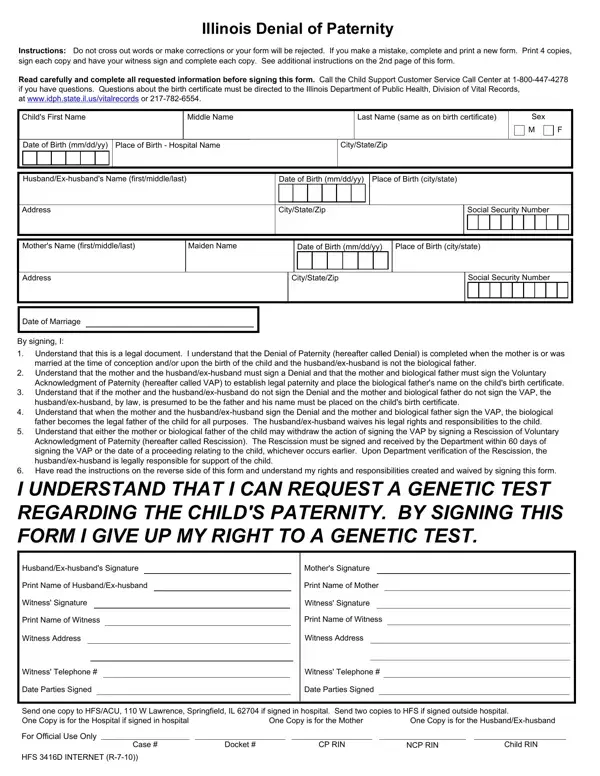
In navigating the complexities of establishing paternity, the Illinois Denial of Paternity form, known as HFS 3416D, stands as a pivotal document for specific families. Challenging as the topic may be, this form facilitates the formal acknowledgment, or denial, of paternity in instances where there is a discrepancy between the biological and presumed legal father, often due to marriage. Primarily utilized when the mother was married at the time of conception or birth, but the child's biological father is another individual, the form allows for the legal acknowledgement of the biological father through a separate acknowledgment form known as the Voluntary Acknowledgment of Paternity (VAP). Furthermore, the form meticulously outlines the relinquishment of paternal rights by the husband or ex-husband, setting a clear pathway for the child's biological father to assume legal responsibility and establish a rightful place on the birth certificate. It's crucial that signatories comprehend the weight of this document, including the irreversible decision to decline genetic testing and the implications of signing, all underscored by a stringent no-correction policy to maintain the form's validity. The procedural aspects underscore the vital necessity of witness verification, showcasing a structured approach towards a transparent handling of such sensitive familial matters. In essence, the HFS 3416D form encapsulates a critical step towards resolving paternity issues within the legal and familial contexts, underscoring the intersection of law, personal rights, and the intricate dynamics of parental responsibilities.

QuestionAnswer
Form NameForm Hfs 3416D
Form Length2 pages
Fillable?No
Fillable fields0
Avg. time to fill out30 sec
Other nameshfs3416d where to get a rescission vap form in illinois

How to Edit Form Hfs 3416D Online for Free

Form Hfs 3416D can be filled in without any problem. Simply try FormsPal PDF editing tool to do the job promptly. Our expert team is ceaselessly endeavoring to expand the editor and help it become even faster for clients with its handy functions. Take full advantage of present-day progressive possibilities, and find a myriad of new experiences! Here is what you will have to do to begin:

Step 1: Click on the "Get Form" button in the top section of this page to get into our tool.

Step 2: After you start the online editor, you will get the form prepared to be filled out. In addition to filling out various fields, it's also possible to perform various other actions with the Document, specifically adding your own textual content, changing the initial textual content, adding graphics, placing your signature to the form, and a lot more.

For you to finalize this document, be certain to type in the information you need in every area:

1. Before anything else, while filling out the Form Hfs 3416D, begin with the page that includes the next blank fields:

Stage # 1 for filling out Form Hfs 3416D

2. Right after this section is done, go on to enter the suitable details in these - NOTE Forms that contain errors, and HFS D INTERNET R.

HFS D INTERNET R, HFS D INTERNET R, and NOTE Forms that contain errors of Form Hfs 3416D

Regarding HFS D INTERNET R and HFS D INTERNET R, be certain you double-check them in this current part. Both these are considered the key fields in this page.

Step 3: Ensure that the information is right and click "Done" to proceed further. Download the Form Hfs 3416D after you subscribe to a free trial. Immediately get access to the document inside your personal account, with any modifications and changes being automatically saved! When using FormsPal, you can easily fill out forms without being concerned about personal data breaches or records getting shared. Our secure software makes sure that your private data is maintained safely.