
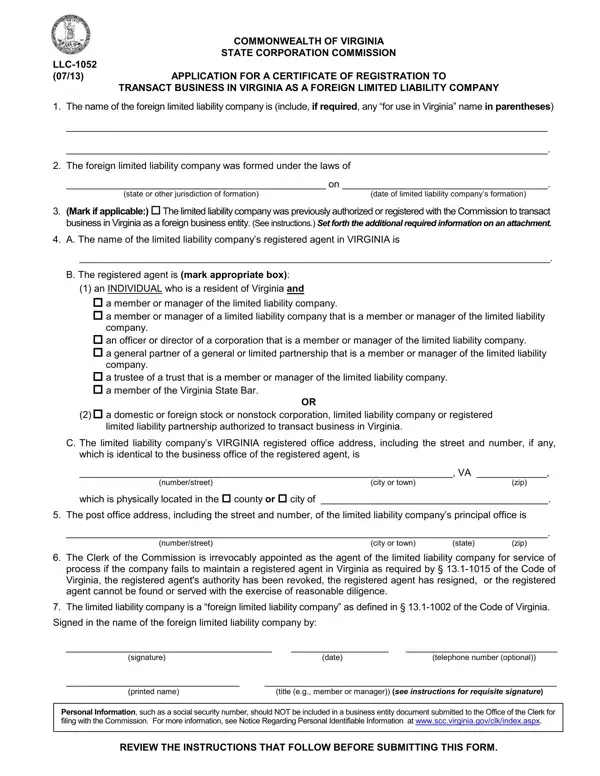
Undertaking business operations in Virginia as a foreign limited liability company (LLC) necessitates navigating through specific legal requisites, one of which involves submitting the LLC-1052 form to the Commonwealth of Virginia's State Corporation Commission. This crucial document, officially titled "Application for a Certificate of Registration to Transact Business in Virginia as a Foreign Limited Liability Company," serves as a gateway for foreign LLCs to legally establish their business presence in Virginia. It details several key pieces of information, including the LLC's official name and any designated name for use within Virginia, the jurisdiction under which the LLC was formed, and the date of its formation. Additionally, it addresses whether the LLC was previously authorized to conduct business in Virginia, identifies the appointed registered agent along with the agent's address in Virginia, and outlines the principal office's location. Importantly, this form also involves the irrevocable appointment of the Clerk of the Commission as the agent for service of process under certain circumstances, reaffirming the LLC as a "foreign" entity according to Virginia law, and requires a signature from an authorized individual within the company. With its accompanying instructions emphasizing the need for accuracy, legibility, and compliance with state law, filing LLC-1052 is a significant step towards ensuring that a foreign LLC meets Virginia's legal and procedural standards for doing business within the state.
| Question | Answer |
|---|---|
| Form Name | Form Llc 1052 |
| Form Length | 4 pages |
| Fillable? | Yes |
| Fillable fields | 35 |
| Avg. time to fill out | 30 sec |
| Other names | aspx, 1052 form, LLC-1052, form 1052 |
Form Llc 1052 isn’t the one you’re looking for?