
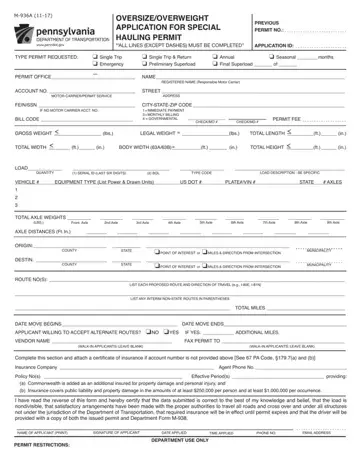
Form M-936A at a glance
What it is: Form M-936A is the Oversize/Overweight Application for Special Hauling Permit.
Where and when to file: Online applications are processed faster than any other application method. All applicants are encouraged to apply via APRAS WEB.
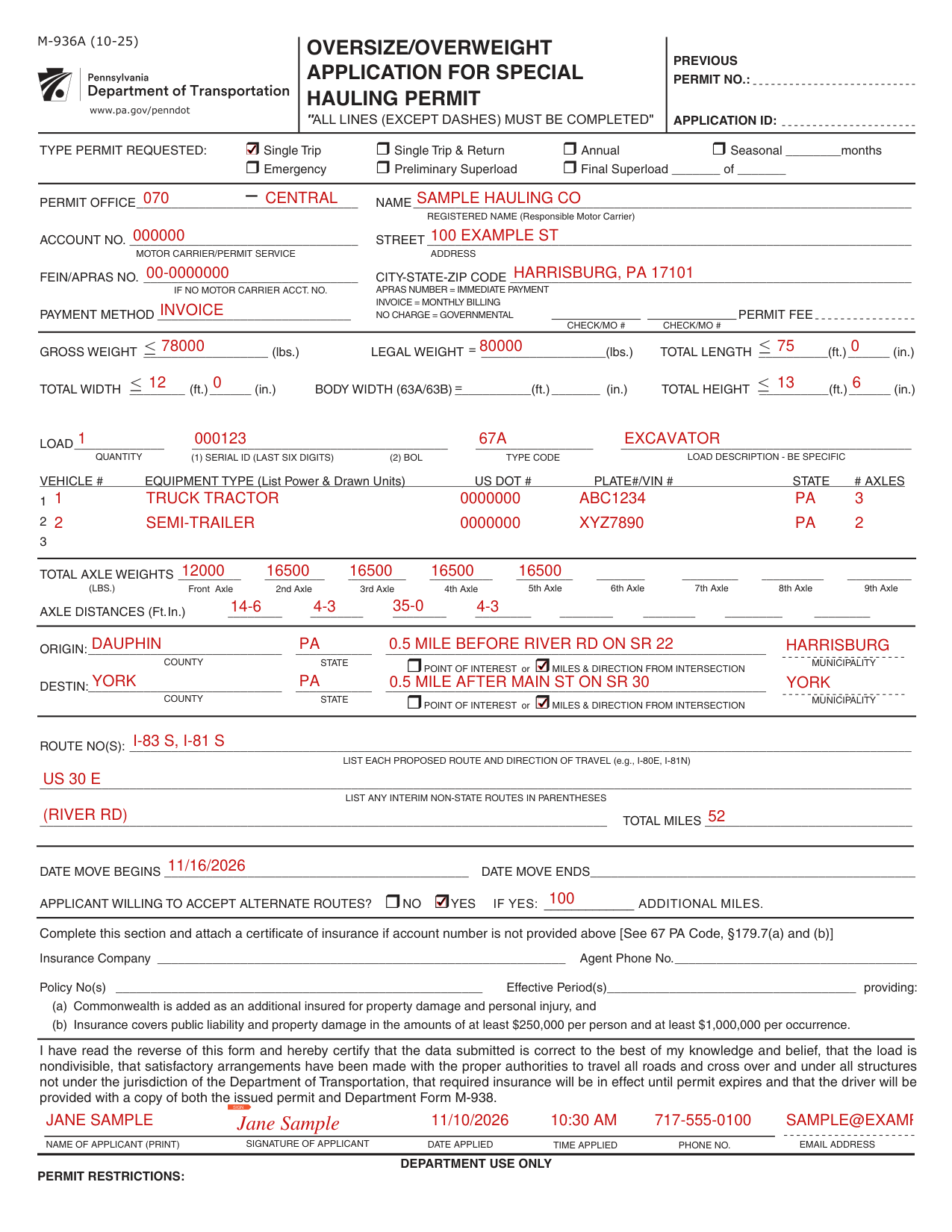
A filled-in Form M-936A example: a single trip permit for an excavator
How to fill out Form M-936A, box by box
Type permit requested

TYPE PERMIT REQUESTED: Indicate the type of permit being requested by checking each applicable box and completing each applicable blank.
Previous permit number and application ID

PREVIOUS PERMIT NO.: Complete only if a previous permit was issued within the past 30 days and is similar (particularly the routing) to the application being submitted.
APPLICATION ID: PENNDOT will assign the Application ID upon processing of the application data.
Permit office, account number and FEIN

PERMIT OFFICE: 3-digit number (e.g., 070). List the Permit Office organization number where application is being submitted (e.g., where movement on State Routes in PA starts or ends).
ACCOUNT NO.: List the 6-digit account number under which the applicant is registered with the Central Permit Office (see Department Regulation 179.4).
If applicant is not registered, enter N/A. Unregistered applicants must apply in person or by mail and must include an Insurance Certificate and a certified check, cashier's check or money order with their application.
FEIN: List the FEIN (Federal Employer Identification Number) of the Responsible Motor Carrier.
The FEIN must always be the Responsible Motor Carrier's FEIN (do not use the FEIN of a Permit Service).
Name and address of the responsible motor carrier

NAME: List complete name of the responsible motor carrier (e.g., owner, lessee or sub-lessee of a motor vehicle - not the owner of the load, any drawn vehicle or any other person).
STREET: List applicant's complete street address or P.O. Box.
CITY/STATE/ZIP CODE: List applicant's municipality, State and Zip Code.
Payment method and permit fee

INVOICE = Registered applicants.
Account # must be entered.
NO CHARGE = Governmental.
PAYMENT METHOD: APRAS NUMBER (Pseudo Account) = Unregistered applicants.
Provide the Check Number(s) in the space(s) provided.
Cash is not acceptable.
PERMIT FEE: The Permit Fee will be determined at the time of issuance.
Gross weight, legal weight, length, width and height

GROSS WEIGHT: List total combined weight of the vehicle or combination and nondivisible load, in pounds.
If Gross Weight exceeds either 136,000 pounds or Department Regulation 179, Table 8-1 combination general gross weight limits, applicants must also submit a Supplemental Application, Form M-936AS.
LEGAL WEIGHT: List Registered Gross Weight (in pounds) as it appears on the motor vehicle registration (i.e., owner's) card.
TOTAL LENGTH: List maximum overall operating length of the vehicle or combination and nondivisible load, in feet and inches.
TOTAL WIDTH: List maximum overall operating width (excluding mirrors) of the vehicle or combination and nondivisible load, in feet and inches.
BODY WIDTH (63A/63B): Field only needs to be completed for Load Types 63A and 63B. List just the body width, not including eaves, door knobs, etc. TOTAL HEIGHT: List the maximum overall operating height of the vehicle or combination and nondivisible load, in feet and inches.
Load information

Load Information: Quantity: List the precise number of loads to be transported under the Permit.
If none, list “0” as the Quantity.
Serial Id: List at least the last six digits of the load serial number, if there is any load.
If the load has no serial number, list the load bill of lading number (e.g., BOL#: 013579 or WO#: 024680) for each article being transported.
Type Code: Select from the general Type Code menu.
Description: List description of load. (e.g., crane, backhoe and transformer).
Vehicle information

VEHICLE INFORMATION: Vehicle #: List each vehicle in sequential order.
Plate#/VIN #: For each vehicle, list the license plate number.
Axle weights and axle distances

TOTAL AXLE WEIGHTS: List each axle weight (front to rear) of vehicle or combination.
Sum of all axle weights must equal stated Gross Weight.
If any axle weight exceeds 27,000 pounds or Department Regulation 179, Table 8-2 combination axle weight limits, applicant must also submit a Supplemental Application, Form M-936AS.
AXLE DISTANCES: List the actual distances, in feet and inches, from the center of each axle to the center of the previous adjacent axle (front to rear).
Origin and destination

ORIGIN INFORMATION: County: List the county within which movement upon a PA State highway starts.
State: List PA if beginning within PA.
List the bordering state if movement begins outside PA.
If a Point of Interest has been established, list it here.
Miles & Direction: If a point of interest has not been entered, list the exact location where movement begins in PA, using reference points identified on the Official State Highway Transportation Map.
Also list the miles (to nearest tenth of a mile), the direction, and the closest intersection before the State Route (.5 mile before River Rd on SR 22).
Municipality: Leave this field blank unless you are sure movement begins within the municipal boundary.
DESTINATION INFORMATION: County: List the county within which movement upon a PA State highway ends.
State: List PA if ending within PA.
Routes and total miles

ROUTE NO(S): List all proposed routes (and direction of travel) upon which the movement may traverse.
The permit does not authorize a return trip unless requested (on Form M-936AM) and specifically indicated on the permit.
TOTAL MILES: List estimated total number of miles traveled -- in one direction -- on PA State Routes only.
Dates and alternate routes

DATE MOVE BEGINS: List the date on which the move is scheduled to begin in PA.
Permits will only be issued up to one week in advance due to changes to the road and bridge infrastructure.
DATE MOVE ENDS: PENNDOT will determine the date on which the move must end, which is five authorized weekdays after the move begins date for single-trip permits.
WILLING TO ACCEPT ALTERNATE ROUTES & ADDITIONAL MILES: Enter a check in the box -- NO or YES -- indicating your willingness to accept alternate routes for a single-trip permit (YES is recommended for single-trip permits and required for other permits).
If yes is checked, list the number of additional miles you will accept (100 miles is recommended).
Insurance

INSURANCE: A Motor carrier with Account # is required to have a current Certificate of Insurance on file with the Central Permit Office and, therefore, does not have to complete these fields -- unless specifically requested by Permit Office staff.
Applicants that do not list a valid Account Number must complete these fields and attach a copy of their Certificate of Insurance to each Form M-936A Application.
The Certificate must show the following: Duration: Insurance is in effect while individual Permit is valid. Amount: $250,000 per person (public liability and property damage) and $1,000,000 per occurrence (public liability and property damage). (checked November 1, 2026)
NOTE: $1,000,000 combined single limits is acceptable. Type: Occurrence-based insurance (not claims based). Additional Insured: Commonwealth of PA must be added as ‘additional insured’ for property damage and personal injury. (checked November 1, 2026)
Signing the application

CERTIFICATION: Review the certification statement and, if true, print/type the name of the applicant, write applicant's signature, list date, time, phone and email address in the space provided at the bottom of the Form. Date Applied - Date application submitted. Time Applied - Time application submitted. Phone No. - Applicant contact's Phone No.
More rules for Form M-936A
All fields underscored with solid lines must be completed.
If any information is incomplete, inaccurate or inconsistent, the application will be denied, so be sure to review each application for completeness, accuracy and consistency before submitting it to PENNDOT.
Applications processed
Applications processed by APRAS
While about four of every five applications are processed automatically by APRAS in about one minute, one of every five applications requires manual review.
Common questions about Form M-936A
Are there fees?
General Issuance Fee (plus 4 cents per ton-mile for overweight): $46 (If < 14' in width), $97 (If > 14' in width). (checked November 1, 2026) Permit issuance fees are non-refundable and mileage-based fees are non-refundable on used Permits.
When is this form not the right one?
Tracked vehicles are not authorized to travel along the highway. A permit will not be issued for a vehicle with other than pneumatic tires to operate along the highway.
Sources
[1] Form M-936A (10-25), Oversize/Overweight Application for Special Hauling Permit, Pennsylvania Department of Transportation (the Official source link on this page).
