
Form Mv 213 PDF Details

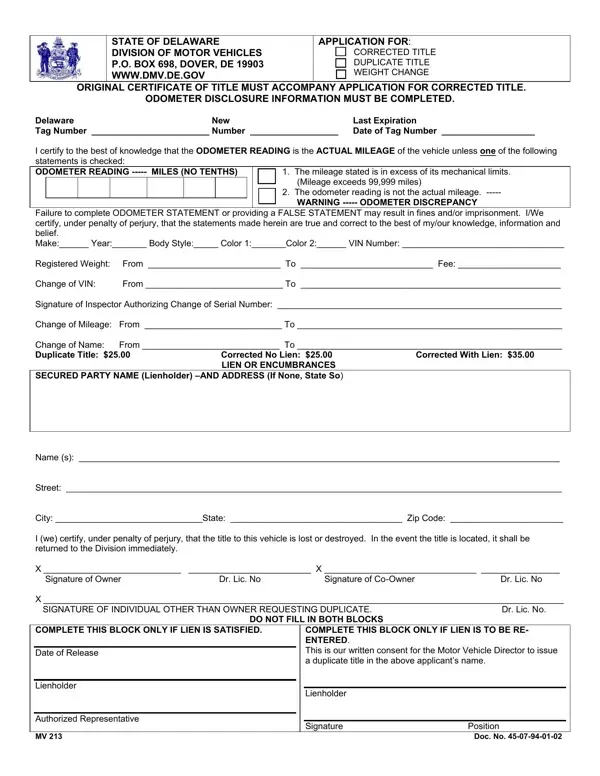
In the realm of vehicle ownership and maintenance in the State of Delaware, navigating through bureaucratic processes is crucial for ensuring that all vehicle-related documents are up to date and accurate. Among these essential documents is the MV 213 form, a multifaceted application that serves several critical functions ranging from requesting a duplicate title to making corrections on an existing title or even altering vehicle weight as documented by the Division of Motor Vehicles (DMV). The form mandates comprehensive details about the vehicle, including make, year, body style, color, and most importantly, the Vehicle Identification Number (VIN). Additionally, it places a significant emphasis on the accuracy of the odometer reading, underscoring the legal implications of falsifying this information. Whether seeking to correct the title due to a lien or change in vehicle information, or needing a duplicate title due to loss or destruction of the original, applicants are required to follow specific procedures, including submission of an original certificate of title for corrections, completion of odometer disclosure, and adherence to fee structures that vary depending on the nature of the application. Furthermore, the form facilitates changes related to vehicle ownership, such as a change in name, and addresses lien-related adjustments, requiring clear indication whether a lien is satisfied or requires re-entry. With potential legal ramifications including fines or imprisonment for providing false statements, the MV 213 form embodies a critical tool in maintaining the integrity and accuracy of vital vehicle documentation in Delaware.

QuestionAnswer
Form NameForm Mv 213
Form Length2 pages
Fillable?No
Fillable fields0
Avg. time to fill out30 sec
Other namesdelaware mv application, de form mv, delaware title application, delaware title application pdf

How to Edit Form Mv 213 Online for Free

You can work with delaware title application easily with our online tool for PDF editing. To have our tool on the leading edge of convenience, we aim to put into action user-driven features and enhancements regularly. We're always thankful for any feedback - assist us with reshaping PDF editing. With some basic steps, you'll be able to begin your PDF journey:

Step 1: Press the "Get Form" button in the top part of this webpage to access our tool.

Step 2: Once you start the editor, you'll see the form all set to be filled in. Aside from filling in various blank fields, you could also perform other actions with the form, that is adding your own text, modifying the initial text, adding illustrations or photos, affixing your signature to the PDF, and more.

As a way to complete this PDF form, ensure you type in the information you need in each and every blank:

1. When filling in the delaware title application, be sure to include all essential blanks in the corresponding part. It will help expedite the process, enabling your information to be processed quickly and accurately.

mv 213 writing process described (step 1)

2. Your next step is usually to fill in the next few blanks: Failure to complete ODOMETER, COMPLETE THIS BLOCK ONLY IF LIEN, DO NOT FILL IN BOTH BLOCKS, and COMPLETE THIS BLOCK ONLY IF LIEN.

mv 213 completion process clarified (stage 2)

Always be really careful when completing COMPLETE THIS BLOCK ONLY IF LIEN and DO NOT FILL IN BOTH BLOCKS, because this is the section in which most users make a few mistakes.

3. In this particular step, have a look at COMPLETE THIS BLOCK ONLY IF LIEN, MV Doc No, Signature Position, Date of Release, Lienholder, Authorized Representative, COMPLETE THIS BLOCK ONLY IF LIEN, and Lienholder. Each one of these should be taken care of with highest focus on detail.

mv 213 conclusion process outlined (stage 3)

Step 3: Prior to moving on, make sure that blanks were filled out the correct way. Once you are satisfied with it, click on “Done." Right after creating a7-day free trial account with us, it will be possible to download delaware title application or send it via email without delay. The document will also be readily accessible in your personal account menu with your changes. FormsPal is focused on the confidentiality of all our users; we always make sure that all personal information used in our tool is secure.