
Form Mv3010 PDF Details

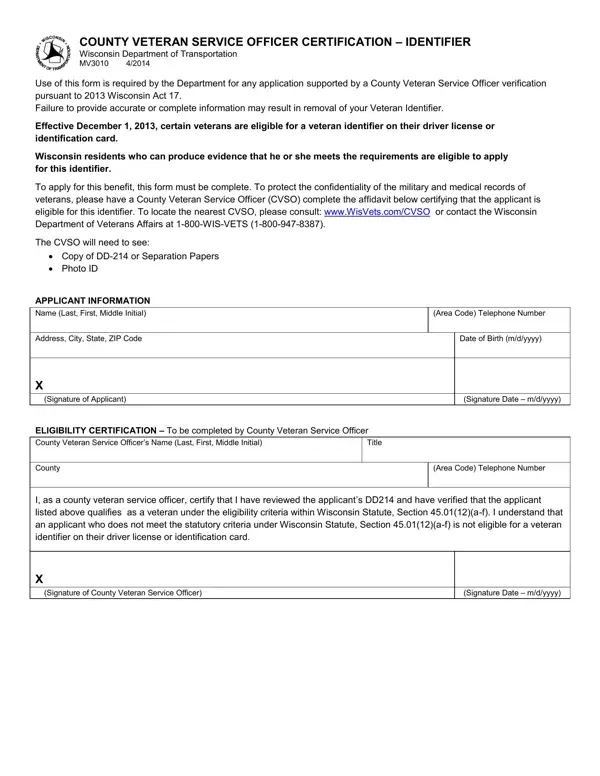
Navigating the process of obtaining a veteran identifier on a driver license or identification card in Wisconsin hinges on the completion and submission of the MV3010 form. As mandated by the 2013 Wisconsin Act 17, this form serves as a critical tool for veterans seeking to have their status recognized on their official forms of identification. Commencing on December 1, 2013, eligibility for this identifier requires veterans to meet specific criteria and submit evidence of their qualifications. The process involves the assistance of a County Veteran Service Officer (CVSO), who plays a key role in verifying a veteran's eligibility. This verification is essential for maintaining the integrity and confidentiality of the applicant's military and medical records. The MV3010 form outlines the need for crucial documents such as the DD-214 or Separation Papers, alongside a photo ID, to ensure the applicant's information is accurate and complete. With clear instructions for locating a CVSO and detailed sections for both applicant information and the CVSO's eligibility certification, the form embodies the state's commitment to honoring its veterans by simplifying their access to deserved benefits.

QuestionAnswer
Form NameForm Mv3010
Form Length1 pages
Fillable?No
Fillable fields0
Avg. time to fill out15 sec
Other nameswisconsin mv3010 identifier printable, wisconsin form mv3010, wisconsin service certification identifier pdf, wisconsin mv3010 form

How to Edit Form Mv3010 Online for Free

When you desire to fill out mv3010 form, you don't need to install any software - simply try using our online PDF editor. Our editor is continually evolving to grant the very best user experience possible, and that's because of our dedication to continual enhancement and listening closely to customer opinions. To get the process started, take these simple steps:

Step 1: Press the orange "Get Form" button above. It is going to open up our tool so you can start filling out your form.

Step 2: When you launch the online editor, there'll be the document ready to be filled out. Other than filling in different blanks, you could also perform various other things with the Document, particularly writing any textual content, changing the initial textual content, inserting illustrations or photos, signing the form, and more.

With regards to the blanks of this particular PDF, here is what you want to do:

1. Begin completing the mv3010 form with a number of major blanks. Note all of the required information and be sure there's nothing left out!

wisconsin service certification identifier pdf writing process detailed (stage 1)

2. The third step is usually to complete these blank fields: County, Area Code Telephone Number, I as a county veteran service, X Signature of County Veteran, and Signature Date mdyyyy.

wisconsin service certification identifier pdf completion process detailed (part 2)

Be really careful while filling out Area Code Telephone Number and Signature Date mdyyyy, since this is where many people make mistakes.

Step 3: Check what you have typed into the blanks and then click on the "Done" button. Go for a 7-day free trial plan with us and acquire instant access to mv3010 form - readily available in your FormsPal cabinet. FormsPal guarantees your information confidentiality by having a secure system that in no way records or shares any kind of private data used in the PDF. Be assured knowing your paperwork are kept protected when you work with our services!