
Form P608 PDF Details

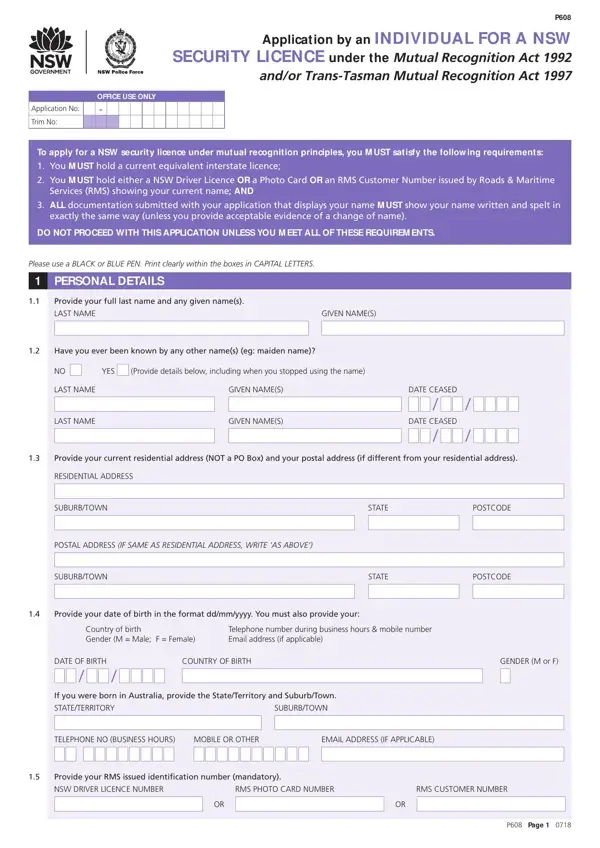
Embarking on a career in the security industry within New South Wales (NSW), Australia, demands a thorough understanding and adherence to the regulatory framework set by the governing authorities, particularly when it involves the application for a security license under mutual recognition principles. The P608 form serves as a vital gateway for individuals seeking to secure a NSW security license, leveraging the Mutual Recognition Act 1992 and/or Trans-Tasman Mutual Recognition Act 1997. As such, it addresses applicants who already hold an equivalent interstate license, provides a structured approach to ensuring applicants meet all the specified requirements including the provision of personal identification details, and navigates through the declarations necessary under the Mutual Recognition Act. Furthermore, the form delves into specifying the type of security license the applicant is seeking, whether class 1 or 2 or even a Master License – each with its own set of sub-classes and requirements – and outlines the necessity of declaring any past disciplinary proceedings that might influence the application's outcome. The form also guides applicants on the statutory declaration aspect, ensuring they understand the gravity of providing true and complete information, thus maintaining the integrity of the licensure process. By fulfilling these requirements, applicants demonstrate their eligibility and readiness to uphold the responsibilities entailed in the provision of security services in NSW.

QuestionAnswer
Form NameForm P608
Form Length5 pages
Fillable?No
Fillable fields0
Avg. time to fill out1 min 15 sec
Other namesnasfund forms 2020, bc spca questionnaire, nsw iptaas form, ndss form nsw

How to Edit Form P608 Online for Free

bc dog adoption form can be filled in easily. Simply try FormsPal PDF editor to get the job done in a timely fashion. To make our editor better and easier to utilize, we consistently implement new features, bearing in mind suggestions from our users. It merely requires just a few easy steps:

Step 1: Open the PDF doc in our editor by clicking the "Get Form Button" at the top of this webpage.

Step 2: When you access the editor, you will find the document ready to be filled in. Other than filling in various fields, you may as well do various other things with the Document, namely putting on your own text, modifying the initial textual content, adding illustrations or photos, affixing your signature to the document, and more.

To be able to fill out this form, make sure you type in the required information in each blank:

1. Whenever submitting the bc dog adoption form, be certain to incorporate all necessary blanks in its associated part. This will help to speed up the process, making it possible for your details to be processed swiftly and accurately.

Completing segment 1 of nasfund forms 2020

2. After filling in the previous step, go on to the subsequent stage and fill out the essential details in all these blank fields - DATE OF BIRTH, COUNTRY OF BIRTH, If you were born in Australia, STATETERRITORY, SUBURBTOWN, TELEPHONE NO BUSINESS HOURS, MOBILE OR OTHER, EMAIL ADDRESS IF APPLICABLE, GENDER M or F, Provide your RMS issued, NSW DRIVER LICENCE NUMBER, RMS PHOTO CARD NUMBER, RMS CUSTOMER NUMBER, and P Page.

Filling out part 2 of nasfund forms 2020

3. This next part is easy - fill in all of the fields in I hold an equivalent class of, TRUE, Provide details in Section, FALSE, Tick the licence for which you are, I seek registration for the, CLASS LICENCE, CLASS LICENCE M ASTER LICENCE, A Unarmed guard, B Bodyguard, C Crowd Controller, A Security Consultant, MA Self employed with no other, B Security Seller, and MB Provide no more than persons to conclude this segment.

FALSE, A Security Consultant, and I hold an equivalent class of of nasfund forms 2020

4. This next section requires some additional information. Ensure you complete all the necessary fields - I am not otherwise personally, TRUE, FALSE, and If you have answered False to any - to proceed further in your process!

I am not otherwise personally, FALSE, and TRUE in nasfund forms 2020

Be very attentive when filling in I am not otherwise personally and FALSE, because this is the section in which many people make errors.

5. To conclude your form, the last part includes a few extra blank fields. Filling out P Page will conclude the process and you're going to be done in an instant!

nasfund forms 2020 completion process shown (step 5)

Step 3: Make certain the details are right and then click on "Done" to finish the project. Try a free trial option at FormsPal and gain immediate access to bc dog adoption form - readily available inside your personal account page. We don't share any details that you type in while filling out forms at our website.