
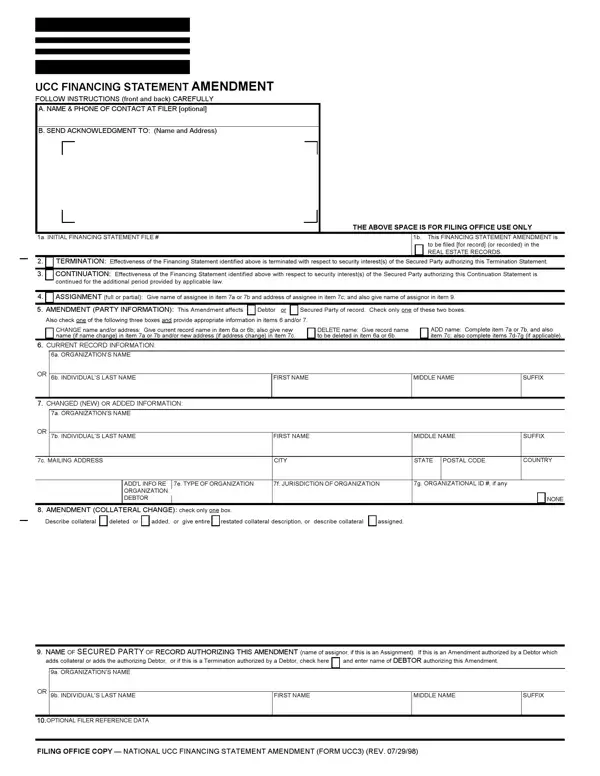

Form UCC3 at a glance
What it is: Form UCC3 is the UCC Financing Statement Amendment.
Where and when to file: Send the completed form and any attachments to the filing office, with the required fee.
A filled-in Form UCC3 example: a bank changes its name and adds collateral
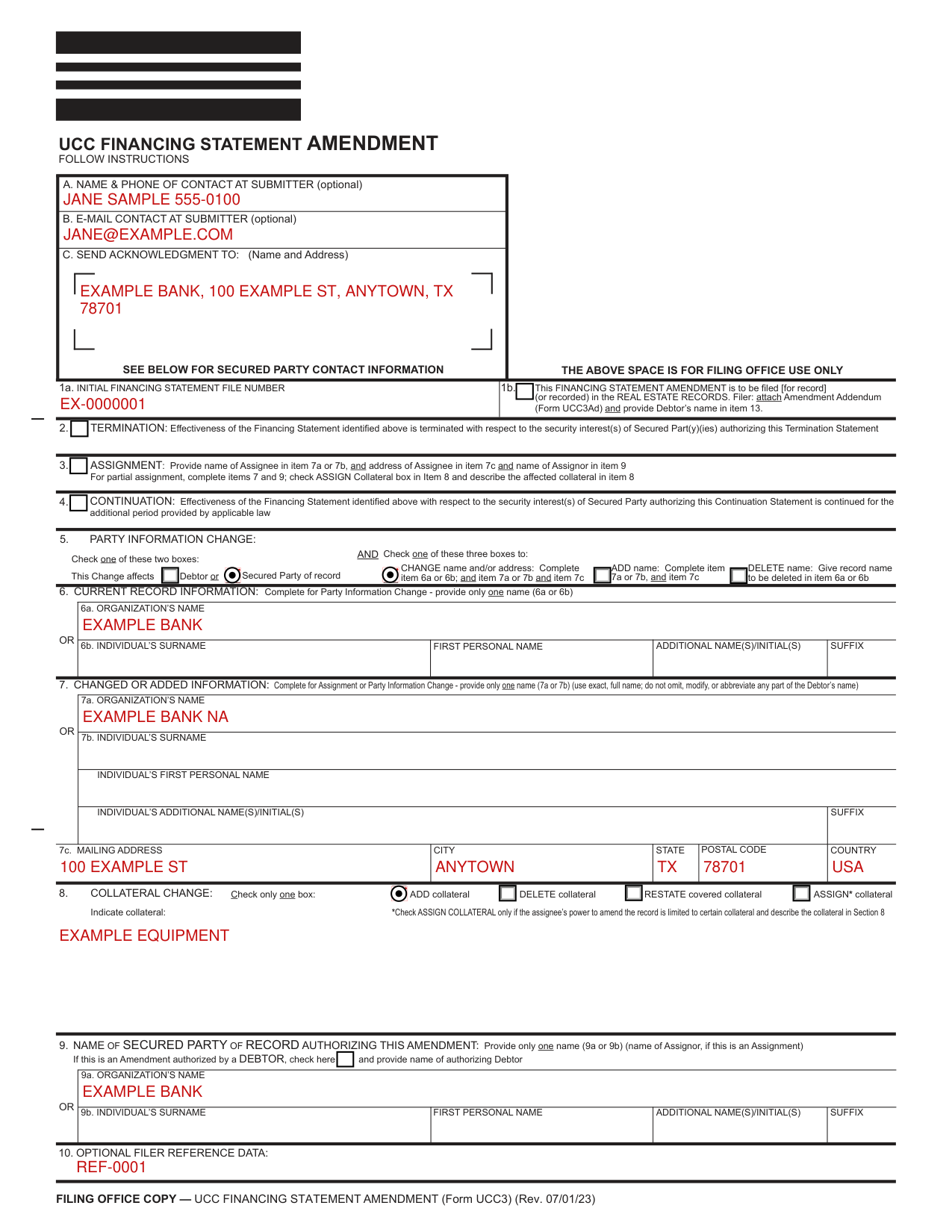
How to fill out Form UCC3, box by box
Items A, B and C, information and acknowledgment
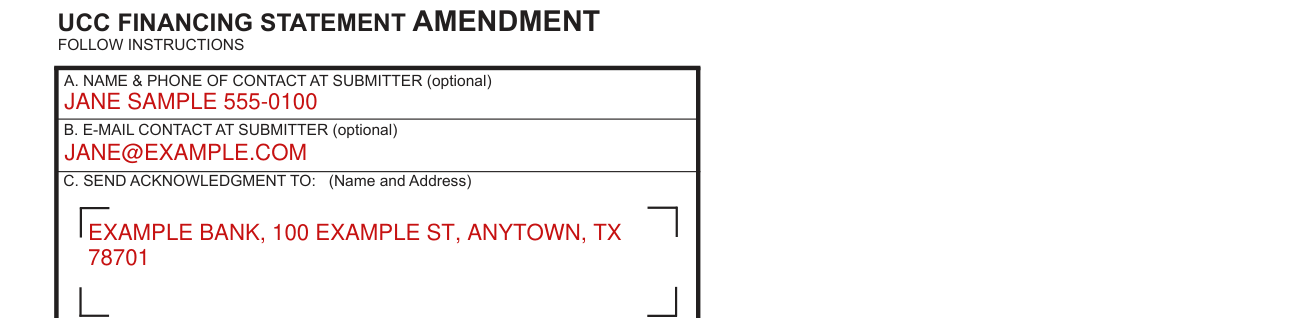
Items A and B are optional: the filer may provide information there to assist filing offices that might wish to communicate with the filer.
Complete item C if the filer desires an acknowledgment sent to them. If filing in a filing office that returns an acknowledgment copy furnished by filer, present simultaneously with this form the Acknowledgment Copy or a carbon or other copy of this form for use as an acknowledgment copy.
Items 1a and 1b, initial financing statement file number

Always complete items 1a and 9.
1a. File Number. Enter the file number of the initial financing statement to which this Amendment relates. Enter only one file number. If required by a local filing office or optionally when filing at the state level, the date of filing may be added after the initial financing statement file number.
If this Amendment is to be filed in the real estate records or in any other filing office where the name of current Debtor is required for indexing purposes, check the box in item 1b and enter the Debtor name in item 13 of Amendment Addendum (Form UCC3Ad). Complete item 13 in accordance with the instructions on Amendment Addendum (Form UCC3Ad). If the Debtor does not have an interest of record, enter the name and address of the record owner in item 16 of Amendment Addendum (Form UCC3Ad).
Items 2, 3 and 4, termination, assignment or continuation

Show the purpose of this Amendment by checking box 2, 3, 4, 5, or 8; in items 5 and 8 you must check additional boxes; also complete items 6, 7, and/ or 8 as appropriate.
To terminate the effectiveness of the identified financing statement with respect to the security interest(s) of the authorizing Secured Party, check the box in item 2. See Instruction 9.
To assign (1) some or all of the Assignor's right to amend the identified financing statement, or (2) the Assignor's right to amend the identified financing statement with respect to some (but not all) of the collateral covered by it: check the box in item 3 and enter the name of the Assignee in item 7a or 7b; always enter the Assignee's mailing address in item 7c. Also enter the name of the Assignor in item 9. If the assignment affects the right to amend the financing statement with respect to some (but not all) of the collateral covered by the identified financing statement, check the ASSIGN collateral box and indicate the particular collateral covered in item 8.
To continue the effectiveness of the identified financing statement with respect to the security interest(s) of the authorizing Secured Party, check the box in item 4. A continuation statement must be filed within six months before the lapse date.
Items 5, 6 and 7, party information change
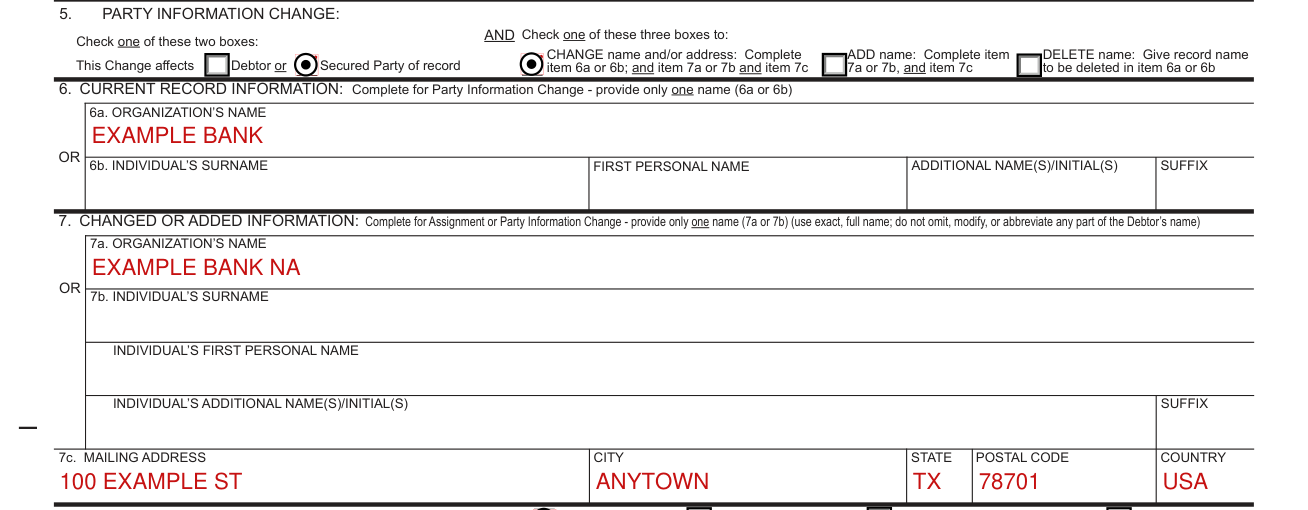
To indicate a party information change, check this box; also check additional boxes (as applicable) and complete items 5, 6, and/or 7 as appropriate.
To change the name and/or address of a party, check the box in item 5 to indicate whether this Amendment relates to a Debtor or Secured Party of record, check the CHANGE name and/or mailing address box in item 5, enter the current record name in item 6a or 6b, and repeat or enter the new name in item 7a or 7b; always enter the party's mailing address in item 7c.
To add a party, check the box in item 5 to indicate whether this Amendment relates to a Debtor or Secured Party of record, check the ADD name box in item 5 and enter the added party's name in item 7a or 7b; always enter the party's mailing address in item 7c. For additional Debtors or Secured Parties, attach Amendment Additional Party (Form UCC3AP), using correct name format.
To delete a party, check the box in item 5 to indicate whether this Amendment relates to a Debtor or Secured Party of record, check the DELETE name box in item 5 and enter the deleted party's name in item 6a or 6b.
Item 8, collateral change

To indicate a collateral change, check the applicable box and describe the change in item 8. If space in item 8 is insufficient, continue the collateral description in item 14 of Amendment Addendum (Form UCC3Ad).
Collateral Change: check only one box.
To add collateral, check the ADD collateral box in item 8 and indicate the additional collateral.
To delete collateral, check the DELETE collateral box in item 8 and indicate the deleted collateral.
To restate the covered collateral description, check the RESTATE covered collateral box in item 8 and indicate the restated collateral.
Item 9, name of authorizing party

Enter the name of the party of record authorizing this Amendment. In most cases, the authorizing party is the Secured Party of record. If this is an Amendment (Assignment), enter the Assignor's secured party's name in item 9a or 9b. If this is an Amendment (Termination) authorized by a Debtor, check the box in item 9 and enter the name of the Debtor authorizing this Amendment in item 9a or 9b. If this Amendment (Termination) is to be filed or recorded in the real estate records, also enter, in item 12 of Amendment Addendum (Form UCC3Ad), the name of Secured Party of record. Optional: if there is more than one authorizing Secured Party or Debtor, enter additional name(s) in item 18 of the Amendment Addendum (Form UCC3Ad) or attach an exhibit listing the additional parties that authorized the amendment.
Item 10, optional filer reference data

Item 10 is optional and is for the filer's use only.
More rules for Form UCC3
Type or print the form and be sure it is completely legible; forms with handwritten entries may be rejected.
Fill in the form very carefully; mistakes may have important legal consequences. If you have questions, consult your attorney. The filing office cannot give legal advice.
Unless specifically required by applicable state law, do not include social security numbers, driver's license numbers, financial account numbers or other non-public personally identifiable information anywhere on the form.
Common questions about Form UCC3
Where do I file it?
Send the completed form and any attachments to the filing office, with the required fee.
Sources
[1] Form UCC3 (Rev. 07/01/23), UCC Financing Statement Amendment, Texas Secretary of State (the Official source link on this page).