
Form Ustsv Cs PDF Details

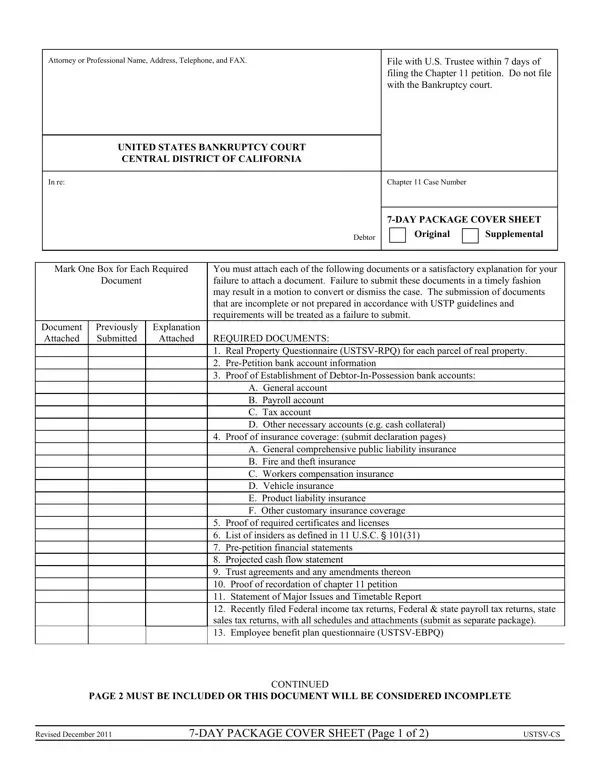
Filing for Chapter 11 Bankruptcy is a complex process filled with numerous critical steps that must be meticulously followed to ensure compliance with legal requirements. Among these, the submission of the USTSV-CS form, known as the 7-Day Package Cover Sheet, stands out as a pivotal component in navigating through bankruptcy proceedings. The form, which should be submitted to the U.S. Trustee within 7 days of filing the Chapter 11 petition—a requirement distinct from filing directly with the Bankruptcy Court—serves as a comprehensive checklist for debtors. It encompasses various essential documents ranging from real property questionnaires, bank account information, proof of insurance coverages, to financial statements and tax returns, each serving to elaborate the debtor's financial landscape. Additional components such as the requirement for a list of insiders, statement of major issues, and a projected cash flow statement, further underline the importance of transparency and accurate representation of the debtor's position. As with any legal document, the significance of the USTSV-CS form lies not just in its capacity to facilitate a smoother bankruptcy process, but also in its role as a tool for providing detailed and crucial information that affects the outcome of the Chapter 11 case. Through the meticulous submission of the required documents or satisfactory explanations for any omissions, the form underpins the foundational aspects of Chapter 11 proceedings, ensuring that both legal professionals and debtors navigate this challenging journey with clarity and compliance.

QuestionAnswer
Form NameForm Ustsv Cs
Form Length2 pages
Fillable?No
Fillable fields0
Avg. time to fill out30 sec
Other namesustsv, seven cover sheet pdf, ustsv cover, day cover sheet

How to Edit Form Ustsv Cs Online for Free

Through the online PDF editor by FormsPal, you're able to complete or modify sheet here and now. The tool is consistently improved by us, acquiring additional features and growing to be even more convenient. With a few simple steps, you may begin your PDF editing:

Step 1: Click the orange "Get Form" button above. It'll open up our pdf tool so you could begin filling out your form.

Step 2: This tool allows you to modify PDF documents in many different ways. Improve it by writing any text, correct what's originally in the PDF, and put in a signature - all at your convenience!

Completing this document requires attention to detail. Ensure that each field is completed correctly.

1. Begin filling out the sheet with a selection of major fields. Collect all the information you need and ensure there's nothing missed!

ustsv cover writing process shown (part 1)

2. Once your current task is complete, take the next step – fill out all of these fields - You must attach each of the, A General account B Payroll, A General comprehensive public, Proof of required certificates, Document Attached, Previously Submitted, and Attached with their corresponding information. Make sure to double check that everything has been entered correctly before continuing!

Stage no. 2 of filling in ustsv cover

3. The next step should also be pretty uncomplicated, Proof of required certificates, CONTINUED, PAGE MUST BE INCLUDED OR THIS, Revised December, DAY PACKAGE COVER SHEET Page of, and USTSVCS - these fields will need to be filled in here.

ustsv cover completion process explained (stage 3)

4. Now proceed to this fourth part! In this case you'll get all of these In re, Chapter Case Number, DAY PACKAGE COVER SHEET, Debtor, Original, Supplemental, Law Firm Name, I have read and understood the, Print Name and Title of Authorized, and Attorney for Debtor blanks to fill out.

ustsv cover completion process explained (part 4)

Be very careful while filling in Law Firm Name and Original, since this is the part where many people make a few mistakes.

Step 3: Glance through all the details you have entered into the form fields and then click on the "Done" button. Try a free trial account at FormsPal and acquire direct access to sheet - with all adjustments preserved and available from your FormsPal cabinet. FormsPal ensures your information privacy by using a secure system that in no way records or distributes any private information involved. You can relax knowing your files are kept protected whenever you use our editor!