Form Wt 7 PDF Details

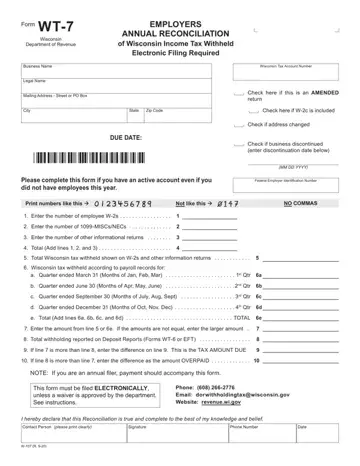
Every year, employers in Wisconsin face the important task of reconciling the state income tax they have withheld from their employees' earnings with the Wisconsin Department of Revenue by completing Form WT-7, also known as the Employers' Annual Reconciliation of Wisconsin Income Tax Withheld. This form serves as a comprehensive tool for businesses to report not only the total Wisconsin tax withheld as shown on W-2s and other information returns but also to compare this with the total tax withheld according to their payroll records across all four quarters of the fiscal year. Additionally, it accounts for 1099-MISCs/NECs and other informational returns, ensuring a holistic approach to tax reconciliation. An interesting aspect of Form WT-7 is its requirement for electronic filing, emphasizing the state’s move towards more efficient and secure processing of tax information. Furthermore, it caters to diverse scenarios by allowing businesses to indicate if they are filing an amended return, if the business address has changed, or if the business has been discontinued. Through detailed sections for both the calculation of totals from employee W-2s and quarterly tax withholding, to adjustment of overpayments or due amounts, Form WT-7 encapsulates the critical elements of annual tax reconciliation processes for businesses, thus ensuring they remain compliant with state tax obligations.

QuestionAnswer
Form NameForm Wt 7
Form Length1 pages
Fillable?No
Fillable fields0
Avg. time to fill out15 sec
Other nameswisconsin wt 7 fill, wi wt 7, wt 7 2020, wt7 form

How to Edit Form Wt 7 Online for Free

Our leading computer programmers have worked together to implement the PDF editor that you may begin using. This application makes it easy to complete wt7 form forms immediately and effortlessly. This is certainly everything you should undertake.

Step 1: Select the button "Get Form Here" on the following website and click it.

Step 2: Once you've entered the editing page wt7 form, you should be able to find each of the options readily available for your document in the top menu.

The next areas will create the PDF file that you'll be creating:

step 1 to writing wt 7 tax

The system will demand you to fill out the Enter the number of other, Total Add lines and, Total Wisconsin tax withheld, Wisconsin tax withheld according, a Quarter ended March Months of, b Quarter ended June Months of, c Quarter ended September Months, d Quarter ended December Months, e Total Add lines a b c and d, Enter the amount from line or e, Total withholding reported on, If line is more than line enter, If line is more than line enter, NOTE If you are an annual filer, and This form must be filed section.

Filling out wt 7 tax stage 2

Describe the main details about the I hereby declare that this, Contact Person please print clearly, Signature, Phone Number, Date, and W R section.

stage 3 to completing wt 7 tax

Step 3: Hit the button "Done". Your PDF document may be exported. You can easily upload it to your device or send it by email.

Step 4: Make sure to remain away from forthcoming problems by creating minimally a pair of copies of the form.

Watch Form Wt 7 Video Instruction

Please rate Form Wt 7

1 Votes
If you believe this page is infringing on your copyright, please familiarize yourself with and follow our DMCA notice and takedown process - click here to proceed .