
Updated:
A medical release form is a patient’s permission to share health information. The form names the recipient, the information to release, the purpose and an end date. Patients use it when an insurer, an employer or a relative asks for their history.
This consent to release medical information form is a free PDF template. Download it and print it, or fill it out online with the builder below.
Build Your Document
Answer a few simple questions to make your document in minutes
Save and Print
Save progress and finish on any device, download and print anytime
Sign and Use
Your valid, lawyer-approved document is ready
A medical release form is also called an authorization for release of information, a consent to release medical information or a HIPAA authorization. Providers print different titles on it, but each version gives the patient’s written go-ahead to share health information with a person or organization they name.
You may also see these names on a provider’s website or intake packet:
The FormsPal template on this page uses the title “HIPAA Authorization and Release.” If a provider hands you its own version, read its fields against the sections below; the parts of the form are the same ones.
The release is used when someone other than the patient’s own care team asks for health information: an insurer, a new provider, an employer or a relative. Having it ready saves time when a provider, insurer or employer asks for your health records.
When the goal is to let another person make health care decisions, and not only see information, a release is not enough. That role belongs to a medical power of attorney.
Medical release forms come in a general version and in versions for one kind of patient or provider. Pick the release form template that matches the person whose records you need.
Use the FormsPal template when you want one general release you can fill out once and send to several offices. Use a provider’s own form when that office hands you one, since its staff knows where each answer sits on its own paper.
The two can also work together. Some patients fill out the FormsPal template first as a worksheet, then copy the same answers onto the office’s version, so nothing is left out.
A medical release form lets the people a patient names see health information; it does not let them make decisions for the patient. Several other health documents are often mixed up with it, and each one does a different job.
| Document | What it does | When people use it |
|---|---|---|
| Medical release form (HIPAA authorization) | Lets a provider share the patient’s health information with the people named | Insurance claims, a new doctor, family members who help with care |
| Medical power of attorney | Names an agent to make health care decisions when the patient cannot | Planning ahead for surgery, a serious illness or old age |
| Advance directive or living will | Writes down the patient’s wishes about treatment near the end of life | Planning for a time when the patient cannot speak |
| Child medical consent form | Lets a trusted adult approve care for a minor while the parents are away | Travel, camp, a stay with grandparents |
| A provider’s own release | A hospital’s or insurer’s printed version of the same permission | When an office asks for its own paper |
Many people sign a release and a medical power of attorney at the same time. The person they trust can then see the information today and, if the patient ever cannot decide, act on it too.
The release can name any person or organization the patient chooses to receive the information, such as a relative, a spouse, a friend, an attorney or another health care provider. Each name on the form widens who sees the details, so the patient decides how many to add.
A second group signs or asks for information on the patient’s behalf. These people show the paper that gives them that role:
Keep a copy of the paper that shows the role ready, as the provider may ask to see it.
One release can name several people to receive the information, such as both parents or a spouse and an adult child. Naming someone as a recipient lets them get the information; it does not make them an agent or a personal representative who acts for the patient. Write each person on a separate line with their own contact details, so the provider can reach each one.
When the information sits with several providers, many patients fill out a separate release for each office. Each form then names the right provider, and one office’s copy never holds another office’s details.
A HIPAA release form for a young adult lets parents keep talking with doctors after their child becomes an adult patient. Families often sign one before a son or daughter leaves for college, the military or a first job away from home.
Once a child is an adult patient, many doctor’s offices and hospitals ask for the patient’s own permission before they discuss care with a parent. A release signed in advance names the parents, so a worried call from home gets an answer instead of a polite refusal.
A young adult can set this up with the template on this page:
The release only opens the door to information. If the parents should also be able to make treatment decisions when the young adult cannot, add a medical power of attorney as well.
A HIPAA authorization names who may share the information, who receives it, a specific description of the information, the purpose, an end date or event, and the patient’s signature and date. It also tells the patient that they can cancel it in writing, whether care or payment depends on signing it, and that the recipient may pass the information on. Each part narrows the permission, so the patient shares only what the recipient needs.
The patient chooses to release the whole history or only part of it. A release can cover one condition, such as a pregnancy or dental care, or one period of time. List each kind of information in plain words, so the provider knows exactly what to send.
Common kinds of information listed on a release:
Naming the kind of information and a date range keeps the package small and easy for the recipient to read.
The receiving party is the person or facility that gets the information. Write its full name, address and contact details, so the provider sends the copies to the right place.
The purpose line tells the provider why the information goes out. The patient can write “at my request” or name a specific reason:

The expiration line sets when the permission ends: a calendar date or an event, such as the end of an insurance claim. A clear end point keeps the release from running longer than the patient intends.
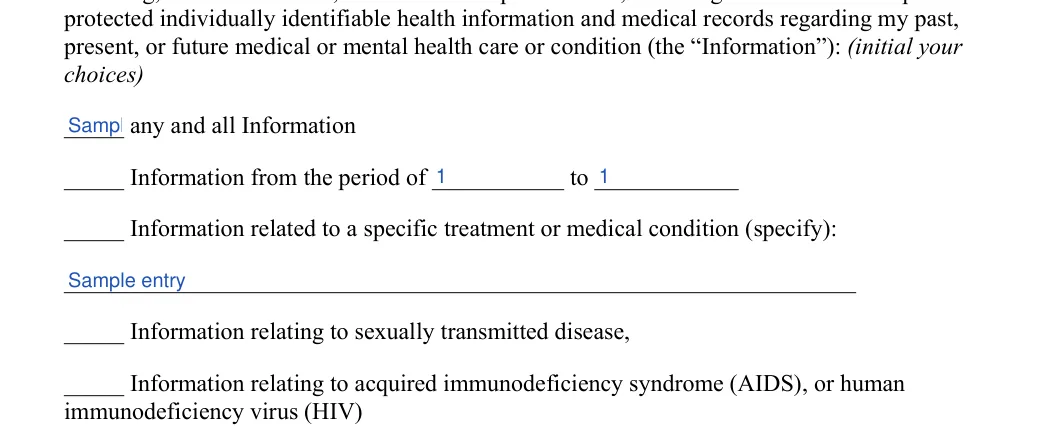
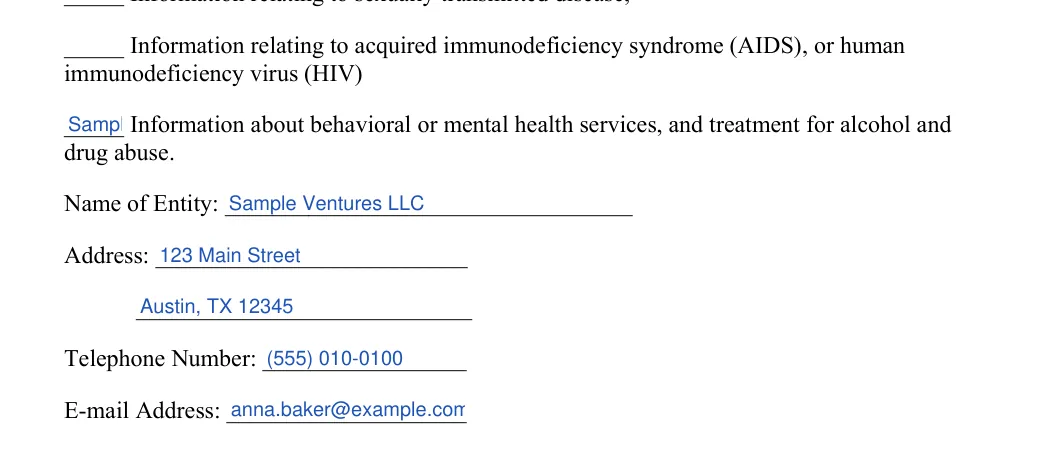
The sensitive information section lets the patient say yes or no, line by line, to sharing details such as sexually transmitted diseases, behavioral health services or substance use treatment. On the FormsPal template, the patient initials each line they agree to and leaves the others blank.
The HIV/AIDS line is a separate choice on the template. The patient initials it only to include that information; a blank line keeps it out of the release.
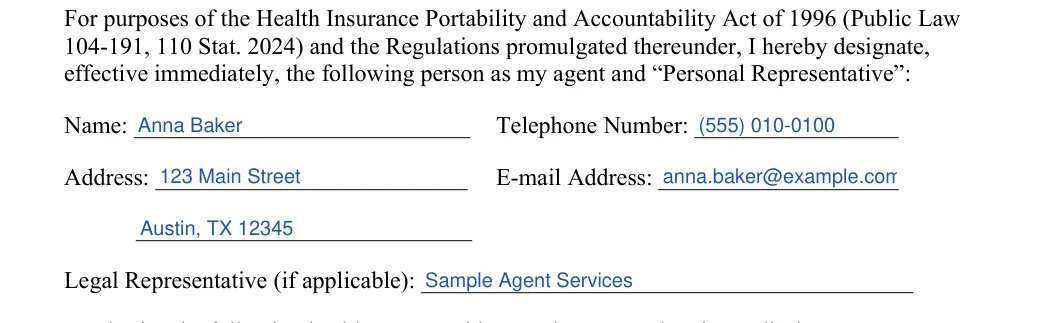
To fill out the release, enter the patient’s details, name the agent, initial the information to share, name the provider that holds it, then date and sign. The steps below follow the FormsPal Medical Release form template you can download on this page. Type your answers in the PDF editor or print the free form and write by hand.
The screenshots under each step show the FormsPal Medical Release template filled with sample entries in blue, so you can see where each answer goes. The names, addresses, dates and amounts are examples only.





The sample below shows how the purpose, recipient and end date lines can read once filled in. Every name and date in it is made up.
Patient: Maria Lopez, date of birth 04/12/1961.
Agent receiving the information: Daniel Lopez (son), 18 Elm Street, Springfield, (555) 010-0142.
Information to disclose: initialed “A date range,” from 01/01/2025 to 06/30/2025. Behavioral health line left blank.
Purpose: at my request, to help with my care and insurance claims.
Expiration: 12/31/2026, or when I cancel this release in writing, whichever comes first.
In this sample, the son sees six months of the mother’s history but nothing from behavioral health services, and the permission ends on its own date.
A second sample shows a release for an insurance claim, limited to one injury.
Patient: James Carter, date of birth 09/30/1984.
Agent receiving the information: Northfield Mutual Insurance, Claims Department, 400 Commerce Way, Lakeview.
Information to disclose: initialed the Specify line, “treatment for a left wrist fracture since 03/02/2026.” All other lines left blank.
Purpose: review of claim no. 7731-B.
Expiration: when claim no. 7731-B is closed.
In this sample, the insurer sees only the wrist treatment, and the permission ends with the claim.
Share only the information the recipient uses for the purpose written on the form. A narrow release protects the patient’s privacy and helps the provider find the right pages faster.
The table below pairs common purposes with the lines a patient often initials and an end point to consider. It is a starting point, not a rule; the patient decides.
| Purpose | Information to initial | End point to consider |
|---|---|---|
| A new doctor or specialist | All information, or the condition being treated | When the transfer of care is done |
| An insurance claim | The injury or illness in the claim and its dates | When the claim closes |
| A disability claim | The conditions listed in the claim | When a decision is made |
| Workers’ compensation | The work injury and its treatment | When the case closes |
| Family help with care | All information, or the condition the family helps with | A date the patient picks, or until the patient cancels it |
| School, camp or sports | Vaccinations, allergies and conditions the staff should know about | The end of the school year or season |
| A personal injury claim | Treatment for the injury, from the day it happened | When the claim settles |
Sensitive lines, such as behavioral health, substance use treatment and HIV/AIDS, are separate choices on the template. Leave them blank unless the recipient uses that information for the purpose on the form.
Sign the release after you read it in full, then keep a copy and send the signed form to the provider that holds the information. Follow the steps below to finish the signing process.
The patient reads every line before signing, including the initialed choices and the end date. A blank or unclear line is easier to fix before the signature than after.
The patient signs and dates the form on the signature line. When a parent, guardian or agent signs instead, they print their name and their relationship to the patient next to the signature, such as parent, guardian or agent.

The patient can cancel the release in writing at any time. The cancellation does not reach information the provider already sent while relying on the signed form. The form itself explains this right and where to send the cancellation.
Keep the signed release with other private papers, such as insurance cards and health summaries, in a folder or a locked drawer at home. A scan or a photo on your phone gives you a copy to show when an office asks for it.
The form carries the patient’s date of birth and other personal details, so send it only to the people and offices named on it. When you e-mail it, use an address you trust or the provider’s patient portal, and delete stray copies from shared computers and printers.
To change a release, fill out a new form with the updated details and send it to the same provider with a note asking it to replace the old one. Ask the office to confirm which version it keeps on hand.
A new form is the clean way to add or drop an agent, widen or narrow the information or move the end date. Crossing out lines on a signed form leaves the office unsure which answer the patient meant.
The most common mistakes on a medical release form are a vague recipient, a blank end date, careless initials and a signature without a date. Each one can send the form back to the patient or share more than the patient meant to.
Run through this list before the form leaves your hands:
To request medical information with a signed release, send the form with a short request that says what to send, in what format and to whom. Asking a provider for records goes faster when you know what to expect.
When you ask for information about another person, send the signed release with a short note that explains your role. A parent, an agent or an executor attaches the paper that shows the role, such as a power of attorney, a guardianship order or letters of administration.
Call the release of information desk first and ask which papers it looks at. Each office checks these papers in its own way, and one call can save a second trip.
Patients who want copies of their own health information often use the provider’s patient portal or its own request form instead of a release. A release becomes useful when the copies go to someone else, such as a new doctor, an insurer or a relative.
Providers often charge a fee for copies of medical records, and the amount differs from state to state. Search fees, per-page prices and charges for electronic records or X-rays are the usual items. Ask the provider for the current price before you send payment.
The blank authorization to release information form on this page is a free, printable PDF that you can also fill out online. Pick the way that suits you:
The template uses plain labels, such as Name of Entity and Agent and Personal Representative, so each line tells you what goes there. The steps above walk through every line with a sample filled in.
Whichever way you choose, write clearly and leave no line half done. A form the office can read at a glance is handled faster.
HIPAA is the Health Insurance Portability and Accountability Act, a federal act that sets privacy standards for health information. The release is how a patient lets a provider share that information with someone they choose. That is why many providers call the form a HIPAA authorization.
The release puts the patient in charge of who receives the information, which parts go out and for how long. The federal Department of Health and Human Services (HHS) publishes the HIPAA Privacy Rule and its guidance on which uses of health information need a patient’s authorization.
The rule for the release itself is 45 CFR 164.508: outside the uses the Privacy Rule permits, a covered entity may not use or disclose protected health information without a valid authorization. Under 45 CFR 164.508, a valid authorization contains an expiration date or an expiration event, and the patient may revoke it at any time in writing, except to the extent the provider has already acted on it or, when the authorization was a condition of getting insurance coverage, other law or the policy gives the insurer the right to contest a claim.
Under the HIPAA Privacy Rule, providers can share health information without a signed release for treatment, payment, their own health care operations (45 CFR 164.506) and some other listed purposes. A provider may also share what a relative or friend involved in the patient’s care needs to know when the patient agrees or does not object, or in an emergency. Sharing outside these purposes, such as sending details to an employer or an attorney, needs the patient’s written authorization under 45 CFR 164.508. The signed form shows the office who the patient chose, which parts to send and until when.
That is also why a provider may call back with questions about a form that is unclear. A release with every line filled in avoids that delay.
A medical release form is a signed document that tells a doctor, hospital or insurer who may receive a patient’s health records. It is also called an authorization for use or release of health information.
Yes. The free FormsPal release form template is a two-page PDF. Download it and print it, or type your answers in a PDF editor before you print.
Yes, an adult child can name a parent as the person who may receive their health information. The adult child fills out and signs the form themselves, and can name both parents or only one.
The FormsPal template is one general form, not a version for a single place. Some providers and insurers use a form of their own, so ask the provider whether it accepts this one before you sign.
The notary block is at the bottom of page 2, under the signature line. Leave it blank until you sign in front of a notary public, who then fills in the day, month and year. The block is optional: HIPAA does not ask for it, so use it only when a provider or the recipient asks.
A medical release lasts until the date or event written on its expiration line. The patient can cancel it sooner in writing at any time, except for information the provider already sent while relying on it.
Keep a copy for your own file and send a copy to the provider named on the form. Ask the provider how they prefer to receive it, for example by mail, fax or a patient portal. If you are unsure, call the provider’s compliance office and ask who handles release forms.
General information, not legal or tax advice.
