
Imrf Form 6 11 PDF Details

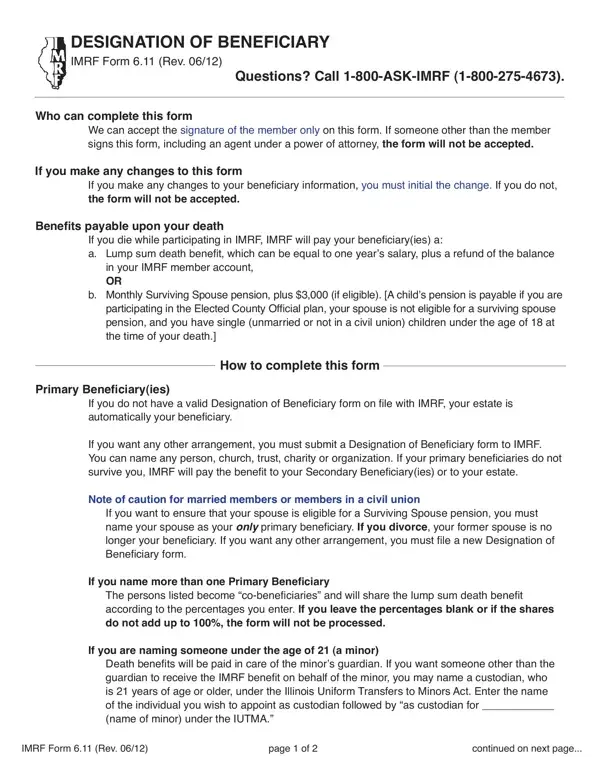
The Illinois Municipal Retirement Fund (IMRF) Form 6.11, revised in June 2012, plays a crucial role for members in designating their beneficiaries for retirement benefits. This form specifically allows members to outline who will receive benefits in the event of their death, offering options like a lump sum death benefit, which can equal one year's salary plus any balance in the member's account, or a monthly surviving spouse pension, complemented by a $3,000 benefit under certain conditions. The form strictly requires the signature of the member themselves to be considered valid, emphasizing the personal responsibility in these designations. Changes to beneficiary information must be initialed by the member to maintain the form's validity, ensuring that any adjustments are deliberately acknowledged. Primary beneficiaries can be directly nominated, with secondary beneficiaries set to receive benefits if no primary beneficiaries survive. Special instructions are provided for cases involving minors or trusts as beneficiaries to ensure that benefits are appropriately handled. Members are cautioned, especially in the context of marital status and specific arrangements for spouses to be eligible for surviving spouse pensions, highlighting the forms' significance in financial and estate planning. The accurate completion and submission of this form are paramount for it to take effect, underscoring its importance in safeguarding members' intentions regarding their beneficiaries. This thorough approach ensures that the IMRF members' benefits are directed according to their wishes, emphasizing the form's critical function in the broader scope of retirement planning.

QuestionAnswer
Form NameImrf Form 6 11
Form Length4 pages
Fillable?No
Fillable fields0
Avg. time to fill out1 min
Other namesform_611 imrf form 611

How to Edit Imrf Form 6 11 Online for Free

Working with PDF files online is surprisingly easy with this PDF tool. You can fill in Imrf Form 6 11 here painlessly. In order to make our editor better and less complicated to work with, we consistently implement new features, bearing in mind feedback coming from our users. With some basic steps, you'll be able to begin your PDF journey:

Step 1: Just hit the "Get Form Button" at the top of this page to get into our pdf editor. Here you will find all that is necessary to work with your document.

Step 2: The editor provides the capability to work with PDF files in various ways. Modify it by writing personalized text, adjust what is already in the file, and include a signature - all within a few mouse clicks!

When it comes to blanks of this precise PDF, this is what you should know:

1. Complete the Imrf Form 6 11 with a selection of major blank fields. Collect all the information you need and ensure there's nothing neglected!

Imrf Form 6 11 conclusion process clarified (part 1)

2. After completing the last part, head on to the next stage and enter all required particulars in all these blank fields - .

Guidelines on how to complete Imrf Form 6 11 part 2

Be really mindful when filling in this field and next field, since this is where a lot of people make mistakes.

3. Completing Employee Name, Mailing Address street address, Social Security Number, Birthdate MMDDYYYY, Daytime Telephone No, Marital Status, Gender of Spouse, Never Married Married Civil Union, Widowed, Spouses Last Name First Name, Male, Female, Primary Beneiciaryies For your, Social Security Number, and Relationship is essential for the next step, make sure to fill them out in their entirety. Don't miss any details!

Spouses Last Name First Name, Widowed, and Social Security Number inside Imrf Form 6 11

4. The form's fourth subsection comes with these particular empty form fields to fill out: Important If the total of all, TOTAL, Secondary Beneiciaryies Will, Social Security Number, Last Name, Relationship, optional, Share to each, Important If the total of all, TOTAL, Signature write do not type or, Form will not be accepted if, and Date.

Imrf Form 6 11 completion process clarified (step 4)

5. While you get close to the end of your form, there are just a few more things to undertake. In particular, IMRF Form Rev, Completed form may be mailed to, and York Road Suite Oak Brook IL must all be done.

Stage no. 5 in submitting Imrf Form 6 11

Step 3: Immediately after looking through your fields you've filled out, click "Done" and you are good to go! Find your Imrf Form 6 11 after you subscribe to a free trial. Easily use the pdf file inside your personal cabinet, with any edits and adjustments being conveniently synced! At FormsPal, we do our utmost to guarantee that all your information is stored secure.