

JDF 205 at a glance
What it is: JDF 205 is the Motion to Waive Fees.
Who signs: Sign on Your Signature.
I request that court fees be waived under C.R.S. § 13-16-103 and C.J.D. 98-01.
This form is not for everyone: if you are incarcerated, use form JDF 201 instead.
What to bring and attach to JDF 205
For JDF 205 - Also Give the Court JDF 206 - Order on the Request to Waive Fees.[2]
A filled-in JDF 205 example: a renter with a job asks for a fee waiver
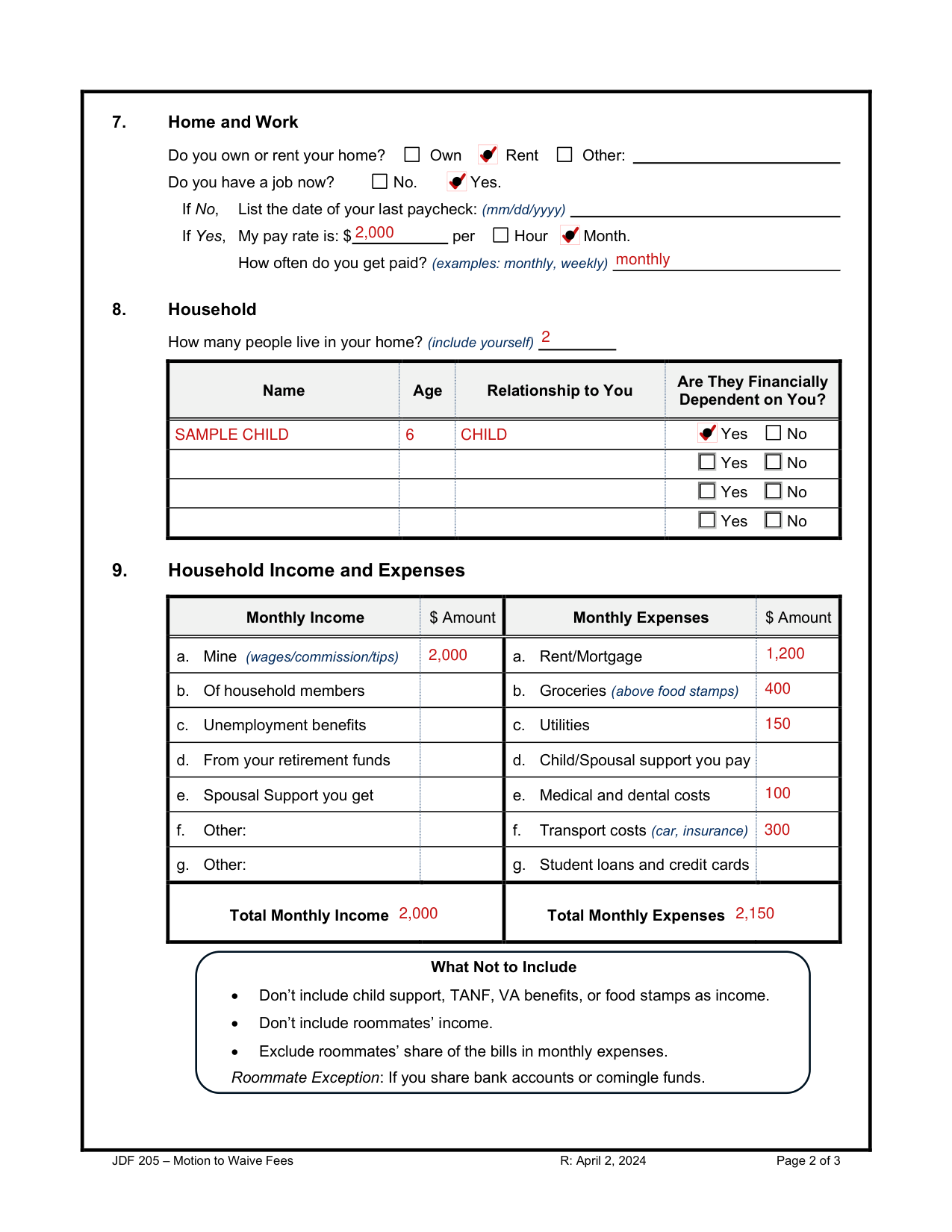
How to fill out JDF 205, box by box
Case Number and county

Enter the Case Number and the county the case was filed in.
My Information
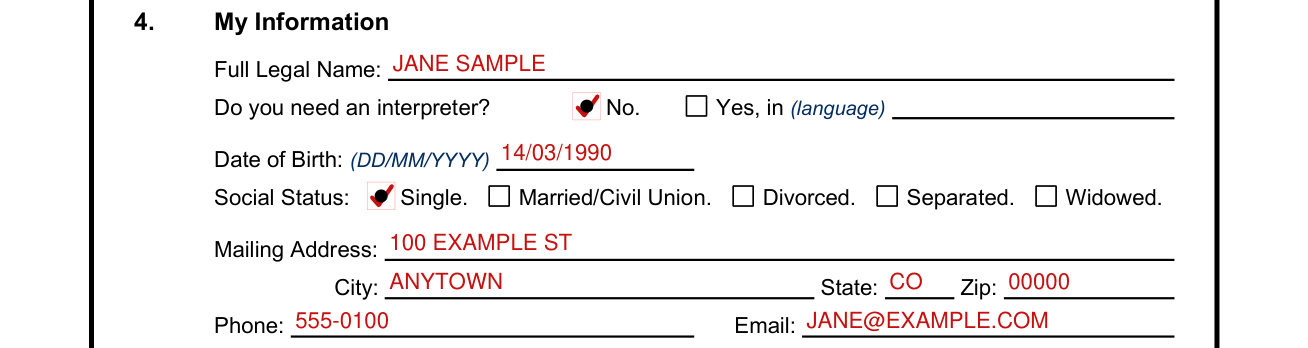
Enter your Full Legal Name.
Do you need an interpreter? Check No, or check Yes, in (language) and enter the language.
Enter your Date of Birth as DD/MM/YYYY.
For Social Status, check Single, Married/Civil Union, Divorced, Separated or Widowed.
Enter your Mailing Address, City, State and Zip.
Enter your Phone and Email.
Fees Waived

If the Court determines you qualify (found indigent), the following fees may be waived: Filing Fees, Reasonable Copy Fees, Jury Fees, eFiling and eService Fees (when available), Form and Instruction fees.
If checked, also write any other fee to waive.
The Court can only waive its fees. Outside fees, like transcript costs, can't be waived.
Automatic Qualification

Are you enrolled in one of these programs? If you check No, go to Section 7. If you check Yes, check all that apply.
The programs are Aid to the Blind Colorado, Temporary Aid for Needy Families (TANF), Old Age Pension - A and B, Supp. Nutrition Assistance Program (SNAP), Supp. Security Income (SSI) and Aid to the Needy and Disabled (AND).
If you check Yes, leave Sections 7 through 10 blank and skip to Section 11.
Attach proof you receive one of these benefits: • Aid to the Blind Colorado. • Aid to the Needy and Disabled (AND). • Old Age Pension - A and B. • Supplemental Security Income (SSI).[2]
Home and Work

Do you own or rent your home? Check Own, Rent or Other.
Do you have a job now? Check No or Yes. If No, list the date of your last paycheck (mm/dd/yyyy).
If Yes, enter your pay rate in $ per Hour or Month.
Enter how often you get paid (examples: monthly, weekly).
Household
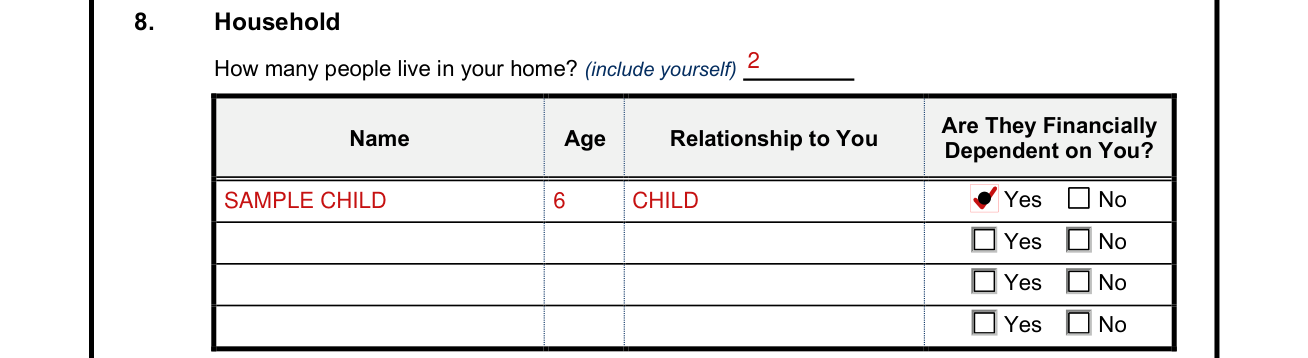
Enter how many people live in your home (include yourself).
Enter Name, Age and Relationship to You, and check Yes or No under Are They Financially Dependent on You?
Household Income and Expenses
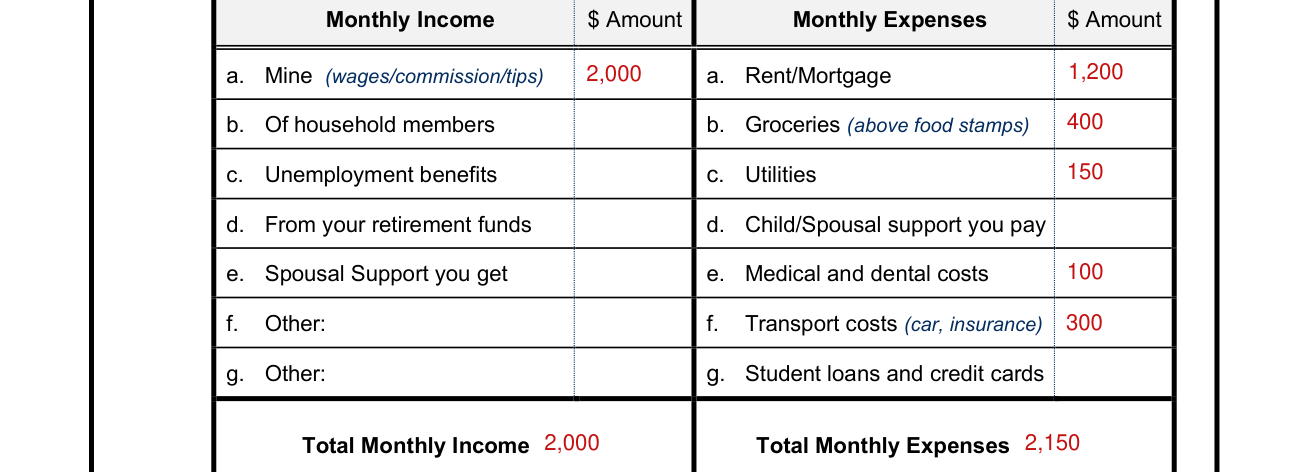
Under Monthly Income, enter the $ Amount for a. Mine (wages/commission/tips), b. Of household members, c. Unemployment benefits, d. From your retirement funds, e. Spousal Support you get, f. Other and g. Other, then the Total Monthly Income.
Under Monthly Expenses, enter the $ Amount for a. Rent/Mortgage, b. Groceries, c. Utilities, d. Child/Spousal support you pay, e. Medical and dental costs, f. Transport costs (car, insurance) and g. Student loans and credit cards, then the Total Monthly Expenses.
This is income from all household members who contribute to the common support of the home.
Don't include child support, TANF, VA benefits, or food stamps as income.
Don't include roommates' income.
Exclude roommates' share of the bills in monthly expenses.
Roommate Exception: If you share bank accounts or comingle funds.
Do not include nonessential items such as cable, streaming services, entertainment, dining out, alcohol, cigarettes, etc.
Allowable expense categories are listed on the form.[2]
How do you pay the bills if your income is less than your expenses?

Enter how you pay the bills if your income is less than your expenses.
Household Assets
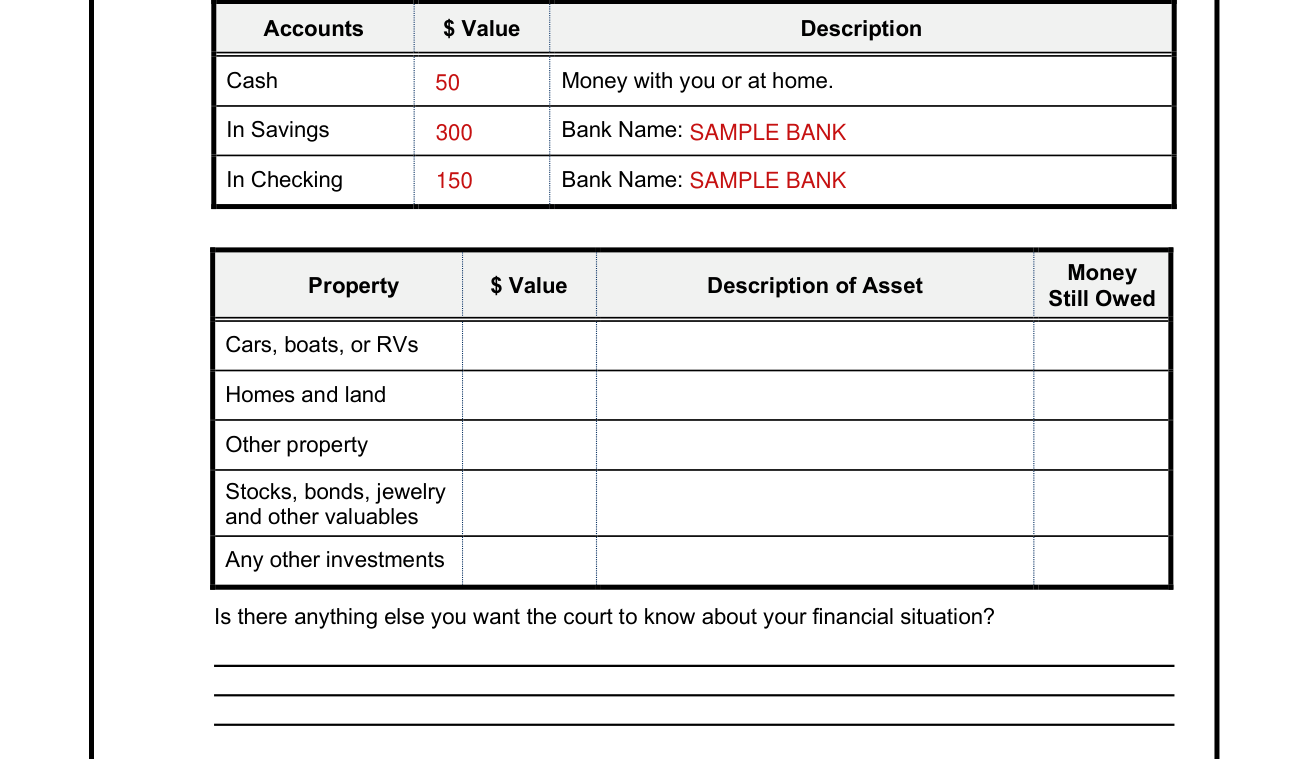
Cash is money with you or at home.
For In Savings and In Checking, enter the $ Value and the Bank Name.
Under Property, enter the $ Value, Description of Asset and Money Still Owed for Cars, boats, or RVs, Homes and land, Other property, Stocks, bonds, jewelry and other valuables, and Any other investments.
Include personal property or investments that could be converted into cash without risking your ability to maintain a home or employment.
Enter anything else you want the court to know about your financial situation.
In some circumstances, the Court may require you to provide proof of income, assets, or expenses before deciding your motion.[2]
Verified Signature
By signing, you declare under penalty of perjury under the law of Colorado that it is true and correct.
Under Executed on, enter the date, month and year, the City (or other location) and the State (or country).
Enter Print Your Name.
Sign on Your Signature.
Your lawyer, if any, signs on Lawyer Signature.
Sources
[1] JDF 205 Motion to Waive Fees (R: April 2, 2024), Colorado Judicial Branch (the Official source link on this page).
[2] coloradojudicial.gov, automatic_qualification_attach_proof_of_benefits_doc. Accessed November 2, 2026.
