

EEI - USPPI Export Information at a glance
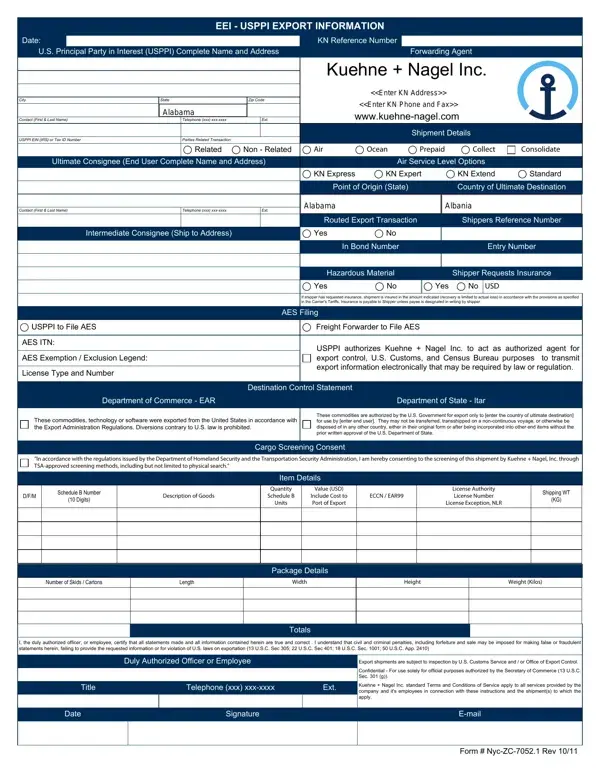
What it is: To ensure accurate and complete reporting to the U.S. Government (AES), complete the EEI - USPPI Export Information Form from Kuehne + Nagel Inc.
Who signs: Enter the duly authorized officer or employee, title, telephone and email and signature of person completing the form.
A filled-in EEI - USPPI Export Information example: an Ohio exporter ships one carton by air
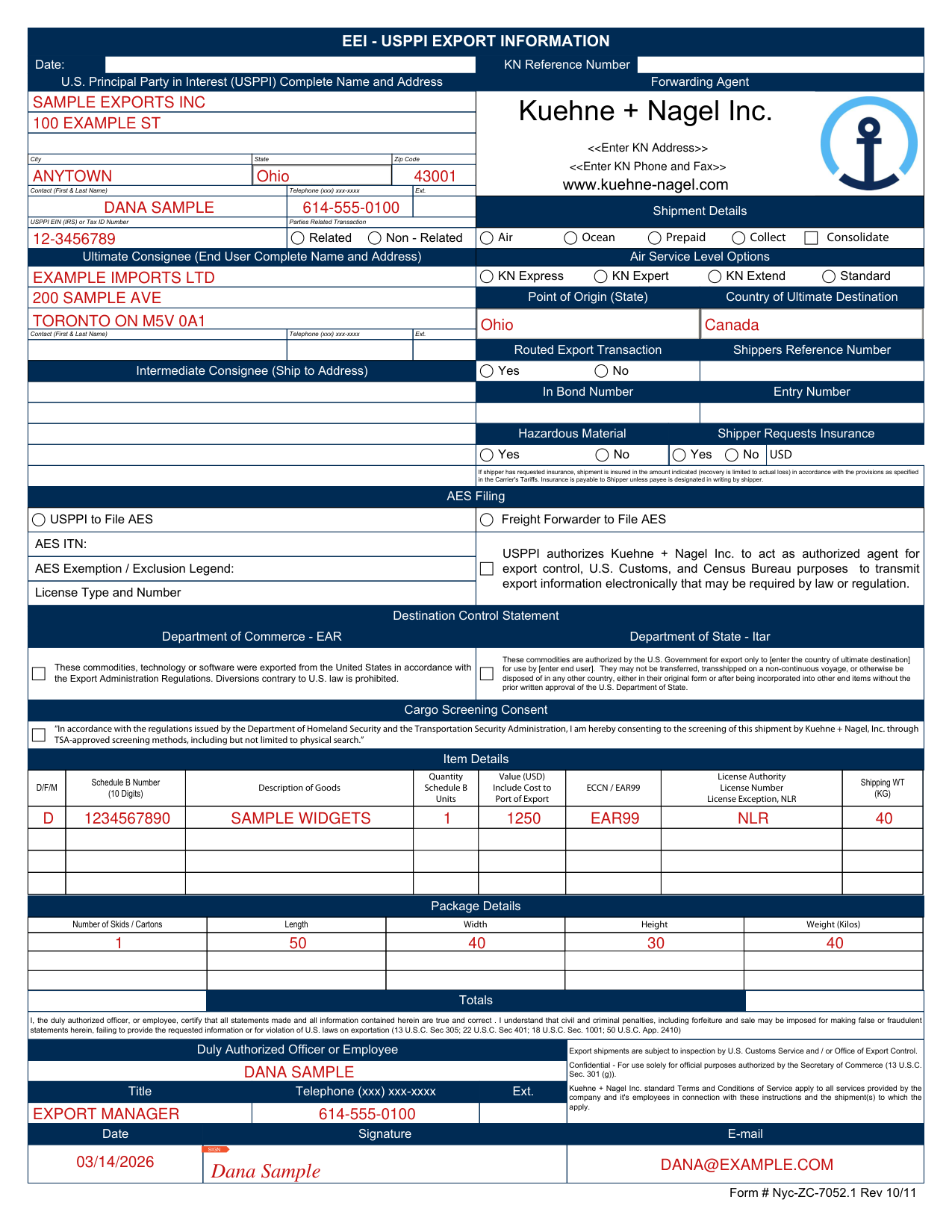
How to fill out EEI - USPPI Export Information, box by box
U.S. Principal Party in Interest (USPPI)
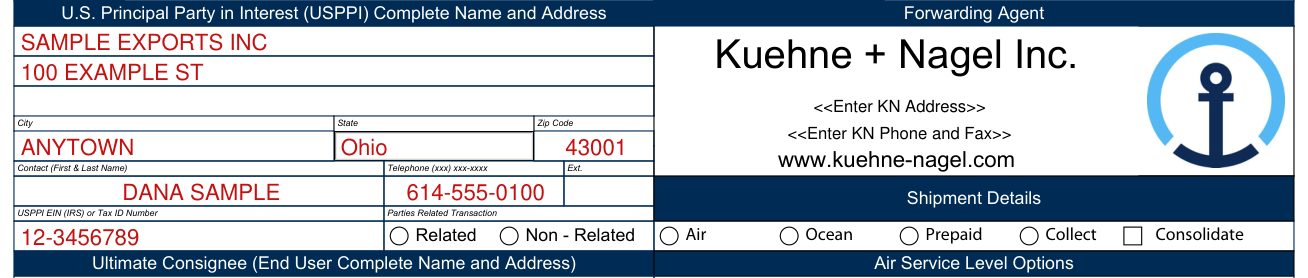
The USPPI is the person in the United States that receives the primary benefit, monetary or otherwise, of the export transaction. Generally, that person is the U.S. seller, manufacturer, or order party. Enter the USPPI name.
Report the address or location (no post office box number) from which the goods actually begin the journey to the port of export. For shipments with multiple origins, report the address from which the commodity with the greatest value begins its export journey. If such information is not known, report the address in state in which the commodities are consolidated for export.
USPPI EIN (IRS) No. or ID No.: Enter the USPPI's Internal Revenue Service Employer Identification Number (EIN). Regardless of the type of items being shipped or the shipping frequency any person/ entity that resides in the United States and ships goods to a foreign country will need to obtain an EIN.
Ultimate consignee

Enter the name and address of the foreign person, party, or designee that is located abroad and that will actually receive the merchandise for the designated end-use or the party designated as end-user on the export license. For overland shipments to Mexico, also include the Mexican state in the address.
Indicate if this is a RELATED or NON-RELATED party transaction. A RELATED party transaction is a transaction between a USPPI and a foreign consignee, (e.g., parent company or sister company), where there is at least 10 percent ownership of each by the same U.S. or foreign person or business enterprise.
If applicable, enter the name and address of the party in a foreign country who acts an agent for the principal party in interest with the purpose of effecting delivery of items to the ultimate consignee or the party so named on the export license.
Shipment Details
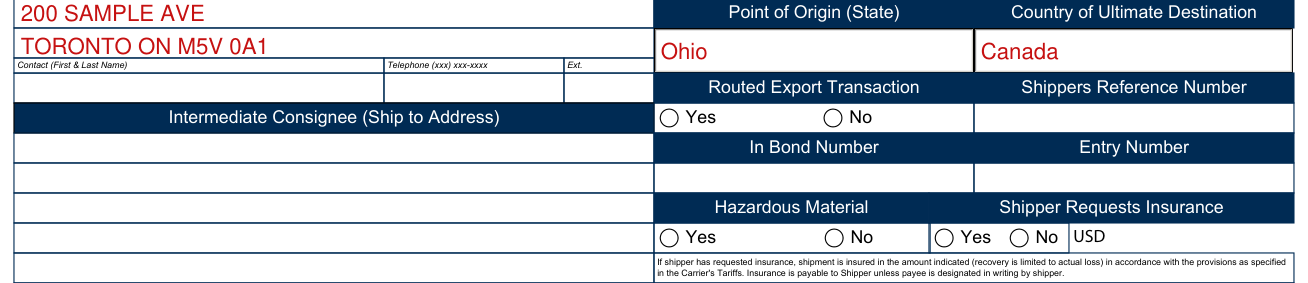
Shipment Details: Select Air or Ocean; Prepaid or Collect. Air Shipment Level Options (if applicable). Point of Origin and if applicable FTZ No.: If from a FTZ enter the FTZ number for items leaving the FTZ, otherwise enter the two-digit U.S. Postal Service abbreviation of the state in which the merchandise actually starts its journey to the port of export, or State of the commodity of the greatest value, or State of Consolidation.
Enter the country in which the merchandise is to be consumed, further processed, or manufactured; the final country of destination as known to the USPPI at the time of export; or the country of ultimate destination as shown on the export license.
Shippers Reference: Enter your reference number. In Bond Number (if applicable): If in bond enter the code type: 36 Warehouse withdrawal for immediate exportation; 37 Warehouse withdrawal for transportation and exportation; 67 Immediate Exportation from a FTZ; 68 transportation and exportation from a FTZ. If not in Bond enter code 70.
Import Entry Number (if applicable): Enter the Import Entry Number when the export transaction is used as proof of export for import transactions, such as In-Bond, Temporary Import Bond, or Drawback's and so forth.
Routed Export Transaction: Check the appropriate "Yes" or "No" indicator depending upon whether goods are controlled by the Foreign Principal (FPPI). If the FPPI is controlling the export from the U.S. select "Yes". Routed export transaction is a transaction in which the FPPI authorizes a U.S. agent to facilitate the export of items from the U.S. on its behalf and may authorize the U.S. agent or the USPPI to file the EEI.
Schedule B number, value and ECCN

D/F or M - Domestic Exports (D): Commodities that are grown, produced, or manufactured in the United States (including commodities incorporating foreign components) and articles of foreign origin that have been enhanced in value or changed from the form in which imported by further manufacture or processing in the U.S.
Foreign Exports (F): merchandise that has entered the U.S. (including U.S. FTZs) and at time of export have undergone no change in form or condition or enhancement in value by further manufacture.
Foreign Military Sales (M): exports of merchandise that are sold under the foreign military sales program.
Enter the 10 digit schedule B number or HTS for each item.
Enter the commercial description for each item. Enter a sufficient description of the commodity as to permit verification of the Schedule B Commodity Number or the commodity description as shown on the validated export license. Include marks, numbers, or other identification shown on the packages and the numbers and kinds of packages (boxes, barrels, baskets, etc.).
When exporting a used self-propelled vehicle provide the VIN/PRODUCT NUMBER/ VEHICLE NUMBER (19 CFR 192:1 (1)). Quantity (Schedule B Units): Report whole unit(s) as specified in the Schedule B/HTS commodity classification code.
Enter the selling price or, if not sold, enter the cost of the goods, including freight, insurance, and other charges to U.S. port of export, but excluding unconditional discounts and commissions (nearest whole dollar, omit cents). Report the export value in U.S. Dollars for each Schedule B number entered.
You must enter the correct Export Control Classification Number (ECCN) on record for all exports authorized under a license or License Exception, and also for items being exported under the "No License Required" (NLR) provisions of the EAR that are listed on the CCL and have a reason for control other than anti-terrorism (AT). When the items being exported are subject to the EAR but not listed on the Commerce Control List (CCL), they are classified as EAR99.
License No. /Licence Exception Symbol/Authorization: Enter the license number when you are exporting under the authority of a Department of Commerce, a Bureau of Industry and Security license; a Department of State, Directorate of Defense Trade Controls (DDTC) ITAR license; a Department of the Treasury, Office of Foreign Assets Control (OFAC) license (enter either the general or specific OFAC license number), a Department of Justice, Drug Enforcement Agency (DEA) permit, or any other export license number issued by a Federal government agency. See http://www.access.gpo.gov/bis/ear/pdf/738.pdf
Enter the correct License Exception symbol (e.g. LVS, GBS, CIV) when you are exporting under the authority of a License Exception.
Enter the "No License Required" (NLR) designator when you are exporting items under the NLR provisions of the EAR. When the items being exported are subject to the EAR but not listed on the Commerce Control List (CCL) (i.e. items that are classified as EAR99); and when the items being exported are listed on the CCL but do not require a license enter (NLR) designator.
Enter the gross shipping weight in kilograms of each Schedule B number, including the weight of packaging. To determine kilograms use pounds (lbs) Multiplied by 0.4536 = kilograms (report whole units).
Package Details

Indicate total pieces, weight, and dims of shipment.
Duly Authorized Officer or Employee

Enter the duly authorized officer or employee, title, telephone and email and signature of person completing the form.
I, the duly authorized officer, or employee, certify that all statements made and all information contained herein are true and correct . I understand that civil and criminal penalties, including forfeiture and sale may be imposed for making false or fraudulent statements herein, failing to provide the requested information or for violation of U.S. laws on exportation (13 U.S.C. Sec 305; 22 U.S.C. Sec 401; 18 U.S.C. Sec. 1001; 50 U.S.C. App. 2410)
More rules for EEI - USPPI Export Information
The EEI-USPPI Export Information Form is a multi purpose document: it meets the TSA requirement for Cargo Screening Consent, is a method to communicate shipping instructions, and may function as an authorization to file the AES record on behalf of the USPPI (authorization is valid for a single shipment).
Hazardous Materials: Check the appropriate "Yes" or "No" indicator. Shipper Request Insurance (if applicable). AES Filing: Select the applicable fields if USPPI files or KN to file and if KN is authorized by the USPPI. Destination Control Statement (if applicable): Select DCS on the left if items are under the EAR and have ECCNs; if under the State Dept. select statement on the right.
USPPI authorizes Kuehne + Nagel Inc. to act as authorized agent for export control, U.S. Customs, and Census Bureau purposes to transmit export information electronically that may be required by law or regulation.
Select Cargo Screening Consent to meet requirements of Department of Homeland Security and Transportation Security Administration.
Sources
[1] EEI - USPPI Export Information form (Form # Nyc-ZC-7052.1 Rev 10/11), Kuehne + Nagel Inc. (the Official source link on this page).