
Mc 07A Form PDF Details

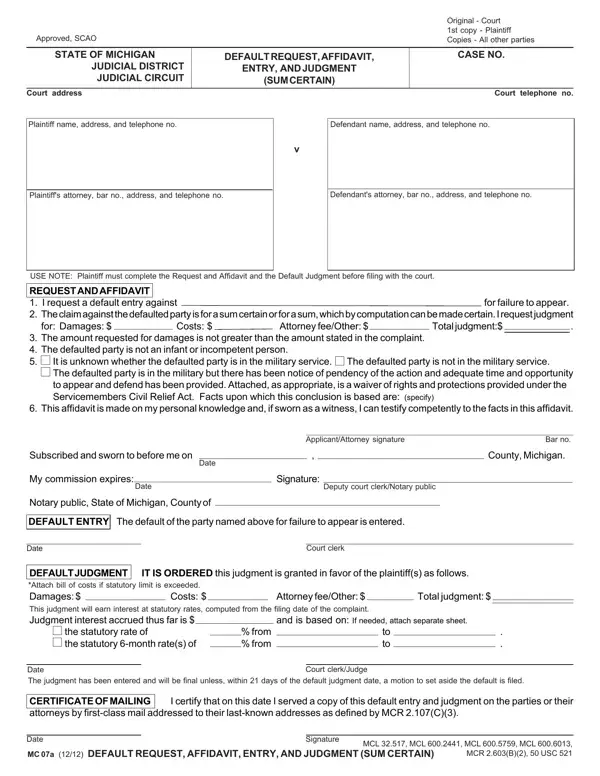
In legal proceedings, meticulous documentation and procedural accuracy are paramount, and the MC 07A form embodies this principle within the Michigan judicial system. This form, integral for plaintiffs seeking a default judgment for a sum certain, combines several critical steps: a request for default entry, an affidavit substantiating the claim, and the final judgment entry. Specifically designed for instances where a defendant fails to appear or respond, the MC 07A outlines a clear path for plaintiffs to assert their claims. It requires detailed information including party names, addresses, contact numbers, and legal representation, ensuring all involved are adequately identified. The form emphasizes the importance of accuracy in claims, stating that damages sought must not exceed those initially stated in the complaint, and it addresses considerations like the defendant’s competence and military status, which might influence the proceedings. Additionally, the MC 07A form includes provisions for calculating interest on judgments and the procedural steps following the issuance of a default judgment, such as the certificate of mailing to ensure all parties are duly notified. Serving as a comprehensive tool, the MC 07A assists in streamlining the process for obtaining a default judgment, making it a crucial document for plaintiffs and legal professionals navigating the Michigan judicial system.

QuestionAnswer
Form NameMc 07A Form
Form Length1 pages
Fillable?No
Fillable fields0
Avg. time to fill out15 sec
Other namesmi default affidavit, mi default request judgment, michigan motion for default judgment, michigan request affidavit

How to Edit Mc 07A Form Online for Free

It is possible to fill in default affidavit instantly using our online editor for PDFs. The tool is consistently maintained by our team, getting additional functions and growing to be better. It just takes a few simple steps:

Step 1: Hit the "Get Form" button above on this page to open our PDF tool.

Step 2: As soon as you open the online editor, you will see the form all set to be completed. Aside from filling out various blank fields, you may also do many other actions with the form, specifically adding your own words, modifying the initial textual content, inserting images, signing the document, and much more.

Pay attention when completing this pdf. Ensure that every field is completed correctly.

1. When filling in the default affidavit, ensure to complete all of the necessary fields in the associated form section. This will help expedite the process, allowing your details to be handled swiftly and correctly.

Learn how to complete default request entry step 1

2. The third stage is usually to fill out the following fields: This affidavit is made on my, Subscribed and sworn to before me, Date, My commission expires, Date, Notary public State of Michigan, ApplicantAttorney signature, Bar no, Signature, Deputy court clerkNotary public, County Michigan, DEFAULT ENTRY The default of the, Date, Court clerk, and DEFAULT JUDGMENT IT IS ORDERED.

Step # 2 in submitting default request entry

As for DEFAULT ENTRY The default of the and County Michigan, make sure you double-check them in this current part. These could be the most important ones in the form.

Step 3: Check the information you have entered into the form fields and press the "Done" button. After registering afree trial account with us, you'll be able to download default affidavit or send it via email directly. The PDF file will also be available in your personal account menu with all of your modifications. FormsPal is dedicated to the confidentiality of our users; we ensure that all personal data entered into our tool is protected.