
Maxicare Philippines Form PDF Details

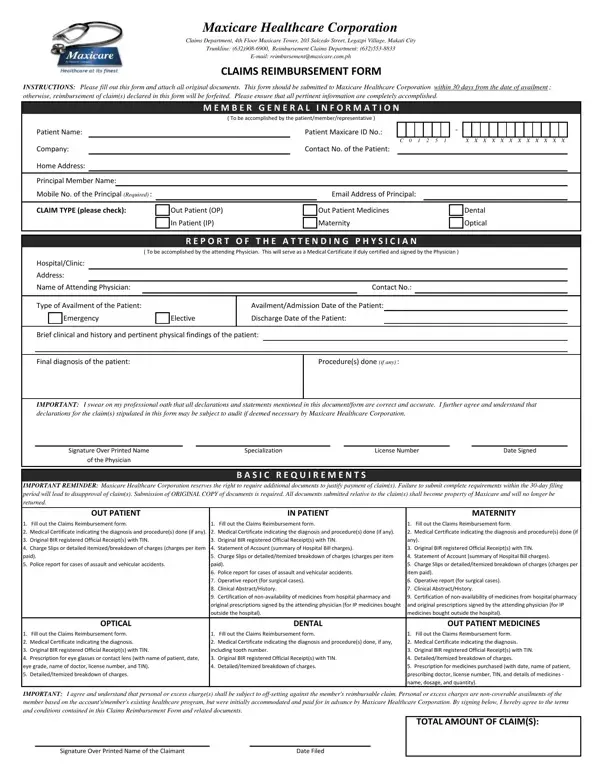
Navigating the healthcare reimbursement landscape can sometimes seem daunting, especially when dealing with insurance claims. The Maxicare Philippines Claims Reimbursement Form serves as a crucial tool for members seeking reimbursement for medical expenses incurred. Located at the Maxicare Healthcare Corporation's Claims Department, the form requires submission within 30 days from the date of availment to avoid forfeiture of claims. It meticulously outlines the necessary steps and documentation needed, such as attaching all original documents and ensuring complete and accurate information across various sections like Member General Information and the attending physician's report. The form also specifies different document requirements based on the type of claim—whether outpatient, inpatient, maternity, dental, or optical services are sought. Further emphasizing the form's importance, it includes a certification section where the attending physician attests to the accuracy of provided information, underlining the critical role of honesty and precision in the reimbursement process. Adding another layer of accountability, the form mentions the possibility of audits by Maxicare Healthcare Corporation to validate declarations. What stands out is the explicit instruction that original documents must be submitted, and once submitted, these documents will become the property of Maxicare, highlighting the form's role in the meticulous verification process that underpins claims reimbursement.

QuestionAnswer
Form NameMaxicare Philippines Form
Form Length1 pages
Fillable?No
Fillable fields0
Avg. time to fill out15 sec
Other namesmaxicare gateway loa, maxicare loa request, maxicare loa form online, member gateway maxicare

How to Edit Maxicare Philippines Form Online for Free

In case you would like to fill out maxicare loa, you don't need to download any programs - just make use of our PDF editor. To have our editor on the cutting edge of convenience, we work to put into operation user-driven features and enhancements on a regular basis. We're at all times pleased to receive suggestions - help us with revolutionizing the way you work with PDF docs. All it takes is a few basic steps:

Step 1: Click the "Get Form" button above on this webpage to open our editor.

Step 2: The tool provides the ability to modify PDF forms in a variety of ways. Transform it with customized text, adjust what's originally in the PDF, and include a signature - all at your fingertips!

This document needs some specific information; to guarantee accuracy, please make sure to heed the guidelines further on:

1. Start filling out your maxicare loa with a number of necessary fields. Get all of the important information and be sure there's nothing missed!

Step number 1 in filling out membergateway maxicare

2. Once your current task is complete, take the next step – fill out all of these fields - IMPORTANT I swear on my, Signature Over Printed Name, of the Physician, Specialization, License Number, Date Signed, B A S I C R E Q U I R E M E N T S, IMPORTANT REMINDER Maxicare, OUT PATIENT, IN PATIENT, MATERNITY, Fill out the Claims Reimbursement, Fill out the Claims Reimbursement, Fill out the Claims Reimbursement, and Medical Certificate indicating with their corresponding information. Make sure to double check that everything has been entered correctly before continuing!

Ways to fill out membergateway maxicare stage 2

It's easy to make a mistake when filling in your IN PATIENT, consequently make sure you take a second look before you'll finalize the form.

Step 3: You should make sure the information is accurate and click "Done" to proceed further. Sign up with us today and easily access maxicare loa, set for download. All changes made by you are saved , which means you can edit the pdf further as required. FormsPal is invested in the privacy of our users; we make sure that all information used in our system remains secure.