

Medcom Form 756 at a glance
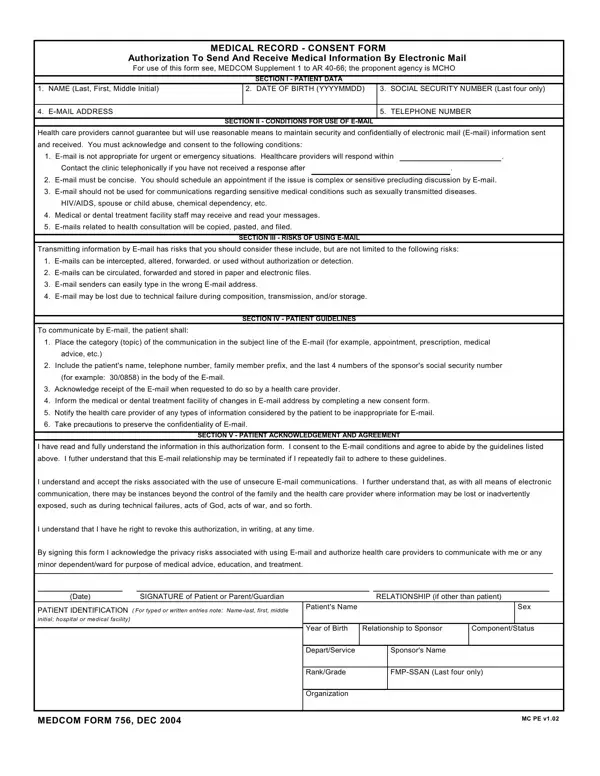
What it is: Medcom Form 756 is the Medical Record - Consent Form, Authorization To Send And Receive Medical Information By Electronic Mail.
Who signs: Sign on the SIGNATURE of Patient or Parent/Guardian line, and write the RELATIONSHIP (if other than patient) and the Date.
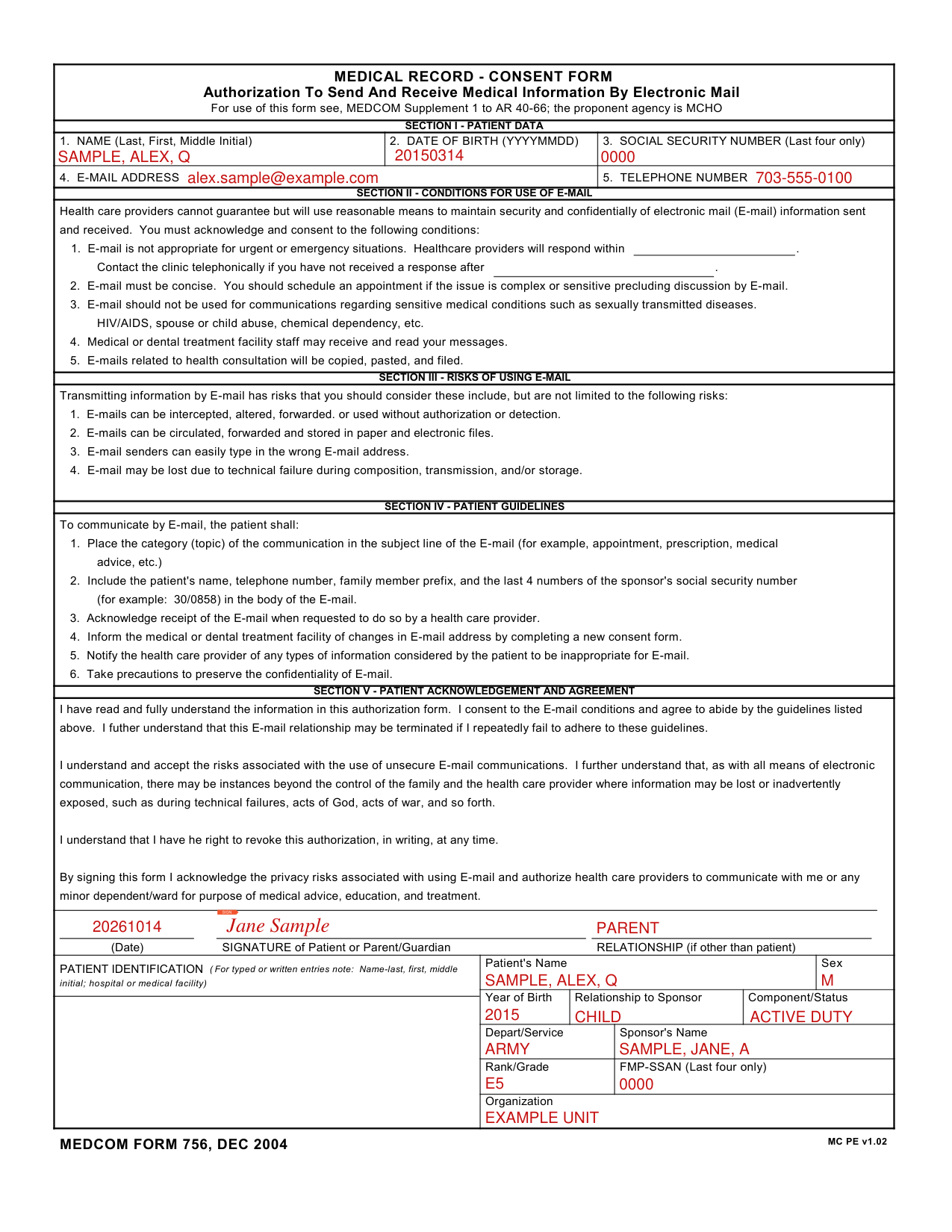
A filled-in Medcom Form 756 example: a parent signs for a minor child
How to fill out Medcom Form 756, box by box
Section I, patient data

Under SECTION I - PATIENT DATA, enter 1. NAME (Last, First, Middle Initial) and 2. DATE OF BIRTH (YYYYMMDD).
Enter the SOCIAL SECURITY NUMBER (Last four only) in Box 3, the E-MAIL ADDRESS in Box 4 and the TELEPHONE NUMBER in Box 5.
Section II, conditions for use of e-mail

Under SECTION II - CONDITIONS FOR USE OF E-MAIL, you must acknowledge and consent to the conditions. Health care providers cannot guarantee but will use reasonable means to maintain security and confidentially of electronic mail (E-mail) information sent and received.
In Box 1, E-mail is not appropriate for urgent or emergency situations. The form has a blank after "Healthcare providers will respond within".
Contact the clinic telephonically if you have not received a response after the blank.
In Box 2, E-mail must be concise. You should schedule an appointment if the issue is complex or sensitive precluding discussion by E-mail.
In Box 3, E-mail should not be used for communications regarding sensitive medical conditions such as sexually transmitted diseases, HIV/AIDS, spouse or child abuse, chemical dependency, etc.
In Boxes 4 and 5, medical or dental treatment facility staff may receive and read your messages, and E-mails related to health consultation will be copied, pasted, and filed.
Section V, signature, relationship and date

Under SECTION V - PATIENT ACKNOWLEDGEMENT AND AGREEMENT, you have read and fully understand the information in this authorization form, you consent to the E-mail conditions and agree to abide by the guidelines listed.
You understand and accept the risks associated with the use of unsecure E-mail communications. As with all means of electronic communication, there may be instances beyond the control of the family and the health care provider where information may be lost or inadvertently exposed, such as during technical failures, acts of God, acts of war, and so forth.
This E-mail relationship may be terminated if you repeatedly fail to adhere to these guidelines.
You have the right to revoke this authorization, in writing, at any time.
By signing this form you acknowledge the privacy risks associated with using E-mail and authorize health care providers to communicate with you or any minor dependent/ward for purpose of medical advice, education, and treatment.
Sign on the SIGNATURE of Patient or Parent/Guardian line, and write the RELATIONSHIP (if other than patient) and the Date.
Patient identification

In PATIENT IDENTIFICATION (For typed or written entries note: Name-last, first, middle initial; hospital or medical facility), enter the Patient's Name, Sex, Year of Birth, Relationship to Sponsor, Component/Status, Depart/Service, Sponsor's Name, Rank/Grade, Organization and FMP-SSAN (Last four only).
Risks and guidelines for E-mail
Section III, risks of using e-mail
Under SECTION III - RISKS OF USING E-MAIL, transmitting information by E-mail has risks. E-mails can be intercepted, altered, forwarded, or used without authorization or detection. E-mails can be circulated, forwarded and stored in paper and electronic files. E-mail senders can easily type in the wrong E-mail address. E-mail may be lost due to technical failure during composition, transmission, and/or storage.
Section IV, the patient guidelines for E-mail
Under SECTION IV - PATIENT GUIDELINES, to communicate by E-mail, the patient shall place the category (topic) of the communication in the subject line of the E-mail (for example, appointment, prescription, medical advice, etc.).
The patient shall include the patient's name, telephone number, family member prefix, and the last 4 numbers of the sponsor's social security number (for example: 30/0858) in the body of the E-mail.
Acknowledge receipt of the E-mail when a health care provider requested it.
Inform the medical or dental treatment facility of changes in E-mail address by completing a new consent form.
The patient shall notify the health care provider of any types of information considered by the patient to be inappropriate for E-mail, and take precautions to preserve the confidentiality of E-mail.
Sources
[1] Medcom Form 756 (DEC 2004), Medical Record - Consent Form, Authorization To Send And Receive Medical Information By Electronic Mail, MEDCOM (the Official source link on this page).