
Mva Form PDF Details

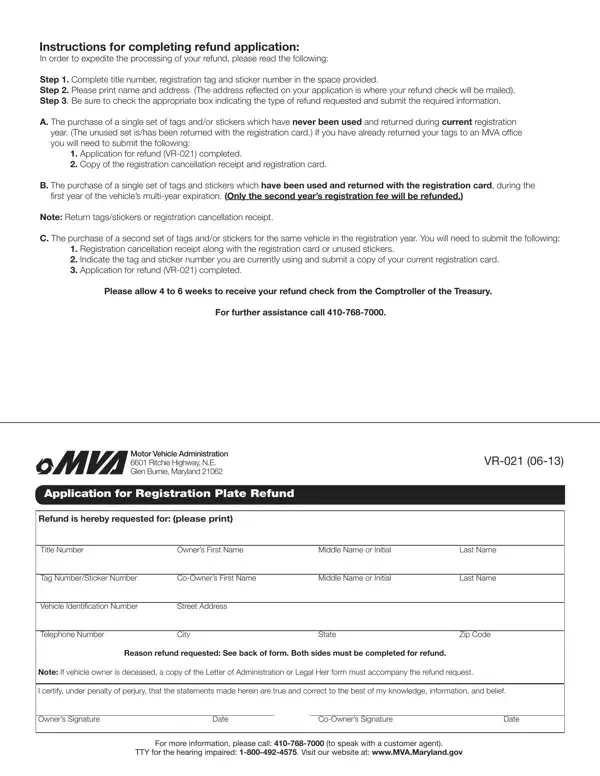
Navigating the bureaucracy of vehicle administration can be a daunting task, but understanding the process for filing a refund application with the Motor Vehicle Administration (MVA) can streamline this often-tedious endeavor. Catering specifically to various situations where a vehicle owner might seek a refund, the MVA form outlines a clear path toward reclaiming funds. It meticulously details the compulsory steps - from providing title, tag, and sticker numbers to printing names and addresses where the refund check will be mailed. Distinct scenarios are accounted for, including refunds for unused tags and stickers returned within the current registration year, for tags and stickers returned during the first year of a vehicle's multi-year registration, and for a second set of tags/stickers purchased for the same vehicle within the registration year. Each scenario requires specific documentation, such as a completed VR-021 refund application, cancellation receipts, and a copy of the registration card, highlighting the MVA's commitment to ensuring rightful refunds are processed efficiently. Furthermore, this form demonstrates the MVA's adaptation to various circumstances, including provisions for vehicle owners who are deceased. The anticipation of a four to six-week timeframe for refund issuance, alongside available contact numbers for further assistance, provides a reassuring touch to the refund process. This comprehensive approach underscores the department's dedication to serving the public and smoothing the bureaucratic pathway for Maryland's vehicle owners.

QuestionAnswer
Form NameMva Form
Form Length2 pages
Fillable?No
Fillable fields0
Avg. time to fill out30 sec
Other names5182333100, Maryland, mva number, TTY

How to Edit Mva Form Online for Free

In case you need to fill out herein, you don't need to download and install any sort of applications - simply give a try to our PDF tool. Our editor is continually developing to provide the very best user experience achievable, and that's due to our resolve for continuous improvement and listening closely to comments from customers. Starting is simple! Everything you need to do is stick to these basic steps below:

Step 1: Open the PDF doc in our tool by hitting the "Get Form Button" in the top section of this webpage.

Step 2: This editor will allow you to change almost all PDF documents in a range of ways. Change it with customized text, correct original content, and add a signature - all when it's needed!

It is an easy task to fill out the pdf adhering to this practical tutorial! This is what you want to do:

1. Start completing the herein with a number of essential blanks. Get all the important information and ensure there's nothing forgotten!

multi conclusion process shown (portion 1)

2. Once your current task is complete, take the next step – fill out all of these fields - Note, A The purchase of a single set of, registration year, Return tagsstickers or, B The purchase of a single set of, registration card during the irst, Return tagsstickers or, registration fee will be refunded, Note, C The purchase of a second set of, set ishas been returned along with, Return tagsstickers or, Iwe are now using Tag Number, Sticker Number, and Apply to with their corresponding information. Make sure to double check that everything has been entered correctly before continuing!

The right way to fill out multi stage 2

As for registration card during the irst and Return tagsstickers or, make sure that you don't make any mistakes in this current part. Both of these are definitely the most important fields in the page.

Step 3: Make certain your details are accurate and click "Done" to finish the task. Sign up with FormsPal right now and instantly get access to herein, ready for download. Every single change you make is handily saved , which enables you to change the pdf at a later stage if required. FormsPal is dedicated to the confidentiality of our users; we always make sure that all information coming through our system stays secure.