
Mvr 8 Form PDF Details

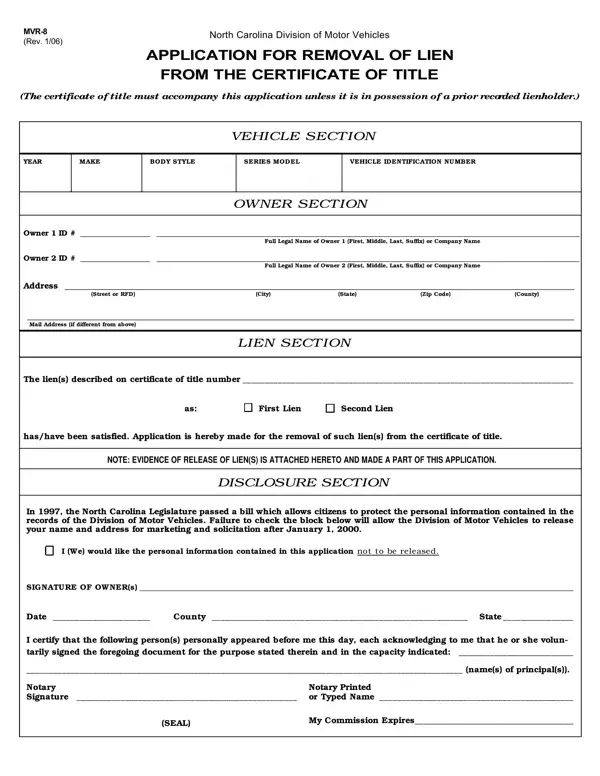
When you own a vehicle in North Carolina, changes in its legal or ownership status require specific documentation with the Division of Motor Vehicles (DMV). Among such documents, the MVR-8 form plays a crucial role, especially when it comes to clearing liens against your vehicle. Essentially, this form constitutes an application for the removal of a lien from the vehicle's certificate of title. Filling out this form is an important step for vehicle owners who have paid off their loans or obligations and wish to update the status of their vehicle's title to reflect that no liens remain. It includes sections for vehicle details—including the year, make, body style, series, model, and vehicle identification number—as well as comprehensive owner information and details about the lien to be removed. Additionally, the MVR-8 form offers an option to protect the personal information provided from being released for marketing purposes, acknowledging privacy concerns. This procedure not only signifies financial freedom regarding the vehicle but also is vital for the clear transfer of ownership in the future. To complete this process, accompanying evidence of the lien's release is required, illustrating the thorough approach North Carolina takes to vehicle title management and the protection of both lienholder and owner interests.

QuestionAnswer
Form NameMvr 8 Form
Form Length1 pages
Fillable?No
Fillable fields0
Avg. time to fill out15 sec
Other namesnc title application, chs dmv paperwork, mvr614, lienholder

How to Edit Mvr 8 Form Online for Free

It is possible to fill out how to fill out form mvr 8 effectively using our PDFinity® online PDF tool. The editor is consistently maintained by our staff, getting new awesome features and growing to be better. To get the process started, go through these simple steps:

Step 1: Hit the orange "Get Form" button above. It'll open our pdf editor so that you could start filling out your form.

Step 2: Using our handy PDF editing tool, you may accomplish more than simply fill in forms. Edit away and make your forms appear professional with custom textual content put in, or optimize the original content to perfection - all comes along with an ability to add any images and sign it off.

This PDF form will require specific details; to ensure consistency, please take heed of the following tips:

1. Whenever filling out the how to fill out form mvr 8, be sure to incorporate all of the necessary blank fields within the corresponding area. This will help to hasten the work, allowing for your information to be processed promptly and properly.

The right way to fill in rded portion 1

2. Now that the previous part is finished, you're ready include the essential specifics in In the North Carolina Legislature, q I We would like the personal, SIGNATU RE OF OWNERs, Date, County, State, I certify that the following, names of principals, Notary Signature, Notary Printed or Typed Name, SEAL, and My Commission Expires so you're able to go further.

Tips on how to fill in rded portion 2

People often make mistakes when filling in Notary Printed or Typed Name in this area. Make sure you re-examine what you enter right here.

Step 3: Right after proofreading your fields and details, press "Done" and you're good to go! Right after registering a7-day free trial account here, it will be possible to download how to fill out form mvr 8 or send it via email at once. The document will also be readily available from your personal account menu with all your modifications. We do not share any information that you type in when filling out forms at our website.