
Nfirs Form PDF Details

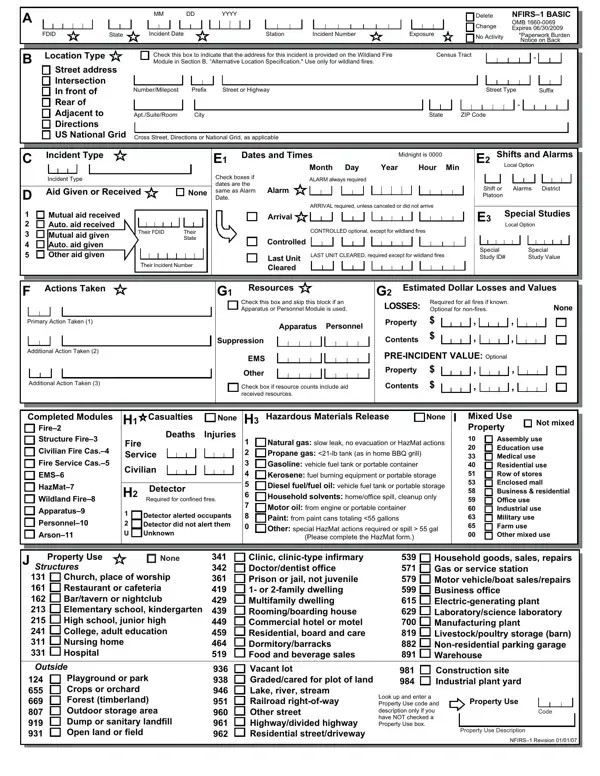
The National Fire Incident Reporting System (NFIRS) form is integral to documenting various details about fire incidents across the United States, encapsulating critical information from the date and location of the incident to the actions taken by emergency services. Encompassing a broad spectrum of data entry fields, the form ensures comprehensive coverage of an incident, including the type of incident, aid given or received, casualties, and property use, among others. Designed to standardize firefighting efforts' reporting, the form also addresses financial aspects by recording estimated dollar losses and values associated with the incident. It facilitates a better understanding and analysis of fire incidents, which is crucial for improving fire prevention and suppression strategies. Moreover, it includes sections for identifying the presence of hazardous materials, describing the incident's property use, and distinguishing the resources deployed during firefighting efforts. Completing the NFIRS-1 form, which Agency Information Management under the Department of Homeland Security mandates, is estimated to take about 75 minutes and is essential for effectively gathering and maintaining data needed for emergency services to assess and refine their response to fire incidents.

QuestionAnswer
Form NameNfirs Form
Form Length2 pages
Fillable?No
Fillable fields0
Avg. time to fill out30 sec
Other namesform nfirs, nfirs forms, nfirs fire, nfirs report form

How to Edit Nfirs Form Online for Free

Through the online PDF tool by FormsPal, you can easily fill in or edit blank fire incident report form right here and now. To maintain our tool on the leading edge of efficiency, we aim to put into practice user-driven capabilities and improvements on a regular basis. We're routinely pleased to get feedback - join us in remolding PDF editing. By taking a couple of easy steps, it is possible to begin your PDF journey:

Step 1: Access the PDF inside our tool by hitting the "Get Form Button" above on this page.

Step 2: The editor will allow you to customize almost all PDF files in many different ways. Transform it by adding any text, correct existing content, and include a signature - all close at hand!

This PDF will need particular data to be filled in, so be certain to take whatever time to provide exactly what is requested:

1. Whenever submitting the blank fire incident report form, be sure to include all important fields within the corresponding form section. It will help facilitate the work, which allows your details to be processed efficiently and properly.

Stage no. 1 of filling in form nfirs

2. After the last section is completed, go on to type in the relevant details in these - Primary Action Taken, Additional Action Taken, Additional Action Taken, Completed Modules, Fire Structure Fire, Civilian Fire Cas, Fire Service Cas, EMS, HazMat, Wildland Fire, Apparatus, Personnel, Arson, Apparatus, and Personnel.

The way to complete form nfirs portion 2

3. This third part should also be rather easy, Structures, Church place of worship Restaurant, Outside, Playground or park Crops or, Clinic clinictype infirmary, Vacant lot Gradedcared for plot of, Household goods sales repairs Gas, Construction site Industrial plant, Look up and enter a Property Use, Property Use, Code, Property Use Description, and NFIRS Revision - every one of these form fields must be completed here.

The best way to prepare form nfirs step 3

4. This next section requires some additional information. Ensure you complete all the necessary fields - PersonEntity Involved, Local Option, Business Name if applicable, Area Code, Phone Number, Check this box if same address as, Mr Ms Mrs, First Name, Last Name, Suffix, Number, Prefix, Street or Highway, Street Type, and Suffix - to proceed further in your process!

Mr Ms Mrs, Local Option, and Last Name in form nfirs

You can certainly make a mistake while completing your Mr Ms Mrs, therefore make sure you look again prior to when you send it in.

5. To wrap up your form, this last segment features a few extra fields. Typing in Number, Prefix, Street or Highway, Street Type, Suffix, Post Office Box, AptSuiteRoom, City, State, ZIP Code, Remarks, Local Option, PAPERWORK BURDEN DISCLOSURE NOTICE, NFIRS, and Paperwork burden for this form is should finalize the process and you'll surely be done in an instant!

Step # 5 in filling in form nfirs

Step 3: Go through the information you have inserted in the blank fields and then click on the "Done" button. Go for a free trial subscription at FormsPal and obtain instant access to blank fire incident report form - download, email, or edit inside your personal account. We do not share the information you enter whenever completing documents at FormsPal.