
Op 198 Form PDF Details

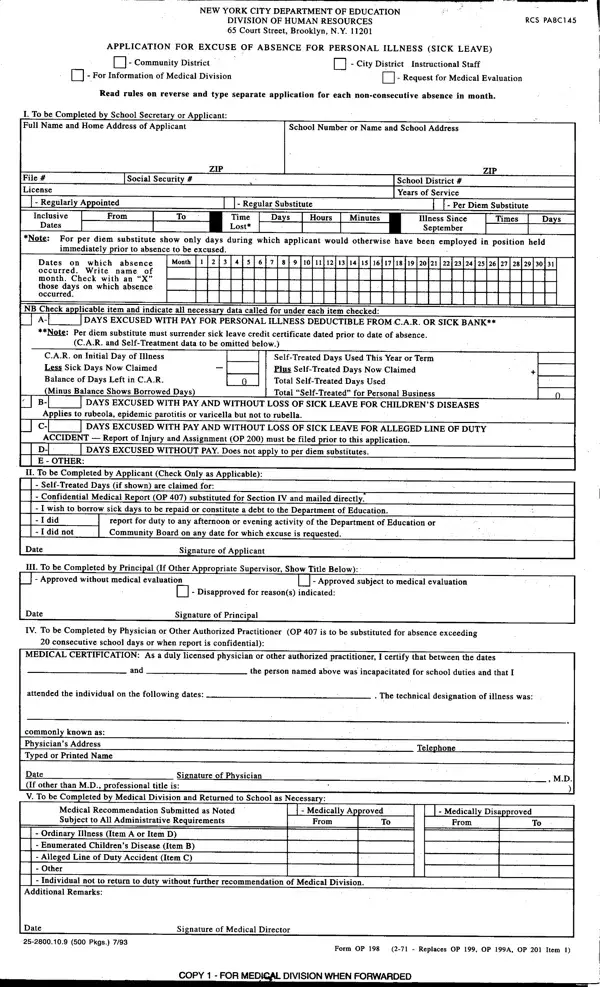
In the realm of education and employment within the New York City Department of Education, the Application for Excuse of Absence for Personal Illness, more formally known as Form OP 198, represents a critical procedural document. It operates under the jurisdiction of the Division of Human Resources and plays a pivotal role in managing personal illness (sick leave) requests of instructional staff across community and city districts. The form requires detailed documentation from the applicant, including specifics about the illness duration, days absent, and whether the leave is to be deducted from the Cumulative Absence Reserve (C.A.R.) or a sick bank. Moreover, for absences extending beyond 20 consecutive school days or in cases requiring confidentiality, medical certification thoroughness escalates, necessitating a comprehensive review by a licensed physician or another authorized practitioner. Notably, the form also accommodates scenarios beyond personal illness, covering allowances for children's diseases, alleged line of duty accidents, and unpaid leave, thereby encapsulating a wide spectrum of absences within the educational staff domain. The bureaucratic process underscores a robust system aimed at ensuring the health and wellbeing of the educational workforce, facilitating a structured mechanism for leave authorization while maintaining a balance between employee rights and educational integrity.

QuestionAnswer
Form NameOp 198 Form
Form Length2 pages
Fillable?No
Fillable fields0
Avg. time to fill out30 sec
Other namesop198 uft, form op198, op 198 form, op 198 form doe

How to Edit Op 198 Form Online for Free

You can prepare op 198 pdf instantly with our online editor for PDFs. In order to make our editor better and simpler to utilize, we continuously develop new features, considering feedback coming from our users. Here is what you would have to do to get going:

Step 1: Access the PDF doc inside our editor by clicking on the "Get Form Button" at the top of this webpage.

Step 2: As you start the file editor, you will find the form made ready to be filled in. Aside from filling out different blanks, you could also perform several other actions with the file, namely putting on your own words, changing the original text, adding graphics, signing the document, and more.

It's an easy task to finish the pdf with our practical guide! Here is what you should do:

1. You should fill out the op 198 pdf correctly, so be mindful while filling in the parts that contain these specific fields:

op 198 writing process described (stage 1)

2. Right after filling in the previous part, go to the subsequent stage and complete all required particulars in all these blank fields - Balance of Days Left in CAR, Total SelfTreated Days Used, Minus Balance Shows Borrowed Da s, Total SelfTreated, for Personal Business, DAYS EXCUSED WITH PAY AND WITHOUT, Applies to rubeola epidemic, DAYS EXCUSED WITH PAY AND WITHOUT, ACCIDENT, Report, of Injury and Assignment OP must, D E OTHER, DAYS EXCUSED WITHOUT PAY Does not, II To be Completed by Applicant, and Check Only as Applicable.

Best ways to fill out op 198 part 2

People who work with this PDF generally make errors when filling out DAYS EXCUSED WITH PAY AND WITHOUT in this area. Don't forget to reread whatever you type in here.

3. This third part is going to be straightforward - fill out every one of the empty fields in commonly known as, Physicians Address Typed or, Date If other than MDpofessional, Signature of Phvsician, title is, V To be Completed by Medical, Telone, Medical Recommendation Submitted, Medicalir Ap proved, MedicallY Disoved, From, From, Ordinary, Illness Item A or Item D, and Enumerated Childrens Disease Item B to conclude this process.

Stage no. 3 of submitting op 198

Step 3: Make certain the details are accurate and then click "Done" to complete the process. Download your op 198 pdf the instant you sign up for a free trial. Easily access the form within your FormsPal account, together with any modifications and changes being automatically kept! We don't share or sell the details you type in when completing documents at our website.