
Opm Form 1510 PDF Details

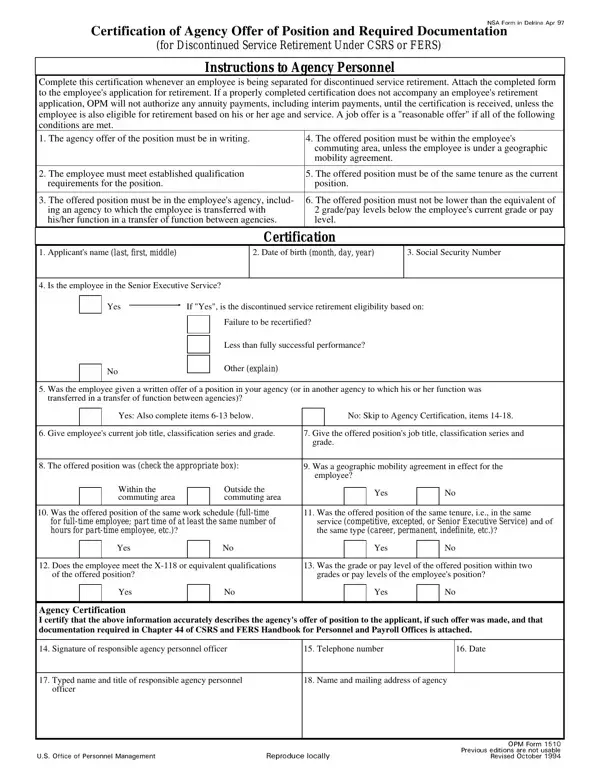
When an employee faces separation due to discontinued service retirement under the Civil Service Retirement System (CSRS) or Federal Employees Retirement System (FERS), the OPM 1510 form becomes an essential document. Characterized as the "Certification of Agency Offer of Position and Required Documentation," this form ensures that employees receive proper consideration for positions that may prevent their separation. Unique in its function, the form serves as a bridge between the agency's intention to retain an employee and the formalization of that intent through a documented job offer. For the process to be deemed valid, the job offer must meet specific criteria: it must be in writing, cater to the qualifications of the employee, be located within a reasonable commuting area unless otherwise agreed, and not represent a significant step down in terms of grade or pay level. Furthermore, the form obligates the offering agency to confirm the job offer's details and the employee's qualifications, emphasizing the importance of a fair and transparent process. Failure to accompany a retirement application with a properly completed OPM 1510 form can significantly delay annuity payments, highlighting the form's critical role in the transition to retirement. Therefore, understanding the nuances of the OPM 1510 form is important for both agency personnel and employees navigating the discontinued service retirement process.

QuestionAnswer
Form NameOpm Form 1510
Form Length1 pages
Fillable?No
Fillable fields0
Avg. time to fill out15 sec
Other namesindefinite, excepted, annuity, opm1510

How to Edit Opm Form 1510 Online for Free

You are able to prepare commuting easily using our online PDF editor. To have our editor on the forefront of practicality, we aim to put into operation user-driven features and improvements regularly. We are routinely looking for suggestions - assist us with revampimg PDF editing. Starting is easy! All you need to do is take the following simple steps below:

Step 1: Just press the "Get Form Button" above on this webpage to get into our form editing tool. This way, you will find all that is necessary to work with your document.

Step 2: This editor gives you the ability to customize your PDF form in many different ways. Enhance it by writing personalized text, adjust what is already in the document, and place in a signature - all close at hand!

Be attentive when completing this pdf. Ensure that each blank is completed properly.

1. You will want to fill out the commuting accurately, so be careful while filling in the sections containing all these fields:

Certification completion process outlined (portion 1)

2. Given that the previous section is finished, you'll want to insert the essential specifics in Does the employee meet the X or, Was the grade or pay level of the, of the offered position, grades or pay levels of the, Yes, Yes, Agency Certification I certify, Signature of responsible agency, Telephone number, Date, Typed name and title of, Name and mailing address of agency, and officer so that you can progress to the 3rd step.

Part no. 2 for filling in Certification

Concerning Telephone number and Name and mailing address of agency, be certain that you double-check them in this current part. The two of these are the key fields in this PDF.

Step 3: Always make sure that the details are correct and then simply click "Done" to finish the project. Sign up with us right now and easily use commuting, all set for download. All alterations you make are preserved , enabling you to customize the file at a later time if required. FormsPal is focused on the personal privacy of our users; we ensure that all personal information entered into our system stays protected.