
Sf 3102 Form PDF Details

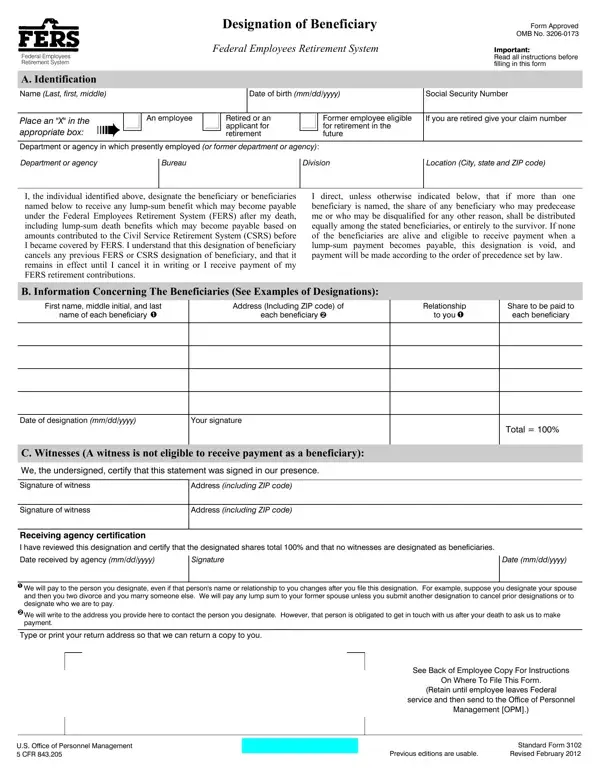
The SF 3102 form, officially titled "Designation of Beneficiary Federal Employees Retirement System," plays a crucial role in the financial planning and legacy considerations of federal employees enrolled in the Federal Employees Retirement System (FERS). This document allows employees and retirees to specify who should receive any lump-sum benefits from their retirement account in the event of their death, including death benefits based on contributions to the Civil Service Retirement System (CSRS) before their coverage under FERS. It's a critical step for ensuring that the benefits accrued during a lifetime of service are distributed according to the individual's wishes, rather than by a predetermined order of precedence set by law. The form requires detailed information about the designator, including identification and employment details, as well as thorough information concerning each beneficiary, such as name, address, relationship to the employee, and the share of benefits to be received. Additionally, the SF 3102 form cancels any previous designations made under both FERS and CSRS, underscoring the importance of keeping beneficiary information current and reflective of the designator's current wishes. Completing and submitting this form correctly is vital, as it directly influences the disbursement of benefits, ensuring they reach the intended parties in the manner the federal employee or retiree desired.

QuestionAnswer
Form NameSf 3102 Form
Form Length3 pages
Fillable?No
Fillable fields0
Avg. time to fill out45 sec
Other namesbeneficiary fillable form, sf 3102, opm sf 3102, sf3102

How to Edit Sf 3102 Form Online for Free

You are able to complete beneficiary fillable form effortlessly using our online editor for PDFs. FormsPal is dedicated to providing you the perfect experience with our tool by regularly introducing new capabilities and enhancements. Our editor has become a lot more user-friendly as the result of the latest updates! Currently, filling out documents is simpler and faster than ever before. With some easy steps, it is possible to begin your PDF editing:

Step 1: Click on the "Get Form" button above on this page to open our PDF editor.

Step 2: With our handy PDF editor, you're able to do more than just complete blank fields. Edit away and make your documents look professional with customized text put in, or optimize the file's original input to excellence - all that backed up by the capability to incorporate your personal images and sign the file off.

It's simple to fill out the document with this practical guide! Here's what you want to do:

1. When filling in the beneficiary fillable form, make certain to incorporate all of the needed fields within the corresponding part. It will help facilitate the process, which allows your information to be processed fast and appropriately.

Stage no. 1 for completing 3102

2. The next part would be to fill out the next few fields: Date of designation mmddyyyy, Your signature, Total, C Witnesses A witness is not, We the undersigned certify that, Signature of witness, Address including ZIP code, Signature of witness, Address including ZIP code, Receiving agency certification I, Date received by agency mmddyyyy, Signature, Date mmddyyyy, We will pay to the person you, and We will write to the address you.

Completing segment 2 of 3102

When it comes to Address including ZIP code and Address including ZIP code, be certain that you review things in this section. The two of these could be the most important fields in the page.

Step 3: Spell-check the information you have typed into the form fields and then hit the "Done" button. Try a free trial plan with us and gain instant access to beneficiary fillable form - downloadable, emailable, and editable from your FormsPal account page. When using FormsPal, you're able to complete documents without being concerned about personal data breaches or data entries getting shared. Our secure platform helps to ensure that your personal information is kept safe.