
Optical Lab Order Form PDF Details

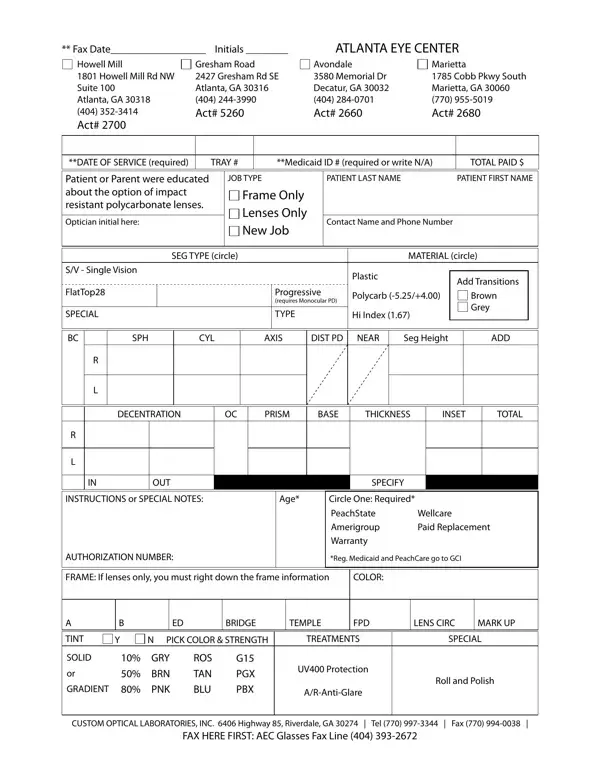
When filling out an Optical Lab Order form, it's important to pay attention to various details that ensure eyewear is crafted to meet specific requirements. This comprehensive document captures essential information, from the date of service and patient details to precise specifications for lenses and frames. Each section, including the patient or parent's education on the advantage of impact-resistant polycarbonate lenses and the choice between frame only or lenses only orders, plays a critical role in customizing eyewear. Specifications such as the type of job, segment type, material choices, and special instructions are crucial for creating the perfect fit and vision correction. Additionally, the form covers financial aspects like Medicaid ID, total paid, and warranty options, alongside authorization numbers for regulated Medicaid and PeachCare. Furthermore, details like the frame information if only lenses are ordered, including color, dimensions, and desired treatments like tint or anti-glare properties, highlight the form's role in ensuring each pair of glasses is tailored to the patient's needs. This level of detail, found at locations like the Atlanta Eye Center with various contact points listed for convenience, illustrates the meticulous process involved in ordering through Custom Optical Laboratories, Inc., indicating a thorough approach to providing personalized eyewear solutions.

QuestionAnswer
Form NameOptical Lab Order Form
Form Length1 pages
Fillable?No
Fillable fields0
Avg. time to fill out15 sec
Other namesWellcare, bard optical fillable forms, BC, UV400

How to Edit Optical Lab Order Form Online for Free

With the help of the online PDF editor by FormsPal, you can complete or change optical shop forms here and now. Our editor is continually evolving to provide the best user experience attainable, and that is due to our dedication to constant enhancement and listening closely to customer opinions. All it takes is just a few basic steps:

Step 1: Click on the "Get Form" button at the top of this page to access our tool.

Step 2: This editor will let you work with the majority of PDF documents in various ways. Modify it with your own text, correct what's already in the file, and place in a signature - all when you need it!

It will be simple to complete the pdf using out helpful tutorial! This is what you want to do:

1. The optical shop forms will require particular details to be inserted. Ensure that the subsequent fields are complete:

Filling out part 1 in Marietta

2. Right after finishing this part, head on to the next stage and enter all required details in these blanks - SPH, CYL, AXIS, DIST PD, NEAR, Seg Height, ADD, DECENTRATION, PRISM, BASE, THICKNESS, INSET, TOTAL, OUT, and SPECIFY.

INSET, PRISM, and ADD of Marietta

People generally make some errors while completing INSET in this part. Don't forget to double-check whatever you enter here.

3. In this step, take a look at TINT, SOLID, GRADIENT, BRIDGE, TEMPLE, FPD, LENS CIRC, MARK UP, N PICK COLOR STRENGTH, TREATMENTS, SPECIAL, GRY BRN PNK, ROS TAN BLU, G PGX PBX, and UV Protection. Each one of these are required to be filled in with highest accuracy.

Part number 3 for submitting Marietta

Step 3: Once you've glanced through the information in the file's blank fields, press "Done" to complete your FormsPal process. Go for a 7-day free trial account at FormsPal and gain instant access to optical shop forms - download, email, or edit inside your personal cabinet. FormsPal is devoted to the privacy of our users; we make certain that all personal information entered into our editor remains confidential.