
Pa 78 Form PDF Details

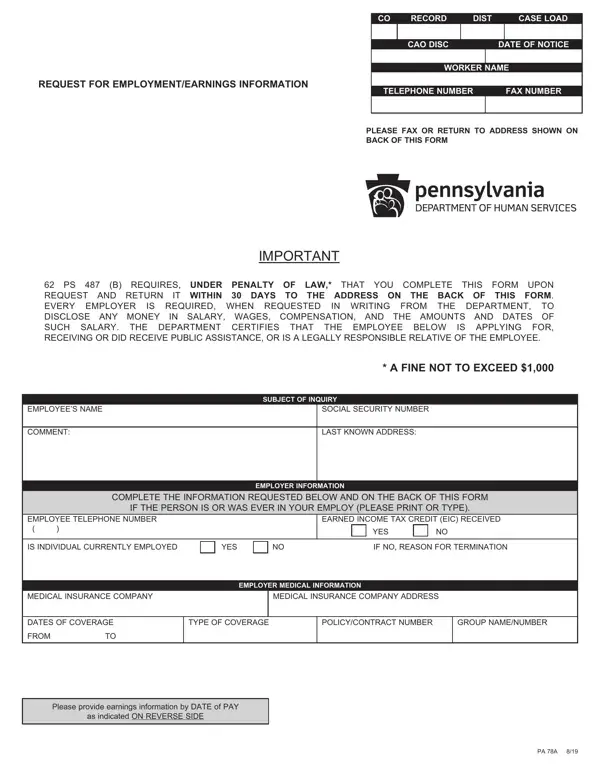
Fulfilling the requirements of the Pa 78 form is a vital step in ensuring compliance with state mandates regarding the disclosure of employment and earnings information. The essence of this document centers around its primary role in assisting employees applying for, receiving, or who have received public assistance. Employers are compelled under the weight of legal obligation, enforceable by a fine of up to $1,000, to furnish detailed information concerning an employee's salary, wages, and other forms of compensation within a 30-day window. This process not only serves to verify the financial status of individuals seeking public aid but also plays a crucial role in maintaining the integrity and efficiency of public assistance programs. By requiring the disclosure of critical employment information, including but not limited to the employee's social security number, last known address, and specifics regarding earned income tax credits, the Pa 78 form facilitates a more streamlined and accurate assessment of eligibility for assistance. Furthermore, it touches on aspects of employer-provided medical insurance, capturing details such as the insurance company, coverage dates, and policy specifics. Ensuring the provision of earnings data by specific pay dates rather than in aggregate quarterly or yearly amounts enhances the form's precision, making it an indispensable tool in the administration of state-supported aid programs.

QuestionAnswer
Form NamePa 78 Form
Form Length2 pages
Fillable?No
Fillable fields0
Avg. time to fill out30 sec
Other namesform pa 78, pa 78 form online, pa 78, erie cao form pa78a

How to Edit Pa 78 Form Online for Free

If you intend to fill out pa 78a form, it's not necessary to install any kind of programs - just make use of our PDF tool. Our tool is constantly developing to present the very best user experience attainable, and that is because of our dedication to continuous enhancement and listening closely to user feedback. It just takes just a few basic steps:

Step 1: Press the "Get Form" button above on this webpage to open our PDF editor.

Step 2: This editor offers the ability to change the majority of PDF forms in various ways. Change it by adding customized text, correct what's already in the PDF, and put in a signature - all close at hand!

It is actually easy to finish the form with our practical tutorial! Here's what you have to do:

1. Start completing your pa 78a form with a number of necessary blanks. Gather all of the necessary information and make certain not a single thing missed!

Guidelines on how to complete pa78a stage 1

2. Immediately after the first section is done, go to enter the suitable information in these: EMPLOYEES NAME, COMMENT, SUBJECT OF INQUIRY, SOCIAL SECURITY NUMBER, LAST KNOWN ADDRESS, COMPLETE THE INFORMATION REQUESTED, IF THE PERSON IS OR WAS EVER IN, EMPLOYER INFORMATION, EMPLOYEE TELEPHONE NUMBER, EARNED INCOME TAX CREDIT EIC, YES, IS INDIVIDUAL CURRENTLY EMPLOYED, YES, IF NO REASON FOR TERMINATION, and MEDICAL INSURANCE COMPANY.

Filling out part 2 in pa78a

Always be very attentive while completing COMMENT and SOCIAL SECURITY NUMBER, since this is the section where many people make a few mistakes.

3. This stage is straightforward - fill in every one of the form fields in PROVIDE EARNINGS INFORMATION BY, DATE OF PAY, GROSS AMOUNT, PRETAX, DEDUCTIONS, DATE OF PAY, GROSS AMOUNT, PRETAX, and DEDUCTIONS in order to complete this part.

pa78a writing process detailed (portion 3)

4. To go forward, this step will require filling out a few empty form fields. Examples include USE THIS SPACE FOR ADDITIONAL, EMPLOYERS REPRESENTATIVE, TITLE, SIGNATURE, PHONE NUMBER, DATE, and PLEASE PRINT, which are fundamental to going forward with this particular document.

Filling in segment 4 in pa78a

Step 3: As soon as you've glanced through the details in the fields, just click "Done" to finalize your form at FormsPal. Right after getting a7-day free trial account at FormsPal, you will be able to download pa 78a form or send it through email without delay. The PDF file will also be easily accessible in your personal cabinet with your changes. We do not share any information that you use while working with documents at our website.