Please rate Pa Child Abuse History Clearance Form

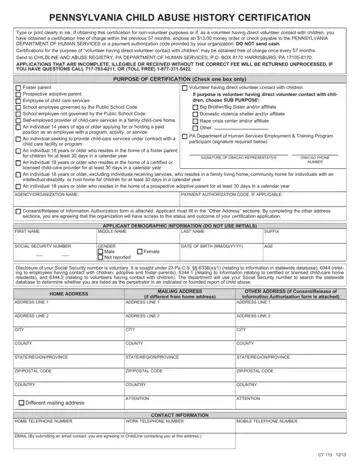
In the Commonwealth of Pennsylvania, individuals who wish to work or volunteer in positions involving direct contact with children are required to obtain a Pennsylvania Child Abuse History Certification. This involves completing a specific form, known as the CY 113 form, thoroughly and accurately in ink. The form mandates a payment of $13.00 for those applying for non-volunteer purposes and for volunteers who have previously received a certification at no cost but are past the 57-month threshold. An option for obtaining this certification at no cost is available for volunteers who meet certain criteria, promoting the safeguarding of children in various capacities without the financial burden. The form must be sent to the ChildLine and Abuse Registry at the Pennsylvania Department of Human Services, emphasizing the state's commitment to child safety. It requires detailed personal information, employment history, and residence history since 1975, underscoring the comprehensive nature of the screening process. The form’s sections include instructions for applicants across a wide range of roles, such as foster parents, school employees, and individuals residing in the home of a certified or licensed child-care provider, amongst others. This process ensures that individuals in positions of responsibility over children undergo thorough vetting, reflecting the state's prioritization of child welfare and safety.
| Question | Answer |
|---|---|
| Form Name | Pa Child Abuse History Clearance Form |
| Form Length | 4 pages |
| Fillable? | No |
| Fillable fields | 0 |
| Avg. time to fill out | 1 min |
| Other names | child abuse history clearance pennsylvania, abuse child clearance pa, child abuse clearances online pa, child abuse check pa |
Pa Child Abuse History Clearance Form isn’t the one you’re looking for?
Please rate Pa Child Abuse History Clearance Form
