

Form UC-2 at a glance
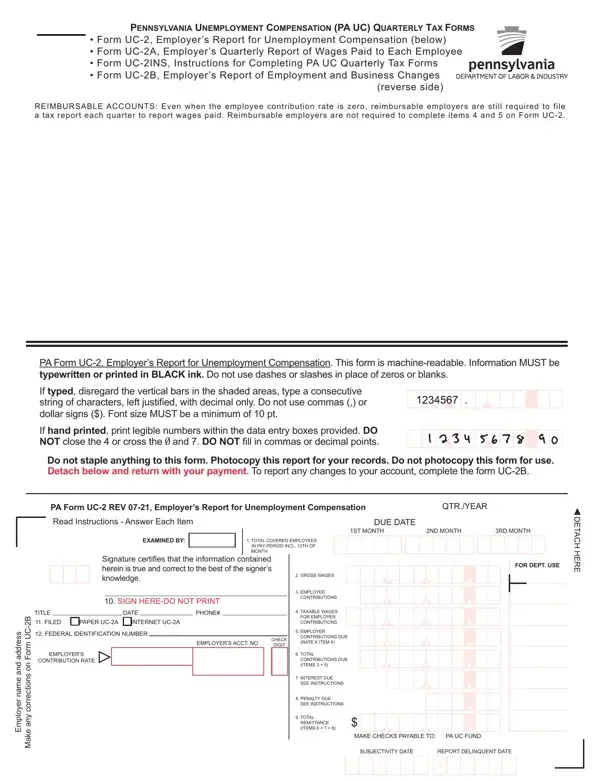
What it is: Form UC-2 is the Employer's Report for Unemployment Compensation.
Who signs: 10. SIGN HERE-DO NOT PRINT.
Even when the employee contribution rate is zero, reimbursable employers are still required to file a tax report each quarter to report wages paid.
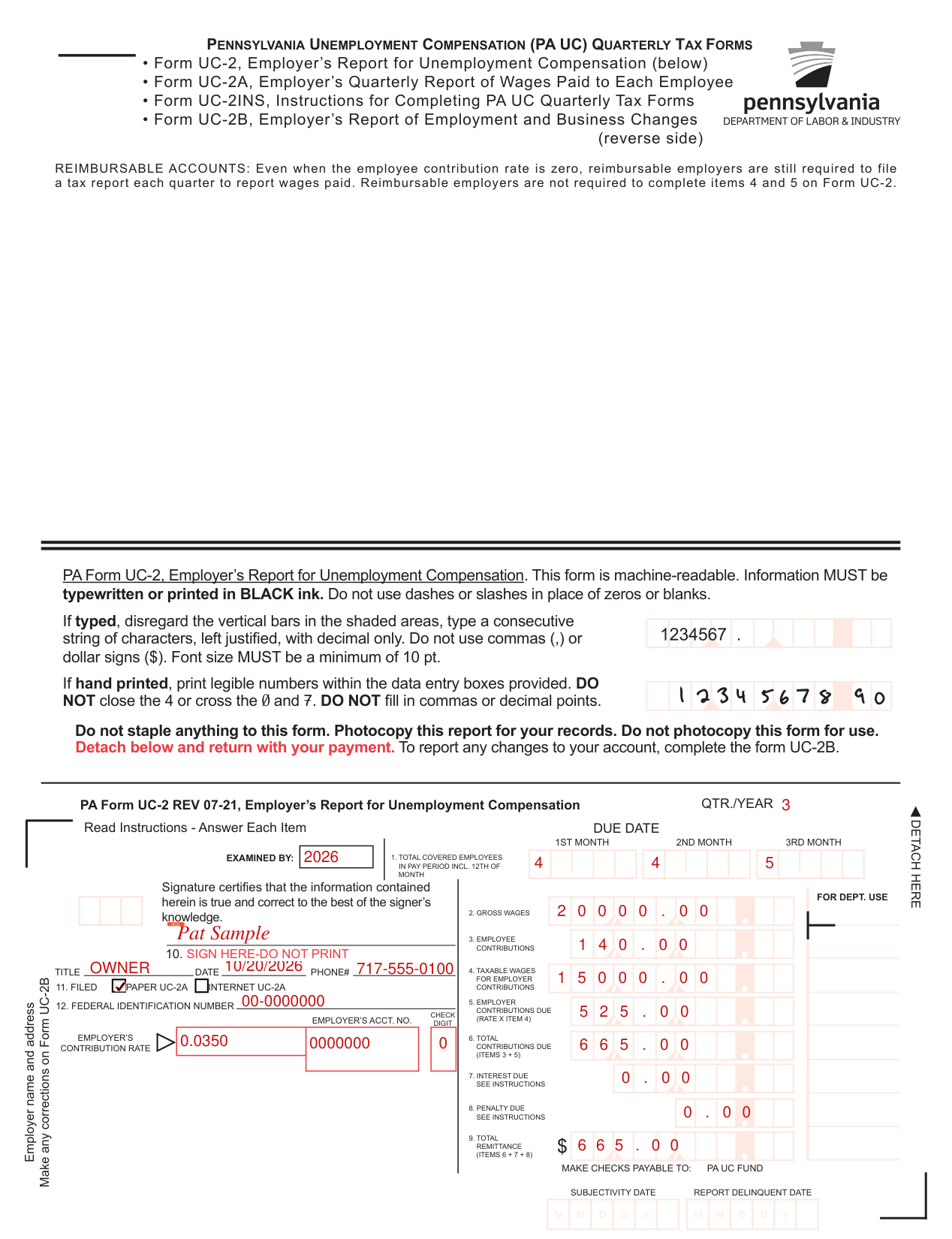
A filled-in Form UC-2 example: an employer reports one quarter
How to fill out Form UC-2, box by box
QTR./YEAR

Enter the QTR./YEAR.
1. TOTAL COVERED EMPLOYEES IN PAY PERIOD INCL. 12TH OF MONTH

For 1. TOTAL COVERED EMPLOYEES IN PAY PERIOD INCL. 12TH OF MONTH, enter a number under each of 1ST MONTH, 2ND MONTH and 3RD MONTH.
2. GROSS WAGES, 3. EMPLOYEE CONTRIBUTIONS and 4. TAXABLE WAGES FOR EMPLOYER CONTRIBUTIONS

For 2. GROSS WAGES, enter the GROSS WAGES.
For 3. EMPLOYEE CONTRIBUTIONS, enter the EMPLOYEE CONTRIBUTIONS.
For 4. TAXABLE WAGES FOR EMPLOYER CONTRIBUTIONS, enter the TAXABLE WAGES FOR EMPLOYER CONTRIBUTIONS.
Reimbursable employers are not required to complete items 4 and 5 on Form UC-2.
5. EMPLOYER CONTRIBUTIONS DUE, 6. TOTAL CONTRIBUTIONS DUE, 7. INTEREST DUE, 8. PENALTY DUE and 9. TOTAL REMITTANCE
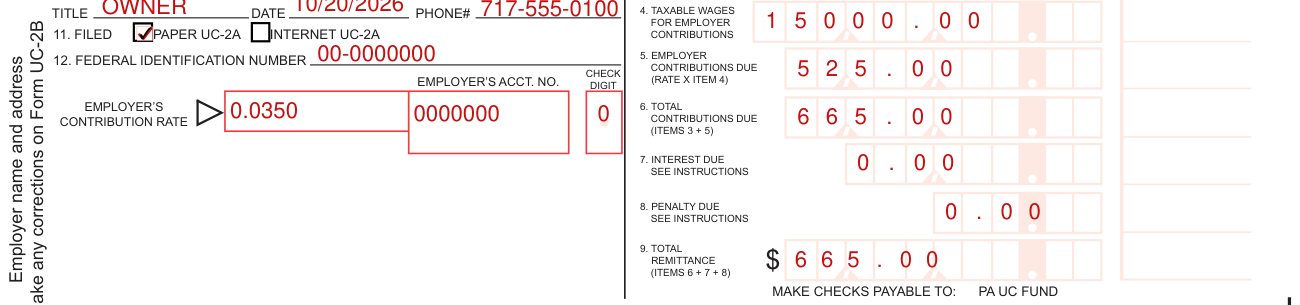
For 5. EMPLOYER CONTRIBUTIONS DUE (RATE X ITEM 4), enter the EMPLOYER'S CONTRIBUTION RATE X ITEM 4.
For 6. TOTAL CONTRIBUTIONS DUE (ITEMS 3 + 5), enter the TOTAL CONTRIBUTIONS DUE (ITEMS 3 + 5).
For 7. INTEREST DUE, enter the INTEREST DUE (SEE INSTRUCTIONS).
For 8. PENALTY DUE, enter the PENALTY DUE (SEE INSTRUCTIONS).
For 9. TOTAL REMITTANCE, enter the TOTAL REMITTANCE (ITEMS 6 + 7 + 8). MAKE CHECKS PAYABLE TO: PA UC FUND.
Signature, TITLE, DATE and PHONE#

Signature certifies that the information contained herein is true and correct to the best of the signer's knowledge.
Fill in TITLE, DATE and PHONE#.
11. FILED PAPER UC-2A INTERNET UC-2A

For 11. FILED, mark PAPER UC-2A or INTERNET UC-2A.
12. FEDERAL IDENTIFICATION NUMBER and EMPLOYER'S ACCT. NO.

For 12., enter the FEDERAL IDENTIFICATION NUMBER, then the EMPLOYER'S ACCT. NO. and its CHECK DIGIT.
More rules for Form UC-2
PA Form UC-2: information MUST be typewritten or printed in BLACK ink. Do not use dashes or slashes in place of zeros or blanks.
If typed, disregard the vertical bars in the shaded areas, type a consecutive string of characters, left justified, with decimal only. Do not use commas (,) or dollar signs ($). Font size MUST be a minimum of 10 pt.
If hand printed, print legible numbers within the data entry boxes provided. DO NOT close the 4 or cross the 0 and 7. DO NOT fill in commas or decimal points.
Do not staple anything to this form. Photocopy this report for your records. Do not photocopy this form for use. Detach at the DETACH HERE line and return with your payment. To report any changes to your account, complete the form UC-2B.
Common questions about Form UC-2
What is a PA UC 2 form?
Form UC-2 is the Employer's Report for Unemployment Compensation. The PA UC quarterly tax forms are Form UC-2, Form UC-2A (Employer's Quarterly Report of Wages Paid to Each Employee), Form UC-2INS (Instructions for Completing PA UC Quarterly Tax Forms) and Form UC-2B (Employer's Report of Employment and Business Changes).
Sources
[1] Form UC-2, Employer's Report for Unemployment Compensation, Pennsylvania Department of Labor & Industry (the Official source link on this page).