
Pala Win Loss Statement Form PDF Details

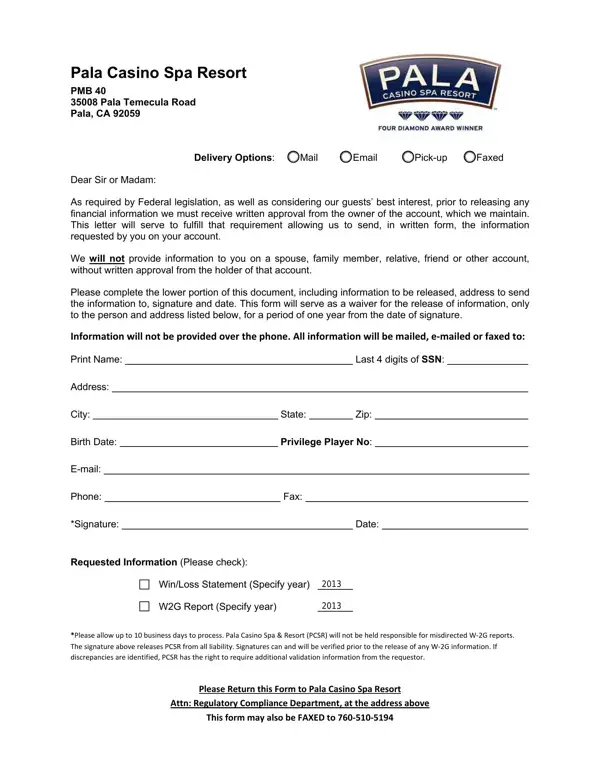
The Pala Win Loss Statement form plays a crucial rule in the interaction between patrons and the Pala Casino Spa Resort, catering to a need for transparency and legal compliance within the gaming industry. Federal laws necessitate that casinos obtain written consent from an account holder before releasing any financial data related to their gambling activities. This form is designed as an instrument to secure such approval, ensuring the safeguarding of personal information while adhering to legislative requirements. It outlines various modes of delivery for this sensitive information, including mail, email, and pick-up options, but notably excludes telephonic communication to preserve data integrity. With a clear directive that information will only be shared with the person whose name and other specified details appear on the form, it builds a framework for privacy and accountability. The form requires personal details, including part of the Social Security Number, address, and signature, further emphasizing the importance of security and individual authorization. It also specifies a timeframe for the release of information, placing the responsibility on the requester to provide accurate and verifiable details to prevent any misuse or misdirection of financial statements or W2G Reports. This approach not only respects the individual's rights but also aligns with the casino's dedication to promoting responsible gaming and adhering to federal regulations.

QuestionAnswer
Form NamePala Win Loss Statement Form
Form Length1 pages
Fillable?No
Fillable fields0
Avg. time to fill out15 sec
Other namesPalaCasinoSpaResort, 2013, Temecula, SSN

How to Edit Pala Win Loss Statement Form Online for Free

Temecula can be completed easily. Simply use FormsPal PDF tool to complete the task quickly. Our editor is constantly developing to present the best user experience attainable, and that's thanks to our dedication to continuous development and listening closely to customer comments. Getting underway is simple! All that you should do is follow the following basic steps directly below:

Step 1: Just hit the "Get Form Button" in the top section of this page to get into our form editing tool. This way, you will find all that is necessary to fill out your document.

Step 2: With this state-of-the-art PDF editor, you may accomplish more than merely complete blanks. Express yourself and make your documents seem faultless with customized textual content added in, or tweak the original content to perfection - all that backed up by the capability to insert any type of images and sign the PDF off.

This document requires particular details to be typed in, hence make sure to take whatever time to fill in what is expected:

1. You will need to fill out the Temecula properly, therefore be mindful while working with the sections comprising all these blank fields:

Part no. 1 of completing PCSR

2. Right after this part is completed, go on to enter the suitable information in all these: Email, Phone, Fax, Signature, Date, Requested Information Please check, WinLoss Statement Specify year, WG Report Specify year, Please allow up to business days, Please Return this Form to Pala, Attn Regulatory Compliance, and This form may also be FAXED to.

Part # 2 for filling out PCSR

Those who work with this PDF generally make errors while filling in Please Return this Form to Pala in this area. Ensure you read again what you type in right here.

Step 3: Just after going through your fields, press "Done" and you are done and dusted! After creating afree trial account with us, you'll be able to download Temecula or email it promptly. The PDF document will also be accessible from your personal account page with your every single change. FormsPal guarantees your information privacy via a protected method that never records or distributes any type of personal data involved. Be assured knowing your documents are kept safe when you use our service!