Please rate Personal Training Form

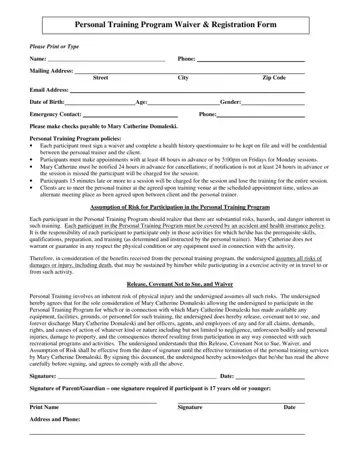
Embarking on a personal training journey involves more than just hitting the gym with a professional; it requires completing a Personal Training Program Waiver & Registration Form. This form is a vital first step for anyone looking to enhance their physical fitness under the guidance of Mary Catherine Domaleski. It encourages participants to provide essential information such as their name, contact details, and health history, ensuring that the training is tailored to their specific needs. Importantly, the form outlines key policies, including the need for signing a waiver, scheduling appointments 48 hours in advance, and the financial implications of missed sessions or late cancellations. Participants are also reminded of the importance of meeting at the agreed-upon venue on time. Beyond logistics and administrative details, the form also covers crucial safety measures. It highlights the risks associated with physical training – noting the requirement for participants to have appropriate health insurance and to only engage in activities that match their skills and preparation, as advised by the personal trainer. The form concludes with a stark reminder of the physical risks involved, requiring participants to assume all responsibility for any injury or damage that might occur during the program. By signing, participants not only acknowledge their comprehension of these terms but also commit to adhering to them, thereby laying a foundation of accountability and safety for their training journey.
| Question | Answer |
|---|---|
| Form Name | Personal Training Form |
| Form Length | 1 pages |
| Fillable? | No |
| Fillable fields | 0 |
| Avg. time to fill out | 15 sec |
| Other names | personal trainer forms printable, personal training registration form template pdf, personal trainer form templates, personal training forms for clients |
Personal Training Form isn’t the one you’re looking for?
Please rate Personal Training Form
