
Post Office Saving Bank Form PDF Details

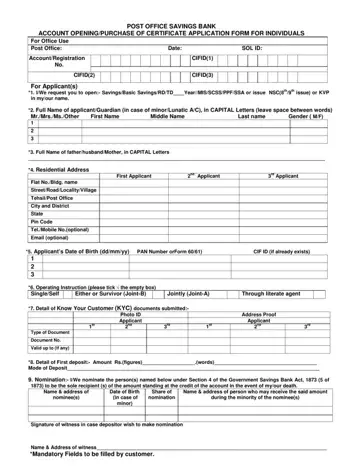
In the ever-evolving landscape of financial services, the need for accessible and reliable savings options becomes increasingly important, and this is where the Post Office Savings Bank Account Opening/Purchase of Certificate Application Form steps in to bridge the gap. Designed with simplicity and inclusivity at its core, this form facilitates the establishment of a savings account or the purchase of certificates like National Savings Certificates (NSC) and Kisan Vikas Patra (KVP) for individuals directly through the Post Office. It comprehensively gathers applicant details including full names, gender, contact information, and essential identification numbers like PAN or Form 60/61, ensuring that the account setup is both secure and adherent to Know Your Customer (KYC) norms. Furthermore, it offers options for account operation instructions, deposit details, and outlines the nomination process under the Government Savings Bank Act, 1873, cementing the user's rights and preferences in managing the account. An array of choices for account types such as Savings, Recurring Deposit (RD), Time Deposit (TD), and more cater to varying financial goals and needs, while the inclusion of provisions for guardianship accounts demonstrates an understanding of diverse societal requirements. Notably, the form also acknowledges the diverse scenarios of prospective account holders by offering specialized account options for minors, the physically handicapped, and others requiring assistance, ensuring no one is left behind in the opportunity to secure their financial future. This document is not only a testament to the Post Office's commitment to offering versatile financial products but also serves as a crucial tool for individuals looking to cultivate saving habits or secure their savings in officially recognized instruments.

QuestionAnswer
Form NamePost Office Saving Bank Form
Form Length2 pages
Fillable?No
Fillable fields0
Avg. time to fill out30 sec
Other namespost office new account opening form, post office savings account form, post office account opening form online, post office account opening form pdf

How to Edit Post Office Saving Bank Form Online for Free

Our finest computer programmers have worked collectively to implement the PDF editor that you may apply. The application allows you to complete post office saving account opening form documentation quickly and without problems. This is all you should do.

Step 1: Select the orange "Get Form Now" button on the following page.

Step 2: Now, you can begin modifying your post office saving account opening form. The multifunctional toolbar is readily available - insert, erase, adjust, highlight, and perform similar commands with the words and phrases in the document.

These parts will frame the PDF file that you will be filling in:

example of empty fields in post office savings account form

You have to enter the essential details in the TehsilPost Office, City and District, State, Pin Code, TelMobile Nooptional, Email optional, Applicants Date of Birth ddmmyy, Operating Instruction please tick, Either or Survivor JointB, Jointly JointA, Through literate agent, Detail of Know Your Customer KYC, Photo ID Applicant nd, Address Proof Applicant nd, and Type of Document area.

Finishing post office savings account form stage 2

Write down the obligatory details when you find yourself on the Detail of First deposit Amount, Nomination IWe nominate the, Name address of person who may, Name address of nominees, Date of Birth in case of minor, Signature of witness in case, and Name Address of witness Mandatory segment.

Filling out post office savings account form part 3

You have to indicate the rights and obligations of both parties in paragraph AADHAR NUMBER, Please open Minor AC through, In case of minorLunatic Account, In case of other, than MinorLunatic please enter, PPOBPLRegistrationEnrollment, Amount of Monthly Installment In, In case of NSCKVP Please, issue No of NSCKVP Den, In case services of SASPPFMPKBY, taken Name of AgentAuthority, NoValid Up to, Standing Instructions if any, IWe authorize Agent, and name.

post office savings account form AADHAR NUMBER, Please open Minor AC through, In case of minorLunatic Account, In case of other, than MinorLunatic please enter, PPOBPLRegistrationEnrollment, Amount of Monthly Installment In, In case of NSCKVP Please, issue No of NSCKVP  Den, In case services of SASPPFMPKBY, taken Name of AgentAuthority, NoValid Up to, Standing Instructions if any, IWe authorize Agent, and name fields to insert

Finish by reading these fields and typing in the proper information: For Office Use only Certified that, Signature of BPM Date Stamp, Signature of SPM, and Signature of Postmaster.

Filling out post office savings account form step 5

Step 3: Choose the Done button to assure that your completed form could be transferred to any device you choose or sent to an email you specify.

Step 4: Create duplicates of the form - it will help you keep away from possible future concerns. And don't get worried - we do not publish or look at your data.

Please rate Post Office Saving Bank Form

3 Votes
If you believe this page is infringing on your copyright, please familiarize yourself with and follow our DMCA notice and takedown process - click here to proceed .
