
Profile Request Form PDF Details

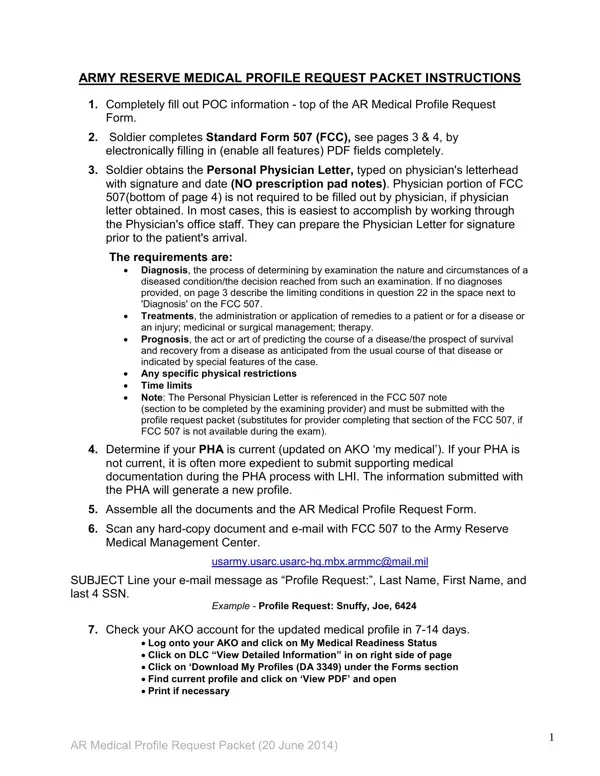
The ARMY RESERVE MEDICAL PROFILE REQUEST PACKET is a detailed process designed for soldiers seeking medical evaluations or adjustments to their service profiles due to health-related conditions. It meticulously outlines steps, beginning with filling out Point of Contact (POC) information, completing the Standard Form 507 for functional capacity, and obtaining a personalized Physician Letter on official letterhead that outlines the diagnosis, treatment, prognosis, physical restrictions, and time limits. It emphasizes the physician's letter, eliminating the need for completing the physician's section of the FCC 507 if the letter is provided. The form also guides on compiling relevant documents, including instructions for soldiers whose Periodic Health Assessment (PHA) might not be current, by suggesting the inclusion of supporting medical documents during the PHA process for a smoother profile update. The packet requires the soldier to scan and email documents to the Army Reserve Medical Management Center, with detailed instructions on how to submit the request correctly and check for updates through their AKO account. This ensures that the information submitted is accurate, complete, making the request process as efficient as possible.

QuestionAnswer
Form NameProfile Request Form
Form Length5 pages
Fillable?No
Fillable fields0
Avg. time to fill out1 min 15 sec
Other namesprofile request, form army medical request, profile request get, gsa medical profile

How to Edit Profile Request Form Online for Free

You are able to complete standard form 507 army instantly with our PDF editor online. To keep our tool on the cutting edge of practicality, we work to adopt user-driven capabilities and improvements on a regular basis. We are routinely happy to receive suggestions - play a vital role in revampimg the way you work with PDF files. To get started on your journey, go through these simple steps:

Step 1: Access the PDF file in our editor by pressing the "Get Form Button" at the top of this webpage.

Step 2: With the help of our handy PDF editing tool, you can do more than merely fill out forms. Try all the functions and make your forms seem sublime with customized textual content incorporated, or modify the file's original content to excellence - all that comes along with the capability to add just about any photos and sign the file off.

So as to finalize this PDF document, be certain to provide the information you need in each area:

1. It's very important to complete the standard form 507 army correctly, hence pay close attention while filling in the sections that contain these particular blank fields:

Stage number 1 in filling in army reserve request

2. Soon after finishing this step, head on to the subsequent step and enter the necessary details in these blanks - RSC, ARMY RESERVE MEDICAL PROFILE, MANDATORY Information Fields are, NAME Last First MI SSN PHONE Day, MOSAOC, TPU, AGR, Other, Evening, Rank, UIC, Unit POC Phone, Rank, Phone, and Request Profile Type select one.

How you can fill in army reserve request part 2

3. This 3rd step should also be fairly straightforward, Previous Profiles NO YES Include, PHA Periodic Health Assessment, WE DO NOT NEED YOUR ENTIRE MEDICAL, To avoid delays in processing your, Signature Todays Date I represent, and AR Medical Profile Request Packet - these blanks needs to be completed here.

Stage number 3 for filling out army reserve request

It is easy to make a mistake while filling in your Previous Profiles NO YES Include, thus be sure to take another look before you'll send it in.

4. Completing The Army Reserve Medical, usarmyusarcusarchqmbxarmmcmailmil, Email Subject Line will state, Profile Request Snuffy Joe, For questions or to speak to your, ARMMC Tollfree Phone main menu, and AR Medical Profile Request Packet is crucial in the fourth stage - you'll want to devote some time and fill in every blank!

AR Medical Profile Request Packet, Email Subject Line will state, and The Army Reserve Medical inside army reserve request

5. Lastly, this final portion is precisely what you should wrap up prior to finalizing the PDF. The blanks in this instance include the following: NOTE TO BE COMPLETED BY SERVICE, Are you able to carry and ire an, If NO what is the medical, If NO what is the medical, Are you able to ride in a military, If NO what is the medical, Are you able to wear a helmet for, If NO what is the medical, Are you able to wear body armor, If NO what is the medical, Are you able to wear load bearing, If NO what is the medical, Are you able to wear military, If NO what is the medical, and Are you able to wear protective.

army reserve request writing process clarified (stage 5)

Step 3: Just after double-checking your filled out blanks, hit "Done" and you are done and dusted! Try a 7-day free trial option at FormsPal and obtain direct access to standard form 507 army - with all transformations preserved and available inside your personal cabinet. We don't sell or share the details you type in when dealing with forms at FormsPal.