
Proliant W2 Reprint Request Form PDF Details

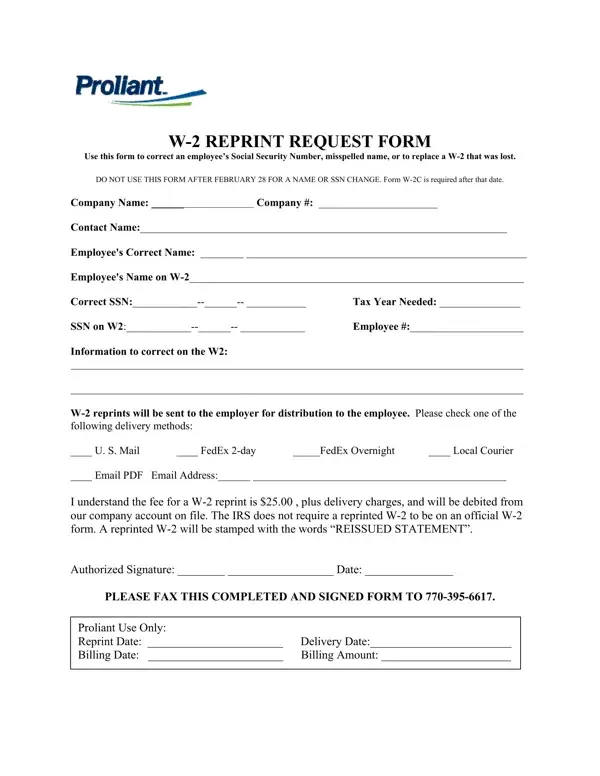
The importance of accurate and timely tax documentation cannot be overstated, especially when it comes to the essential W-2 forms that detail an employee's annual wages and tax withholdings. Sometimes, however, there arises a need to correct personal information or replace a lost W-2, a situation that calls for the Proliant W2 Reprint Request form. This form serves as a crucial tool for employers to rectify errors such as incorrect Social Security numbers or misspelled names, or to obtain a replacement for a W-2 document that has gone missing. It is particularly important to note that this form is intended for use prior to February 28 for corrections to names or Social Security numbers; beyond this date, a different process—the filing of a Form W-2C—is required. Additionally, the form outlines various delivery options for the reprinted W-2, including U.S. Mail and FedEx, among others, and mentions the associated fee. All requested reprints come marked as “REISSUED STATEMENT” to distinguish them from their originals. Completion and submission details are clearly specified, including a fax number for submission, thereby providing a structured and efficient pathway for employers to ensure their employees' records are accurate and up-to-date.

QuestionAnswer
Form NameProliant W2 Reprint Request Form
Form Length1 pages
Fillable?No
Fillable fields0
Avg. time to fill out15 sec
Other namesW2Reprint how to correct name misspelled on w2 form

How to Edit Proliant W2 Reprint Request Form Online for Free

Through the online PDF editor by FormsPal, you can easily fill in or change Proliant W2 Reprint Request Form right here and now. We are dedicated to giving you the perfect experience with our editor by consistently introducing new functions and enhancements. Our tool has become even more helpful with the latest updates! At this point, working with PDF files is a lot easier and faster than ever. Starting is simple! All that you should do is stick to the next easy steps down below:

Step 1: Press the orange "Get Form" button above. It'll open up our pdf editor so that you could start filling out your form.

Step 2: As soon as you start the file editor, you will get the document made ready to be filled in. Apart from filling out various blanks, you may also perform other sorts of actions with the file, specifically putting on custom text, editing the original textual content, adding illustrations or photos, affixing your signature to the document, and more.

As for the blank fields of this precise form, here's what you should know:

1. Complete the Proliant W2 Reprint Request Form with a group of essential blank fields. Note all the required information and make sure there is nothing omitted!

Writing part 1 of Proliant W2 Reprint Request Form

2. The next part would be to fill out these particular blanks: Company Name Company Contact, Local Courier, FedEx day, FedEx Overnight, PLEASE FAX THIS COMPLETED AND, and Proliant Use Only Reprint Date.

Stage no. 2 of filling in Proliant W2 Reprint Request Form

It is possible to make an error when filling in the Company Name Company Contact, so ensure that you go through it again prior to when you finalize the form.

Step 3: Confirm that your details are accurate and click "Done" to continue further. Try a free trial account at FormsPal and gain instant access to Proliant W2 Reprint Request Form - downloadable, emailable, and editable from your personal account page. FormsPal guarantees your data confidentiality with a protected method that in no way records or distributes any sensitive information used. Feel safe knowing your docs are kept confidential every time you use our service!