
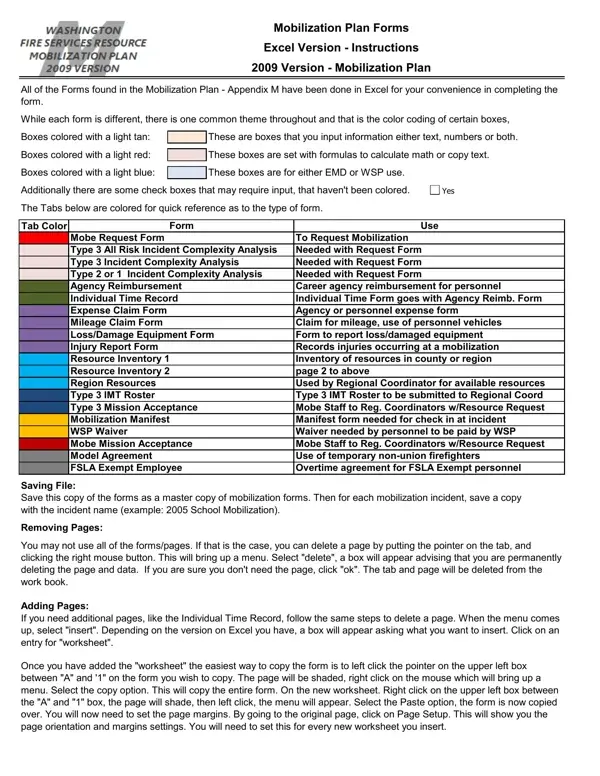
The Project Mobilization Schedule form, an essential tool within the 2009 Version - Mobilization Plan, has been meticulously crafted to streamline the process of mobilization for various incidents by employing an Excel format for user convenience. Designed with attention to detail, it features color-coded boxes—light tan for user input, light red for automatic calculations, and light blue specifically for EMD or WSP use—facilitating an intuitive experience for completing the form. Beyond these color codes, it incorporates check boxes for further inputs. Included within this document are various tabs, each color-coded to easily distinguish between the type of form, ranging from Mobilization Request Forms, Incident Complexity Analysis, Agency Reimbursement Forms, and several other resource and incident management forms. Each form serves a distinct purpose, such as requesting mobilization, analyzing incident complexity, claiming expenses, and reporting injuries, among others. Instructions are comprehensively laid out for saving, deleting, adding, and printing pages, ensuring the forms are tailored to the specific needs of each mobilization incident. Additionally, guidelines for form submission underscore the importance of following up on emailed or faxed documents to confirm their receipt. Support contacts and a channel for feedback suggest a system in place for assistance and continuous improvement. This versatile tool not only assists in efficient mobilization planning but also in the meticulous documentation and management of resources, personnel, and incidents, reflecting an effort to make the process as smooth as possible for all agencies involved.
| Question | Answer |
|---|---|
| Form Name | Project Mobilization Schedule Form |
| Form Length | 43 pages |
| Fillable? | No |
| Fillable fields | 0 |
| Avg. time to fill out | 10 min 45 sec |
| Other names | mobilization plan sample pdf, construction mobilization plan sample, mobilization plan, mobilization schedule for road construction |