
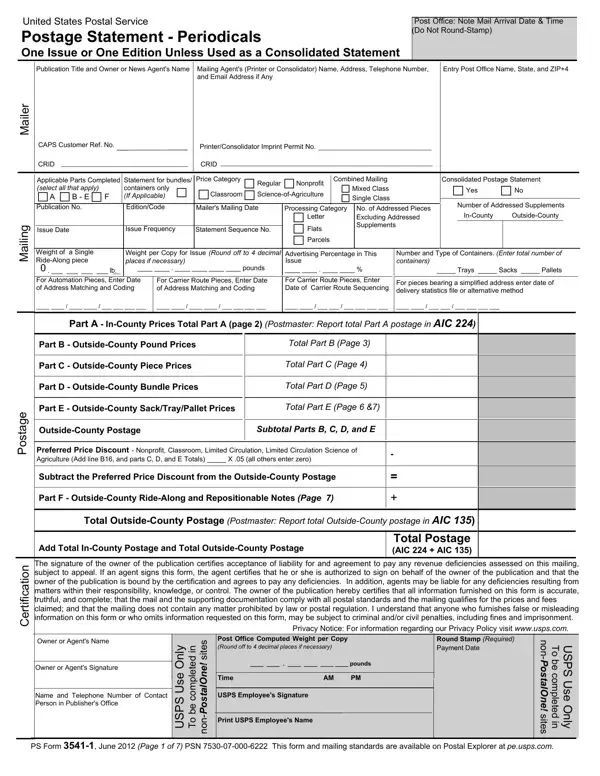
PS Form 3541 at a glance
What it is: The United States Postal Service Postage Statement-Periodicals, PS Form 3541, is for One Issue or One Edition Unless Used as a Consolidated Statement.
Who signs: The signature of the owner of the publication certifies acceptance of liability for and agreement to pay any revenue deficiencies assessed on this mailing, subject to appeal.
Use this form for Periodicals mailings.
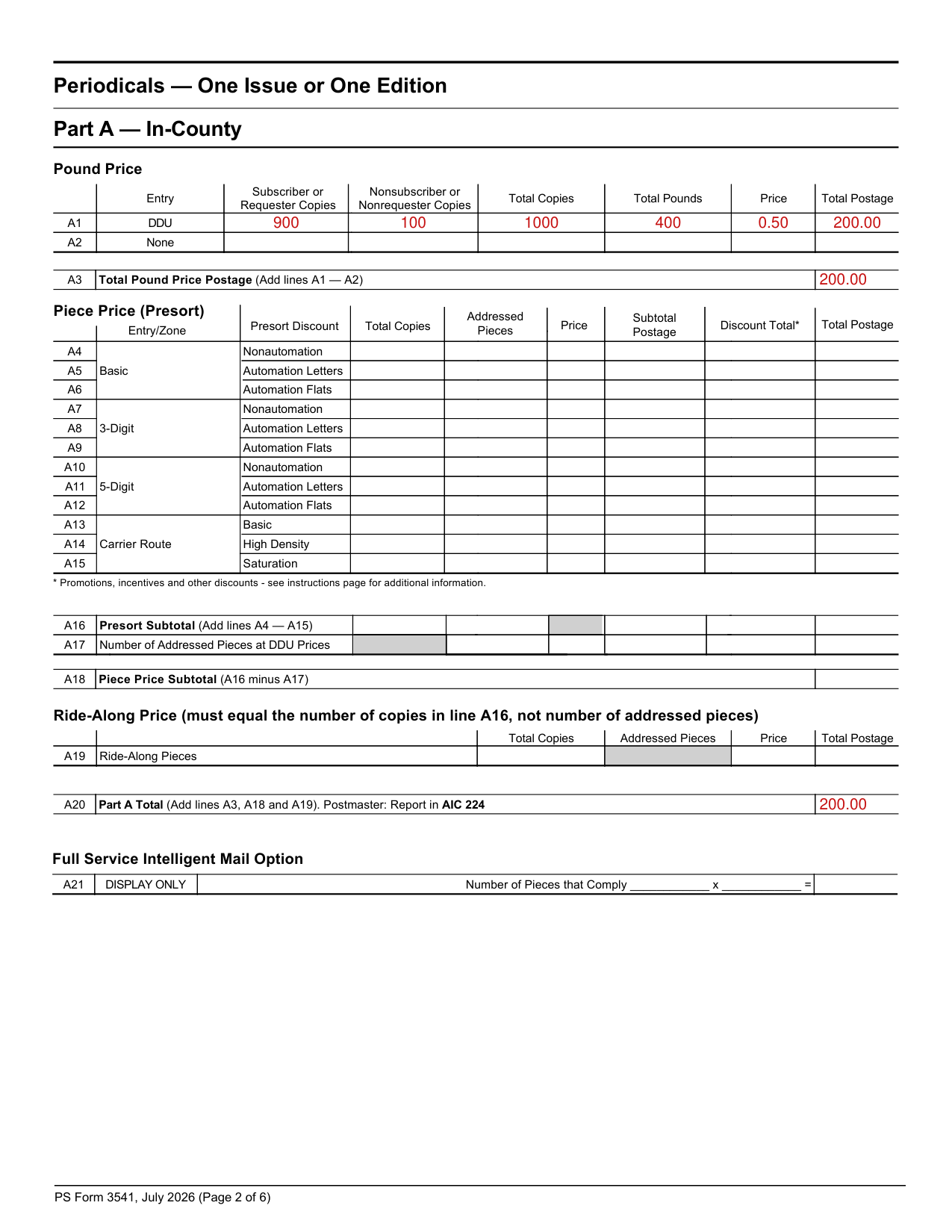
A filled-in PS Form 3541 example: one In-County issue priced by the pound
How to fill out PS Form 3541, box by box
Pound Price

On line A3, add lines A1 - A2 to get the Total Pound Price Postage.
Piece Price (Presort): A4 to A18
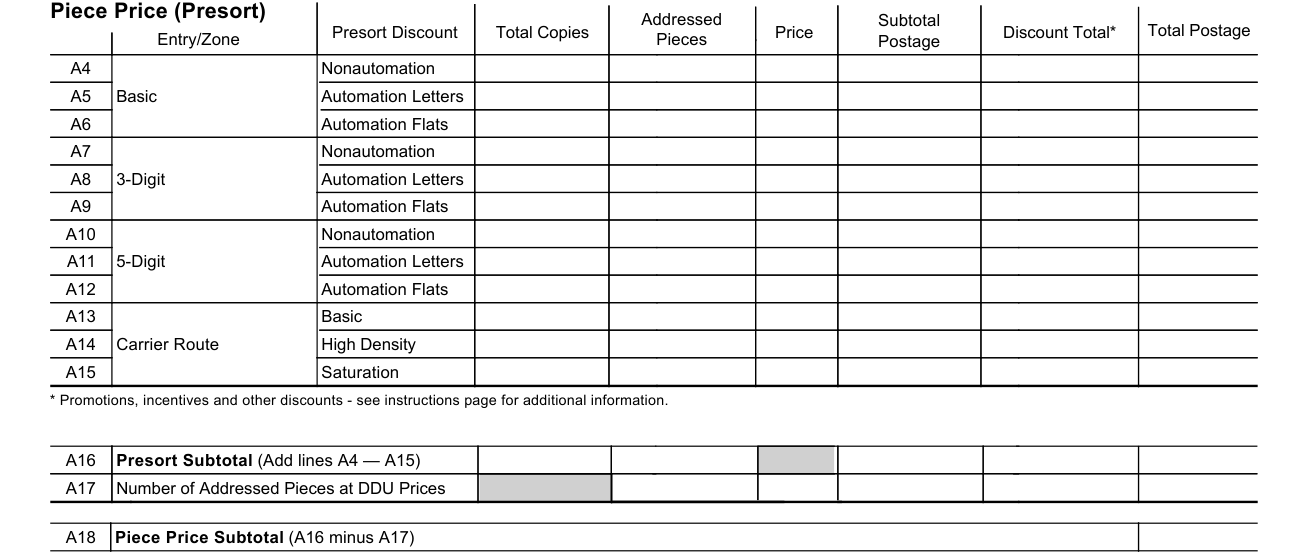
For each Entry/Zone Presort Discount, fill in Total Copies, Addressed Pieces, Price, Subtotal Postage, Discount Total* and Total Postage.
On line A16, add lines A4 - A15 to get the Presort Subtotal.
On line A17, enter the Number of Addressed Pieces at DDU Prices.
Line A18 Piece Price Subtotal is A16 minus A17.
Discount Total*: Promotions, incentives and other discounts - see instructions page for additional information.
A19 Ride-Along Pieces

The Ride-Along Price must equal the number of copies in line A16, not number of addressed pieces.
A20 Part A Total

Line A20 Part A Total is the sum of lines A3, A18 and A19.
A21 Full Service Intelligent Mail Option

On line A21, enter the Number of Pieces that Comply, DISPLAY ONLY.
Pieces that comply with the Full-Service Intelligent Mail option requirements are additionally reported on the line provided.
More rules for PS Form 3541
Step 4: Go to the Postage Section on page 1 and add postage from Part Total box for each completed part. Bring these totals forward to front page and insert in appropriate box.
Add all parts together to get Total Postage.
Step 5: Go to the Total Postage While Pending Section on page 1, add postage from Part P Total box (P3) and bring total forward to front page and insert in Total Postage While Pending box.
For more information on mailing standards, prices, and fees please go to Postal Explorer at pe.usps.com.
Mailings and parts
You mail In-County
1. For In-County mailings, complete only part A.
Part A: In-County piece and pound prices.
You mail Outside-County
2. For Outside-County mailings, complete applicable parts B through F.
Part B: Outside-County pound prices.
Part C: Outside-County piece prices.
Part F: Outside-County Ride-along prices.
For Nonprofit & Classroom: All commingled nonsubscriber or nonrequester copies over the 10% limit must pay regular prices & use a separate PS Form 3541.
On line B4, add lines B1 - B3 for the Subtotal.
Line B9 Pound Price Postage Total is the sum of lines B4 and B8.
On line C23, add lines C1 - C22 for the Subtotal.
Line C25 Part C Total Outside-County Piece Price is lines C23 minus C24.
Line F2 Part F Total is Line F1.
For Nonprofit, Classroom, Limited Circulation and Limited Circulation Science of Agriculture, add line B8 and part C Totals x .05; all others enter zero.
Part Z, optional and display only
Part Z is an optional, display-only part.
Part Z is not intended to be used for postage calculations.
Before you go
Step 1: Complete the Mailer and Mailing sections on page 1.
List all containers in the Number and Type of Containers field.
You must select either Yes or No under Consolidated Postage Statement.
Step 2: Before you complete the Postage section, go to parts A through E and complete the part(s) that pertain to your mailing.
Common questions about PS Form 3541
Who signs it?
If an agent signs this form, the agent certifies that he or she is authorized to sign on behalf of the owner of the publication. In addition, agents may be liable for any deficiencies resulting from matters within their responsibility, knowledge, or control.
Where do I file it?
Attach all completed pages together to submit with the mailing (do not include blank pages).
Is there a penalty?
Anyone who furnishes false or misleading information on this form or who omits information requested on this form, may be subject to criminal and/or civil penalties, including fines and imprisonment.
What am I certifying when I sign?
The owner of the publication certifies that all information furnished on this form is accurate, truthful, and complete; that the mail and the supporting documentation comply with all postal standards and that the mailing qualifies for the prices and fees claimed; and that the mailing does not contain any matter prohibited by law or postal regulation. Step 6: Read and sign the Certification section, including your telephone number.
Sources
[1] PS Form 3541, July 2026, Postage Statement-Periodicals, United States Postal Service (the Official source link on this page).