
Pw1 Form PDF Details

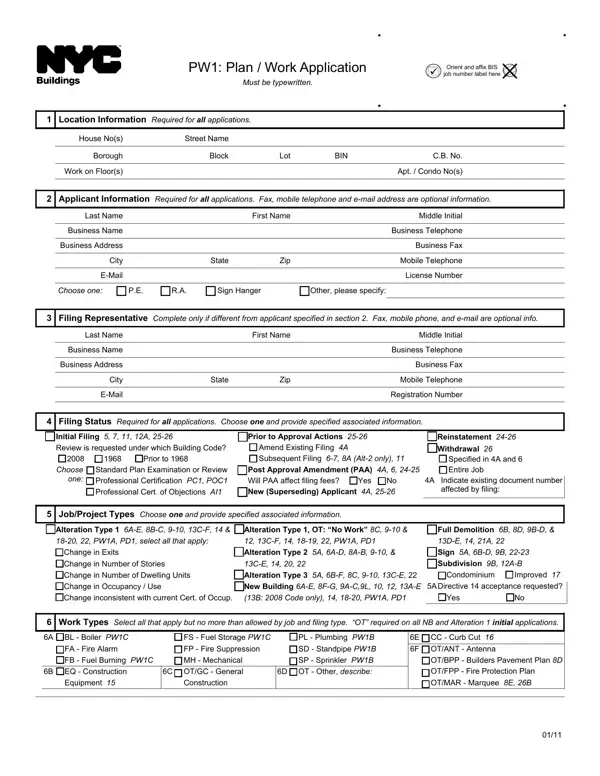
Entering the realm of building and construction in New York City involves navigating a maze of forms and permits, among which the PW1: Plan / Work Application stands out for its critical role. This document, mandatory for nearly all construction, alteration, and demolition projects, must be completed meticulously in typewritten form to commence the official review process by the Department of Buildings (DOB). It succinctly gathers essential information about the work site, including precise location details, and extends to gather applicant and filing representative data, underscoring the demand for accuracy in both identification and contact information. Specific sections of the form guide applicants through declaring job/project types—distinguishing among alterations, new buildings, or demolition projects among others—and detail the nature of work, encompassing a wide spectrum from structural changes to essential service installations like plumbing, fire suppression, and more. The filing status and job description sections facilitate the initial versus amendment distinctions, crucial for the DOB's tracking and processing. Furthermore, considerations regarding zoning characteristics, building occupancy, and compliance paths for energy conservation highlight the PW1's comprehensive coverage. Accompanying professional certifications enforce the submission’s integrity, emphasizing the accountability of the applicants in ensuring adherence to all applicable codes and regulations. A final nod to property owner statements solidifies the form as a pivotal document bridging regulatory compliance with the physical transformation of New York City’s built environment.

QuestionAnswer
Form NamePw1 Form
Form Length5 pages
Fillable?No
Fillable fields0
Avg. time to fill out1 min 15 sec
Other namespw1 information, nyc buildings pw1, what is a pw1 form, dob pw1 forms

How to Edit Pw1 Form Online for Free

pw1 form dob can be filled in online in no time. Just make use of FormsPal PDF editing tool to do the job right away. The tool is consistently upgraded by our team, acquiring additional functions and growing to be better. All it requires is a couple of simple steps:

Step 1: Press the "Get Form" button above. It will open up our pdf tool so that you can start completing your form.

Step 2: The tool provides you with the opportunity to change your PDF file in many different ways. Improve it with customized text, adjust what is already in the file, and include a signature - all at your fingertips!

This PDF will need specific info to be filled in, thus make sure you take some time to enter exactly what is asked:

1. Whenever filling out the pw1 form dob, make certain to include all necessary fields in its corresponding area. This will help to speed up the process, enabling your details to be processed without delay and properly.

Filling out segment 1 in pw1 forms

2. The subsequent part is to fill in all of the following blanks: Choose only one, Standard Plan Examination or, Prior to Approval Actions Amend, Withdrawal Specified in A and, A Indicate existing document number, affected by filing, JobProject Types Choose one and, Alteration Type or Alteration, Alteration Type A AD AB CE, Full Demolition B D A, to meet New Building requirements, AE BC CF, Alteration Type A BF C CE, PWA PD Alteration Type OT No Work, and New Building AE FG A CK.

Alteration Type  or Alteration, PWA PD Alteration Type  OT No Work, and Alteration Type  A AD AB  CE inside pw1 forms

3. This next section is considered relatively easy, PlansConstruction Documents, Are plans being submitted with, Additional Information, A WT Cost, WT Cost, WT Cost, B Is a building enlargement, Additional Construction Floor Area, sq ft, No enlargement is proposed, D Street Frontage, Yes PD, E Height, ft Width, and Horizontal - these fields has to be filled out here.

Step no. 3 in filling in pw1 forms

4. The next subsection needs your details in the subsequent parts: Landmark Little E or RD Site, UnmappedCCO Street, Requesting legalization of work, without a permit violations have, Other please specify on line, CRFNs Restrictive Declaration, CRFNs Zoning Exhibit I II III etc, BSA Calendar Numbers max, CPC Calendar Numbers max, Filing to address violations list, Filing to comply with Local Laws, LL Number, Year, Work includes lighting fixture, and Work includes modular construction. Just remember to type in all requested information to move forward.

Stage # 4 of submitting pw1 forms

Concerning CRFNs Restrictive Declaration and BSA Calendar Numbers max, be sure that you get them right in this current part. These could be the key ones in this file.

5. To wrap up your document, this particular segment has several extra fields. Filling in The work is an alteration of a will conclude everything and you will be done in no time!

Step number 5 of filling out pw1 forms

Step 3: Immediately after looking through your completed blanks, click "Done" and you are done and dusted! After creating afree trial account at FormsPal, you'll be able to download pw1 form dob or send it through email at once. The PDF document will also be readily accessible through your personal cabinet with all of your edits. If you use FormsPal, it is simple to fill out documents without having to be concerned about information incidents or records being distributed. Our protected system ensures that your personal data is maintained safely.