
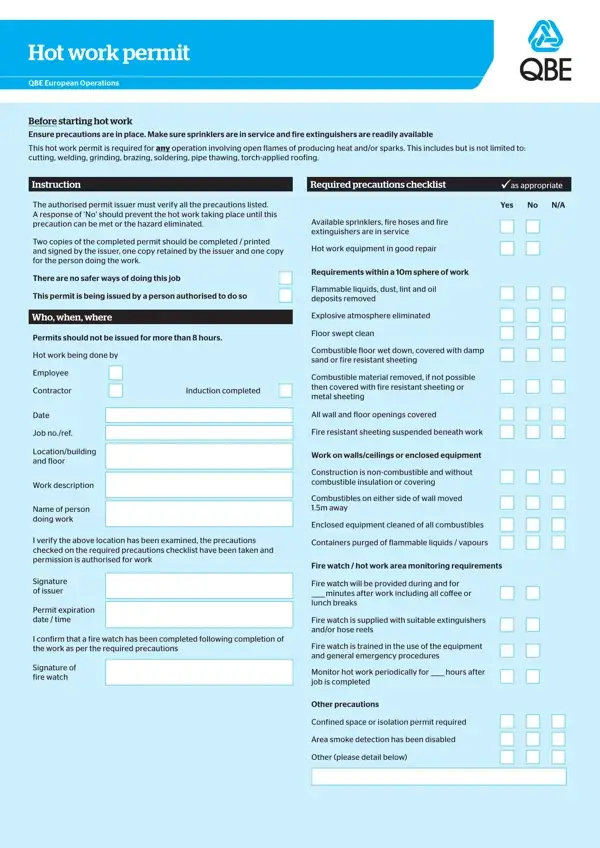
The QBE Hot Work Permit form serves as a critical document designed to enhance safety measures during operations that involve the generation of heat and/or sparks, such as welding, cutting, brazing, soldering, and grinding, among others. Its primary purpose is to ensure that before commencing such high-risk work, necessary precautions are in place, including the availability of fire extinguishers and the operational status of sprinkler systems, to mitigate the risk of fire. This comprehensive permit necessitates the verification of safety measures by an authorised permit issuer, emphasizing a rigorous checklist that includes the removal of flammable materials, ensuring equipment is in good repair, and confirming the area is free from explosive atmospheres. Not only does it stipulate conditions for issuing the permit, such as not exceeding an eight-hour duration, but it also details the responsibilities of both employees and contractors. Through this permit, the QBE European Operations underlines the significance of a methodical approach to hot work, aiming to prevent fire incidents that have historically plagued industrial settings. Furthermore, the form underscores the importance of third-party insurance verification, the preparation of a method statement for larger projects, and the meticulous post-work inspection to safeguard against any latent fire hazards, thereby manifesting QBE's commitment to best practices in operational safety and risk management.
| Question | Answer |
|---|---|
| Form Name | Qbe Hot Work Permit Form |
| Form Length | 2 pages |
| Fillable? | No |
| Fillable fields | 0 |
| Avg. time to fill out | 30 sec |
| Other names | hot work permit template word, hot work permit form, permit template word, hot works permit template |
Qbe Hot Work Permit Form isn’t the one you’re looking for?