
Qme Form 105 PDF Details

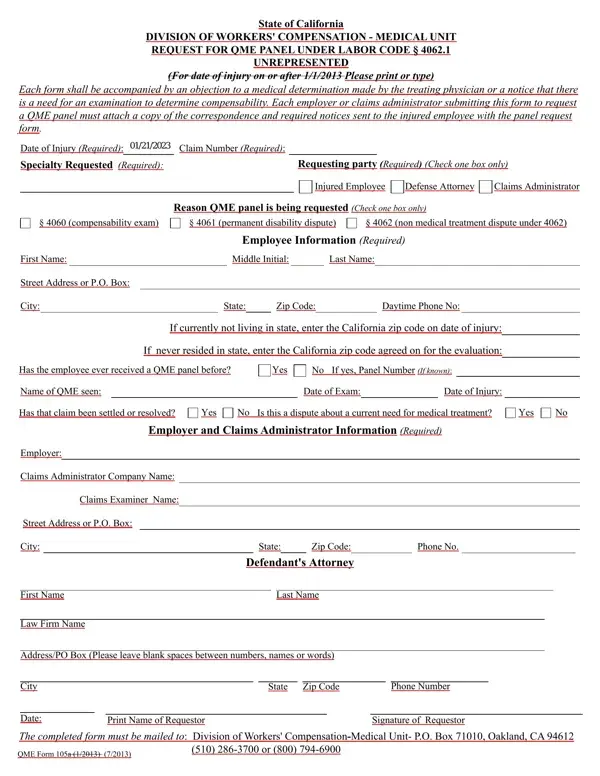
In California, managing workers' compensation cases involves a meticulous process, especially when disputes arise regarding medical determinations made by treating physicians. At the heart of this process lies the QME 105 form, a crucial document used under Labor Code § 4062.1 for cases where an employee is unrepresented and a disagreement surfaces. This form serves as a formal request to the Division of Workers' Compensation - Medical Unit for a Qualified Medical Examiner (QME) panel. Primarily, it is used to challenge decisions related to an employee's need for medical treatment, the compensability of an injury, or disputes over permanent disability ratings. Required to accompany each submission are the underlying objection to the treating physician’s medical determination or a notification of the necessity for an examination to ascertain compensability. Besides the essential dispute information, the form mandates details such as the date of injury, claim number, and the specific medical specialty requested for the panel. It also collects comprehensive information regarding the injured employee, including past interactions with a QME and current disputes about medical treatments. Additionally, the employer or claim administrator's information, alongside the documentation of the declared service method for form submission, underscores the procedural rigor in ensuring all parties are duly notified. Distilling this complex procedure into accessible terms, the QME 105 form embodies the structured approach to resolving medical disputes in workers' compensation cases, ensuring fairness and transparency in the evaluation of an injured worker's needs.

QuestionAnswer
Form NameQme Form 105
Form Length4 pages
Fillable?No
Fillable fields0
Avg. time to fill out1 min
Other namesQMEForm105new blank qme form 105

How to Edit Qme Form 105 Online for Free

When using the online tool for PDF editing by FormsPal, you can easily complete or change Qme Form 105 here. To have our tool on the cutting edge of practicality, we aim to put into operation user-oriented features and enhancements on a regular basis. We are at all times grateful for any suggestions - assist us with reshaping the way you work with PDF forms. All it takes is a few simple steps:

Step 1: Press the orange "Get Form" button above. It will open up our editor so you can start filling out your form.

Step 2: With this advanced PDF file editor, it is possible to do more than just complete blanks. Express yourself and make your documents look high-quality with custom text added, or optimize the file's original input to perfection - all that accompanied by an ability to incorporate stunning images and sign the PDF off.

Filling out this form will require attentiveness. Make certain every single blank is done correctly.

1. Whenever filling out the Qme Form 105, ensure to complete all of the important blanks within the corresponding section. This will help expedite the work, allowing your information to be handled efficiently and appropriately.

Tips on how to fill out Qme Form 105 portion 1

2. Once your current task is complete, take the next step – fill out all of these fields - Name of QME seen, Date of Exam, Date of Injury, Has that claim been settled or, Yes, Is this a dispute about a current, Yes, Employer and Claims Administrator, Employer, Claims Administrator Company Name, Claims Examiner Name, Street Address or PO Box, City, State, and Zip Code with their corresponding information. Make sure to double check that everything has been entered correctly before continuing!

How one can prepare Qme Form 105 step 2

Many people often make mistakes while filling in Street Address or PO Box in this area. You need to go over whatever you enter right here.

3. In this stage, check out City, Date, State, Zip Code, Phone Number, Print Name of Requestor, Signature of Requestor, and The completed form must be mailed. Each of these will have to be filled in with greatest attention to detail.

Best ways to fill out Qme Form 105 stage 3

4. The form's fourth part comes with these particular blanks to consider: I declare that I am a resident of, On I served this QME form the, or firm named below and by, depositing the sealed envelope, placing the sealed envelope for, placing the sealed envelope for, placing the sealed envelope for, personally delivering the sealed, Method of Service, Person or firm served, and Street Address.

placing the sealed envelope for, On  I served this QME  form the, and placing the sealed envelope for of Qme Form 105

5. And finally, this last segment is precisely what you will have to complete before closing the document. The fields in this case are the following: Method of Service, Method of Service, Method of Service, City, State, Zip Code, Person or firm served, Street Address, City, State, Zip Code, Person or firm served, Street Address, City, and State.

Filling out part 5 of Qme Form 105

Step 3: Before moving forward, it's a good idea to ensure that all blank fields have been filled out right. Once you determine that it is good, click “Done." Get your Qme Form 105 when you sign up at FormsPal for a 7-day free trial. Conveniently get access to the pdf from your personal account, along with any modifications and changes being automatically kept! FormsPal is dedicated to the confidentiality of all our users; we make certain that all personal information going through our system remains protected.