
Qme Form 110 PDF Details

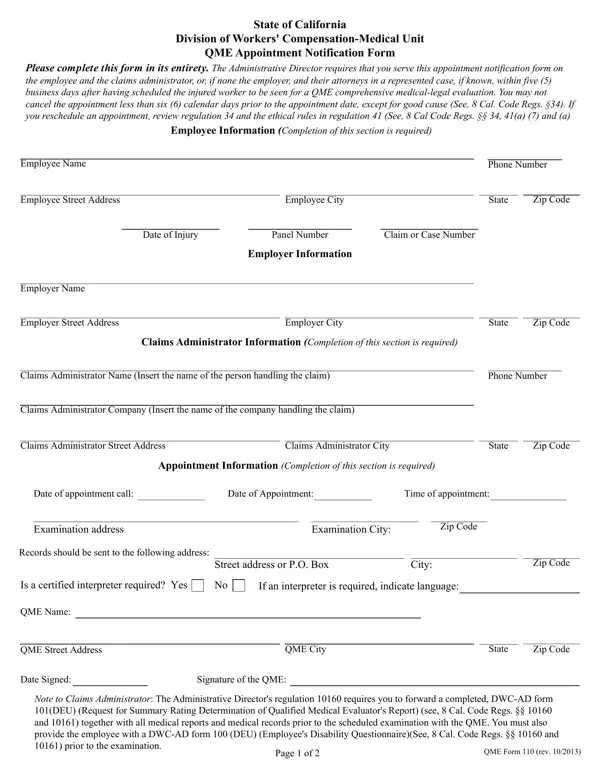
In the complex landscape of workers' compensation in California, the QME Form 110 emerges as a crucial document, ensuring a systematic process for scheduling comprehensive medical-legal evaluations. Revised in October 2013 by the State of California's Division of Workers' Compensation - Medical Unit, this form mandates detailed communication among all parties involved in a workers' compensation case. Specifically, it requires the Qualified Medical Evaluator (QME) to notify the employee, the claims administrator, or, in the absence of a claims administrator, the employer, along with their attorneys in represented cases, of the appointment details. This communication must occur within five business days after the appointment is made, setting a clear timeline that respects the rights and schedules of all parties involved. Equally important, the form highlights restrictions on appointment cancellations, only permitting them under "good cause" and with at least six calendar days' notice, ensuring that the process moves forward with due diligence and fair warning. The form also stresses the importance of accurate and complete information gathering, requiring details such as the employee's name, address, phone number, the date of injury, and the employer's and claims administrator's information. Furthermore, it specifies the necessity of forwarding all relevant medical reports and records to the QME prior to the examination, alongside providing the employee with essential disability questionnaires, thus ensuring a comprehensive and informed evaluation process. This thorough procedural document underscores the California workers' compensation system's commitment to fairness, efficiency, and thoroughness.

QuestionAnswer
Form NameQme Form 110
Form Length2 pages
Fillable?No
Fillable fields0
Avg. time to fill out30 sec
Other namesQMEForm110new injured workers notification of qme appointment form

How to Edit Qme Form 110 Online for Free

You'll be able to fill in Qme Form 110 easily with our online editor for PDFs. Our expert team is constantly endeavoring to improve the tool and ensure it is much better for clients with its extensive features. Enjoy an ever-improving experience now! This is what you will have to do to get going:

Step 1: Open the PDF file in our editor by clicking the "Get Form Button" in the top section of this page.

Step 2: The editor will give you the capability to customize nearly all PDF documents in a range of ways. Enhance it by including your own text, adjust existing content, and include a signature - all at your disposal!

When it comes to fields of this particular form, this is what you want to do:

1. Fill out the Qme Form 110 with a group of major blanks. Gather all the required information and ensure not a single thing neglected!

Simple tips to prepare Qme Form 110 portion 1

2. Just after filling in this step, go on to the subsequent step and complete all required details in all these fields - Claims Administrator Company, Claims Administrator Street Address, Claims Administrator City, State, Zip Code, Appointment Information Completion, Date of appointment call, Date of Appointment, Time of appointment, Examination address, Examination City, Zip Code, Records should be sent to the, Street address or PO Box, and City.

Completing section 2 in Qme Form 110

3. Completing I declare that I am a resident of, On I served this QME Appointment, addressed to the person or firm, depositing the sealed envelope, placing the sealed envelope for, placing the sealed envelope for, placing the sealed envelope for, and personally delivering the sealed is essential for the next step, make sure to fill them out in their entirety. Don't miss any details!

placing the sealed envelope for, addressed to the person or firm, and I declare that I am a resident of of Qme Form 110

4. To go forward, the next section requires filling out several fields. Examples include Method of Service, Method of Service, Method of Service, Method of Service, Person or firm served, Street Address, City, State, Zip Code, Person or firm served, Street Address, City, State, Zip Code, and Person or firm served, which are vital to moving forward with this particular process.

Filling out section 4 of Qme Form 110

As to Method of Service and Zip Code, ensure you don't make any mistakes in this current part. Those two could be the key ones in this file.

5. Finally, the following final portion is precisely what you will have to complete prior to closing the PDF. The blank fields in question are the next: Type or print name, Signature, and QME Form rev.

Qme Form 110 conclusion process detailed (step 5)

Step 3: Always make sure that your details are correct and simply click "Done" to conclude the task. Get the Qme Form 110 after you sign up at FormsPal for a free trial. Readily use the document within your FormsPal account page, along with any edits and adjustments being automatically preserved! When using FormsPal, you're able to complete forms without worrying about personal data leaks or entries getting distributed. Our secure software makes sure that your personal information is kept safely.