
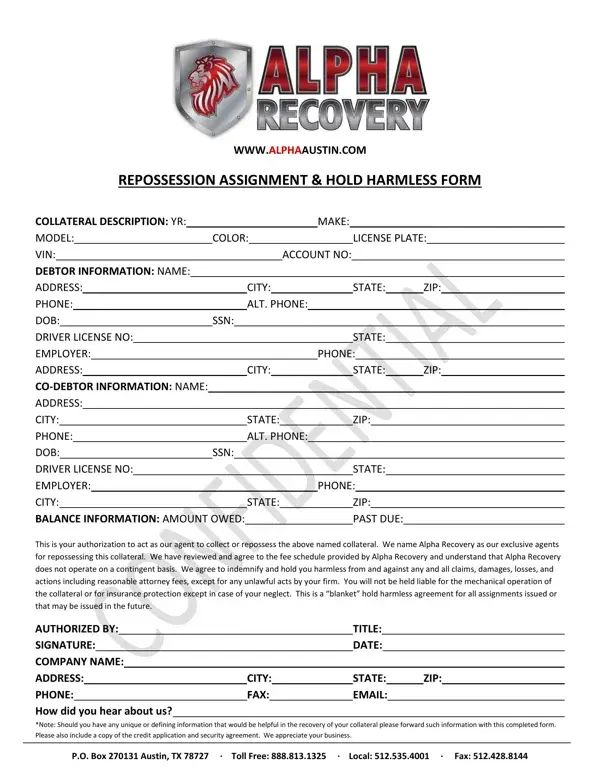
When a borrower fails to meet their payment obligations for a financed or leased item, whether it's a car, boat, or other valuable property, creditors have the right to take back, or repossess, the collateral. This is where the Repossession Assignment form plays a crucial role in the legal and logistical framework of asset recovery. Essentially, this document authorizes a third party, in this case, Alpha Recovery, to act on behalf of the creditor to retrieve the item in question. The form meticulously details the collateral to be repossessed, including its make, model, color, and identification numbers which are vital for accurate recovery. It also includes comprehensive debtor information, such as contact details and employer information, making the process streamlined and more efficient. Moreover, it outlines the financial aspects, detailing the amount owed and any past due amounts, granting clear insight into the debtor’s account status. Importantly, the form includes a hold harmless agreement, protecting the repossession agent from liability except in cases of negligence or unlawful acts on their part. This document not only formalizes the repossession process but also ensures that all parties involved are aware of their rights and responsibilities, thereby minimizing potential disputes. It's a testament to the meticulous planning and legal foresight required in asset recovery operations, ensuring that the recovery process is conducted professionally and within the bounds of the law.
| Question | Answer |
|---|---|
| Form Name | Repossession Assignment Form |
| Form Length | 1 pages |
| Fillable? | No |
| Fillable fields | 0 |
| Avg. time to fill out | 15 sec |
| Other names | car reposession form, repossession assignment form, SSN, TX |
Repossession Assignment Form isn’t the one you’re looking for?