
RTA Notice Of Disposal Form PDF Details

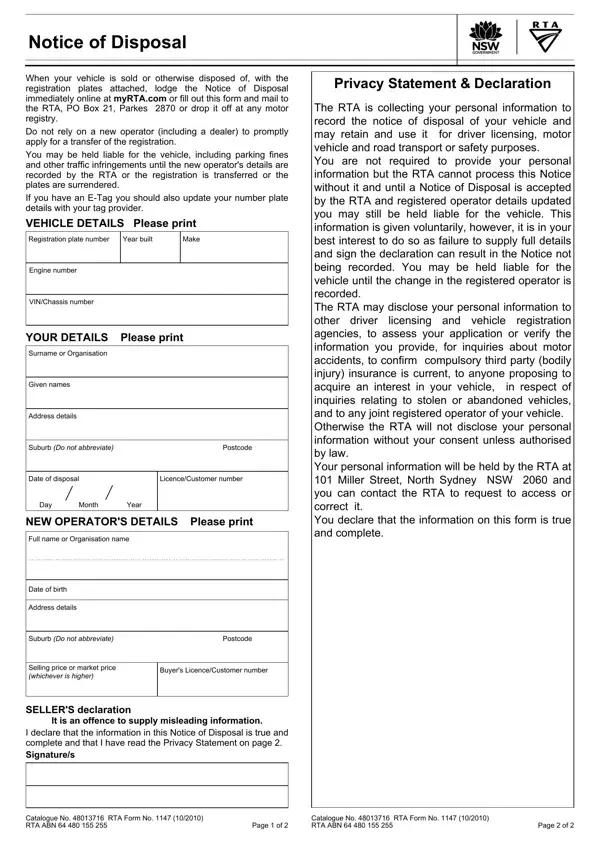
Navigating the process of vehicle disposal involves numerous responsibilities for the seller, key among them is the submission of the RTA Notice of Disposal form. This essential document serves as a formal notification to the Road Transport Authority (RTA) when a vehicle is sold or otherwise disposed of while still registered. It mandates the immediate online registration of the disposal at myRTA.com, alternatively allowing for the physical submission of the form through mail or in-person delivery at any motor registry. The significance of this form cannot be overstated as it directly impacts the seller's liability for the vehicle post-disposal. Without the timely and accurate completion of this form, sellers may find themselves unfairly responsible for subsequent parking fines, traffic infringements, or other liabilities associated with the vehicle until the new operator's details have been officially recorded by the RTA or the registration has been transferred. Moreover, the form meticulously gathers comprehensive details regarding the vehicle, the seller, and the new operator, all aimed at ensuring a transparent and traceable transfer of ownership. Sellers are also reminded of the importance of updating E-Tag details to correspond with new number plates, further emphasizing the form's role in the broader context of vehicle ownership and responsibility transfer. Through its detailed declaration and privacy statements, the RTA reinforces the need for accuracy and honesty in the completion of the Notice of Disposal, underlining the legal and procedural seriousness of the process.

QuestionAnswer
Form NameRTA Notice Of Disposal Form
Form Length1 pages
Fillable?Yes
Fillable fields1
Avg. time to fill out27 sec
Other namesnotice of disposal, abbreviate, Parkes, rta form

How to Edit RTA Notice Of Disposal Form Online for Free

Using PDF forms online is very easy with this PDF editor. Anyone can fill in Postcode here painlessly. Our tool is consistently developing to present the very best user experience attainable, and that's due to our resolve for constant development and listening closely to feedback from customers. This is what you will need to do to get started:

Step 1: Simply hit the "Get Form Button" above on this site to access our pdf file editor. This way, you'll find all that is needed to fill out your document.

Step 2: With our advanced PDF file editor, you could do more than merely complete forms. Try all the functions and make your docs appear perfect with customized textual content added, or fine-tune the file's original content to perfection - all backed up by an ability to insert your own photos and sign the document off.

Completing this document calls for thoroughness. Make certain each and every field is filled in properly.

1. It is crucial to complete the Postcode properly, thus be mindful when filling in the sections that contain all of these blank fields:

Filling out segment 1 of notice of disposal

2. Now that this section is finished, you have to insert the needed specifics in Date of birth, Address details, Suburb Do not abbreviate, Postcode, Selling price or market price, Buyers LicenceCustomer number, SELLERS declaration, It is an offence to supply, I declare that the information in, Catalogue No RTA Form No RTA, Page of, Catalogue No RTA Form No RTA, and Page of in order to move on to the 3rd step.

Find out how to complete notice of disposal step 2

As for Buyers LicenceCustomer number and Catalogue No RTA Form No RTA, be certain that you get them right in this section. These are the most important ones in the document.

Step 3: As soon as you have looked over the information in the fields, press "Done" to conclude your FormsPal process. Join us right now and immediately get access to Postcode, set for download. Every last change made is conveniently saved , which means you can customize the pdf at a later time when required. Here at FormsPal, we do our utmost to make sure that your details are stored private.