Please rate Safety Daily Checklist

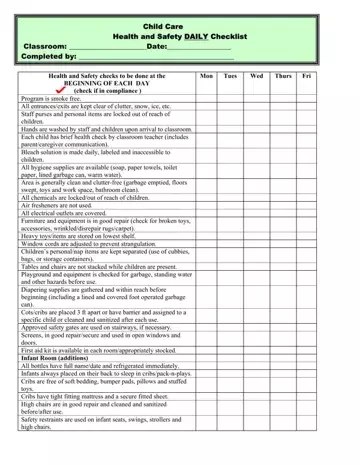
The importance of a Safety Daily Checklist form in child care environments is profound, offering a structured guide to ensure that health and safety standards are met each day. This meticulous form covers everything from ensuring the program is smoke-free to verifying that all exits and entrances are clear of clutter, including snow and ice, which might block emergency egress. It demands that staff personal items are securely stored away from children's reach, promotes hygiene by mandating that hands are washed upon arrival, and insists on daily health checks for every child. Noteworthy is its emphasis on the preparation and secure storage of a bleach solution, availability of hygiene supplies, and the cleanliness of the overall environment. It checks for potential hazards, like unlocked chemicals, uncovered electrical outlets, and poorly stored heavy items, while also focusing on the condition of furniture and equipment. Specific to certain areas, like the playground, it requires a pre-use check for safety risks. In the realm of infant care, it goes a step further by outlining specific necessities such as the proper labeling and storage of bottles, safe sleep practices, and the condition and cleanliness of high chairs, ensuring every detail contributes to a safe and nurturing environment. This comprehensive checklist not only underscores the significance of daily inspections but also serves as a testament to the dedication of child care providers in maintaining a secure and healthy setting for the children in their care.
| Question | Answer |
|---|---|
| Form Name | Safety Daily Checklist |
| Form Length | 2 pages |
| Fillable? | No |
| Fillable fields | 0 |
| Avg. time to fill out | 30 sec |
| Other names | child care daily checklist, safety daily checklist, safety checklist classroom, child daily checklist printable |
Safety Daily Checklist isn’t the one you’re looking for?
Please rate Safety Daily Checklist
