
Scan Prior Authorization Form PDF Details

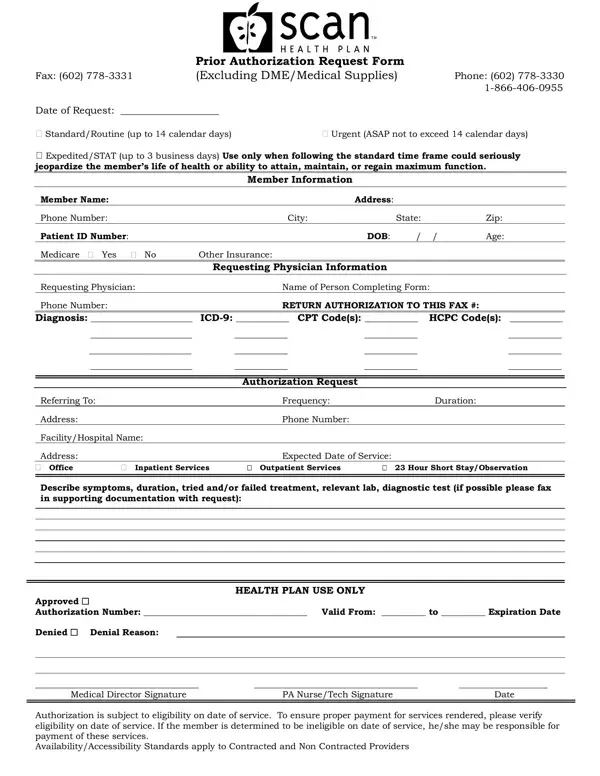
Understanding the nuances of healthcare paperwork can often feel like navigating a labyrinth. Among the myriad forms that both patients and healthcare providers must familiarize themselves with is the Scan Prior Authorization request form. This form plays a pivotal role in the healthcare process, acting as a prerequisite for certain medical services or medications. The form requires detailed information, including the member’s personal details, the requesting physician's information, and specifics about the requested service, including diagnosis codes and the type of service needed. A fundamental aspect of this form is the classification of the request based on urgency, distinguishing between standard, urgent, and expedited/STAT requests. This classification underscores the importance of timely medical intervention and the potential impact on a patient’s health and well-being. The form also facilitates the communication process between healthcare providers and insurance companies, ensuring that the necessary services are approved and can proceed without undue delay. It embodies the intricate dance between ensuring patient care is both timely and within the bounds of insurance stipulations, a critical pathway to ensuring healthcare access and affordability.

QuestionAnswer
Form NameScan Prior Authorization Form
Form Length1 pages
Fillable?No
Fillable fields0
Avg. time to fill out15 sec
Other namesscan authorization, scan insurance auhorization form, scan health prior, scan health prior authorization form

How to Edit Scan Prior Authorization Form Online for Free

Handling PDF files online is a piece of cake using our PDF editor. Anyone can fill out scan prior authorization here and use a number of other functions we provide. FormsPal is focused on providing you the ideal experience with our editor by continuously introducing new capabilities and upgrades. Our editor is now even more useful thanks to the latest updates! Currently, editing PDF files is easier and faster than ever before. Here is what you will want to do to get started:

Step 1: Press the orange "Get Form" button above. It's going to open our editor so you could begin filling in your form.

Step 2: With the help of this state-of-the-art PDF editing tool, you can actually do more than simply complete blanks. Express yourself and make your forms seem great with customized textual content incorporated, or fine-tune the file's original input to perfection - all that accompanied by the capability to add your personal images and sign the file off.

It will be straightforward to fill out the form with our practical guide! Here's what you should do:

1. While submitting the scan prior authorization, be certain to incorporate all of the essential blank fields within its relevant section. This will help speed up the work, enabling your details to be processed without delay and appropriately.

How to complete scan health plan prior authorization step 1

2. The subsequent part is to fill out these blank fields: Address, Phone Number, FacilityHospital Name, Address Office Inpatient Services, Expected Date of Service, Outpatient Services, Hour Short StayObservation, Describe symptoms duration tried, HEALTH PLAN USE ONLY, Approved Authorization Number, Medical Director Signature, Authorization is subject to, PA NurseTech Signature, and Date.

Stage # 2 for filling out scan health plan prior authorization

Many people generally make some errors when filling in Describe symptoms duration tried in this area. You should review whatever you type in right here.

Step 3: As soon as you've looked over the information in the blanks, just click "Done" to conclude your form at FormsPal. Grab your scan prior authorization when you sign up for a free trial. Easily use the pdf form from your FormsPal account, along with any modifications and adjustments automatically saved! At FormsPal.com, we do our utmost to be sure that your details are stored secure.