
SCE Medical Baseline Form PDF Details

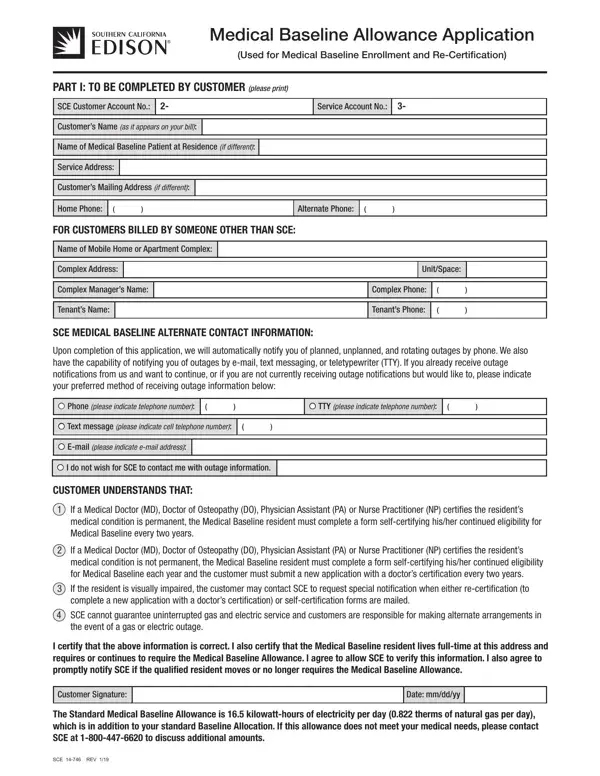
For individuals facing medical conditions requiring the use of electrically-operated devices, the Southern California Edison (SCE) Medical Baseline Allowance Application emerges as a crucial resource. This form serves a dual purpose, facilitating both the enrollment into and recertification for the Medical Baseline program. It demands completion by the customer, seeking details such as customer account numbers, contact information, and specifies the medical equipment or additional heating and cooling needs of the patient. The application underscores the need for certification from licensed medical professionals like MDs, DOs, PAs, or NPs, verifying the necessity of medical devices that operate on electricity or gas, or the need for enhanced heating and cooling due to the patient's medical condition. It further outlines the conditions under which recertification is required, along with the allowances provided, such as a daily standard Medical Baseline Allowance of electricity and natural gas, to support those with medical needs. The form also accommodates the possibility of receiving outage notifications through various means, ensuring that individuals reliant on life-sustaining medical devices are informed in advance of potential power disruptions. This comprehensive approach demonstrates SCE's commitment to accommodating customers with special medical requirements, ensuring they receive the necessary support and resources.

QuestionAnswer
Form Name SCE Medical Baseline Form
Form Length 2 pages
Fillable? No
Fillable fields 0
Avg. time to fill out 30 sec
Other names medical baseline allowance application, sce com medical baseline form, medical baseline allowance, southern california edison medical baseline

How to Edit SCE Medical Baseline Form Online for Free

medical baseline allowance can be completed online very easily. Simply use FormsPal PDF editing tool to accomplish the job fast. We are committed to providing you the perfect experience with our tool by consistently releasing new capabilities and enhancements. With these improvements, using our tool becomes easier than ever! Here is what you will have to do to begin:

Step 1: Hit the "Get Form" button in the top section of this page to open our editor.

Step 2: This tool offers the ability to change almost all PDF files in a range of ways. Improve it with your own text, correct original content, and add a signature - all readily available!

Filling out this PDF needs focus on details. Ensure that each blank field is filled in properly.

1. While filling out the medical baseline allowance, make certain to incorporate all of the necessary fields in the corresponding area. It will help facilitate the process, allowing your information to be processed quickly and properly.

Step # 1 for filling in sce forms

2. Right after performing the previous section, go on to the next part and complete all required particulars in all these fields - Upon completion of this, Phone please indicate telephone, TTY please indicate telephone, Text message please indicate cell, Email please indicate email, I do not wish for SCE to contact, CUSTOMER UNDERSTANDS THAT, If a Medical Doctor MD Doctor of, If a Medical Doctor MD Doctor of, If the resident is visually, SCE cannot guarantee, the event of a gas or electric, I certify that the above, Customer Signature, and Date mmddyy.

sce forms completion process outlined (portion 2)

3. Completing I certify that the medical, Patients Last Name, First Name, REQUIRES USE OF, Yes No, The following electricallyoperated, Device, Device, Device, Electricity, Gas, Electricity, Gas, Electricity, and Gas is essential for the next step, make sure to fill them out in their entirety. Don't miss any details!

Device, Gas, and The following electricallyoperated of sce forms

4. This particular part comes next with these particular fields to look at: Requires Standard Medical Baseline, Requires Standard Medical Baseline, Yes No Yes No, I CERTIFY THAT THE MEDICAL, APPROXIMATELY check one, No of Years or Permanently, IF THE EQUIPMENT IS FOR, EQUIPMENT check one Hours or Less, More Than Hours, MD DO PA NP Name please print, Phone, Office Address, MD DO PA NP State License or, Signature of Doctor MD DO PA NP, and Date mmddyy.

Filling in part 4 of sce forms

5. This very last point to submit this document is crucial. Make sure to fill out the required form fields, for example Recertification SelfCertify Every, SelfCertify Annually MD DO PA NP, MAIL APPLICATION TO, Southern California Edison Company, Medical Baseline Department, PO Box, and Azusa CA, before finalizing. If not, it may generate an unfinished and possibly invalid form!

sce forms writing process detailed (part 5)

It's easy to make errors while filling in the Southern California Edison Company, hence make sure to take another look before you'll send it in.

Step 3: Right after you've looked again at the details entered, simply click "Done" to conclude your FormsPal process. Find your medical baseline allowance the instant you subscribe to a 7-day free trial. Immediately gain access to the pdf file from your personal account page, together with any edits and adjustments being conveniently synced! Here at FormsPal.com, we endeavor to make sure all of your details are stored private.