

Standard Form 2809 at a glance
What it is: Standard Form (SF) 2809 is the Health Benefits Election Form: use it to enroll or reenroll in the FEHB Program or change your FEHB enrollment.
Who signs: Part H - Signature, 1. Your signature (do not print) 2. Date (mm/dd/yyyy)
Who May Use SF 2809: employees eligible to enroll in or currently enrolled in the FEHB Program. Employees automatically participate in premium conversion unless they waive it.
Annuitants in retirement systems other than the Civil Service Retirement System (CSRS) or Federal Employees Retirement System (FERS).
Former spouses eligible to enroll in or currently enrolled in the FEHB Program under the Spouse Equity law or similar statutes.
Individuals eligible for Temporary Continuation of Coverage (TCC) under the FEHB Program, including former employees (who separated from service) and children who lose FEHB coverage.
A filled-in Standard Form 2809 example: changing plans during open season
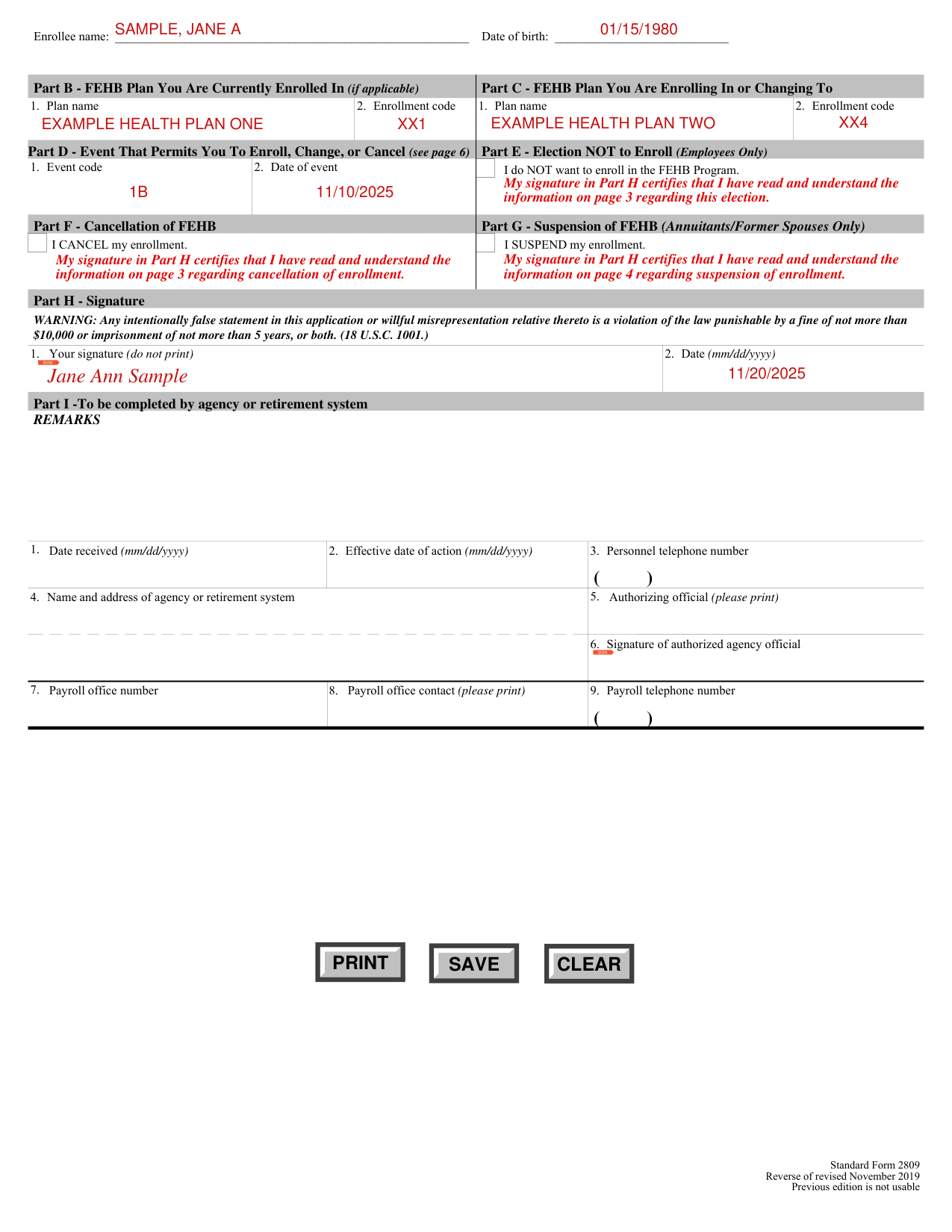
How to fill out Standard Form 2809, box by box
Item 5, married
Item 5: If you are separated but not divorced, you are still married.
Medicare, items 7 and 8
Item 7: If you have Medicare, check which Parts you have, including prescription drug coverage under Medicare Part D.
Item 8: If you have Medicare, enter your Medicare Beneficiary Identifier (MBI). This number is on your Medicare Card.
Other insurance, items 9 and 10
Item 9: If you are covered by other health insurance, either in your name or under a family member's policy, check yes and complete item 10.
Item 10: Provide the information requested on any other health insurance that covers you. If you or a family member is covered under another FEHB enrollment, check the FEHB box and stop. Contact your Human Resources office or retirement system immediately as this is a dual coverage situation.
No person may be covered under more than one FEHB enrollment.
Family member, items 13 to 24
If your enrollment is for Self Plus One or Self and Family, complete the family member information as appropriate. In order for your Self Plus One FEHB enrollment election to be processed, you must complete the family member information for your designated family member.
Item 14: Provide the Social Security Number for this family member if he/she has one. If your family member does not have a Social Security Number, leave blank; benefits will not be withheld.
Item 17, relationship codes: 01 Spouse; 19 Child under age 26; 09 Adopted Child under age 26; 17 Stepchild under age 26; 10 Foster Child under age 26; 99 Disabled child age 26 or older who is incapable of self support because of a physical or mental disability that began before his/her 26th birthday.
Item 18: If your family member does not live with you, enter his/her home address.
Item 19: If your family member has Medicare, check which Parts he/she has, including prescription drug coverage under Medicare Part D.
Item 20: If your family member has Medicare, enter his/her Medicare Beneficiary Identifier (MBI). This number is on his/her Medicare Card.
Item 21: If your family member is covered by other group insurance, such as private, state, or Medicaid, check the box and complete item 22.
Item 22: Provide the information requested on any other health insurance that covers this family member. If your family member is covered under another FEHB plan, see instructions for item 10.
Items 23 and 24: Enter email address and preferred telephone number, if applicable, for this family member.
Additional family members, items 25 to 48
If you need extra space for additional family members, list them on a separate sheet and attach. The instructions for completing items 13 through 24 for your initial family member also apply to the information you provide for additional family members.
Part B, FEHB plan you are currently enrolled in
You must complete Part B if you are changing, cancelling, or suspending your enrollment. Item 1: Enter the name of the plan you are enrolled in from the front cover of the plan brochure. Item 2: Enter your current enrollment code from your plan ID card.
Part C, FEHB plan you are enrolling in or changing to
Complete Part C to enroll or change your enrollment in the FEHB Program. Item 1: Enter the name of the plan you are enrolling in or changing to.
Item 2: Enter the enrollment code of the plan you are enrolling in or changing to. The enrollment code is on the front cover of the brochure of the plan you want to be enrolled in, and shows whether you are enrolling for Self Only, Self Plus One, or Self and Family.
Your signature in Part H authorizes deductions from your salary, annuity, or compensation to cover your cost of the enrollment you elect in this item, unless you are required to make direct payments to the employing office.
Part D, event that permits you to enroll, change, or cancel
Part D, Item 1: Enter the event code that permits you to enroll, change, or cancel based on a Qualifying Life Event (QLE) from the Table of Permissible Changes in Enrollment that applies to you.
Item 2: Enter the date of the QLE using numbers to show month, day, and complete year; e.g., 06/30/2011. If you are making an open season enrollment or change, enter the date on which the open season begins.
Parts E, F and G
Part E: Place an "X" in the box only if you are an employee and you do NOT wish to enroll in the FEHB Program.
Part F: Place an "X" in the box only if you wish to cancel your FEHB enrollment. Also enter your current plan name and enrollment code in Part B.
Employees participating in premium conversion may cancel their FEHB enrollment only during the open season or when they experience a Qualifying Life Event. Employees who waived participation in premium conversion, annuitants, former spouses, and individuals enrolled under TCC may cancel their enrollment at any time.
However, if you cancel, neither you nor any family member covered by your enrollment are entitled to a 31-day temporary extension of coverage, or to convert to an individual, nongroup policy.
Part G: Place an "X" in the box only if you are an annuitant or former spouse and wish to suspend your FEHB enrollment.
You may suspend your FEHB enrollment because you are enrolling in one of the following programs:
A Medicare Advantage plan or Medicare HMO; Medicaid or similar State-sponsored program of medical assistance for the needy; TRICARE (including Uniformed Services Family Health Plan or TRICARE for Life); CHAMPVA; or Peace Corps.
Part H, signature
Part H - Signature: Your agency, retirement system, or office maintaining your enrollment cannot process your request unless you complete this part. Your signature in Part H certifies that you have read and understand the information on page 3 regarding this election and cancellation of enrollment, and on page 4 regarding suspension of enrollment.
Part I, agency or retirement system
Part I - Agency or Retirement System Information and Remarks: Leave this section blank as it is for agency or retirement system use only. For the eligible former spouse of an enrollee, the enrollee or the former spouse must notify the employing office within 60 days after the former spouse's change in status; e.g., the date of the divorce.
If your situation is different
You are a former employee, child, or former spouse
The time limit for a former employee, child, or former spouse to enroll with the employing office is within 60 days after the Qualifying Life Event, or receiving notice of eligibility, whichever is later.
Common questions about Standard Form 2809
What is a standard form 2809?
Standard Form (SF) 2809 is the Health Benefits Election Form: use it to enroll or reenroll in the FEHB Program or change your FEHB enrollment. Use this form to switch designated eligible family member, cancel your FEHB enrollment, or suspend your FEHB enrollment (annuitants or former spouses only).
Is there a penalty?
WARNING: Any intentionally false statement in this application or willful misrepresentation relative thereto is a violation of the law punishable by a fine of not more than $10,000 or imprisonment of not more than 5 years, or both (checked November 2, 2026).
When is this form not the right one?
Civil Service Retirement System (CSRS) and Federal Employees Retirement System (FERS) annuitants and former spouses and children of CSRS/FERS annuitants: do not use this form. Use form OPM 2809 instead.
Sources
[1] Standard Form 2809 (Revised November 2019), Health Benefits Election Form, U.S. Office of Personnel Management (the Official source link on this page).
